AI-POWERED DOCS
What do you want to know?
Troubleshooting
System Diagnostics
OV Hub checks its own prerequisites and connections. Open the Settings page to see System Diagnostics, or run ov-hub doctor in a terminal. Each check shows pass, warning, or failed — the banner at the top explains what's wrong and how to fix it.
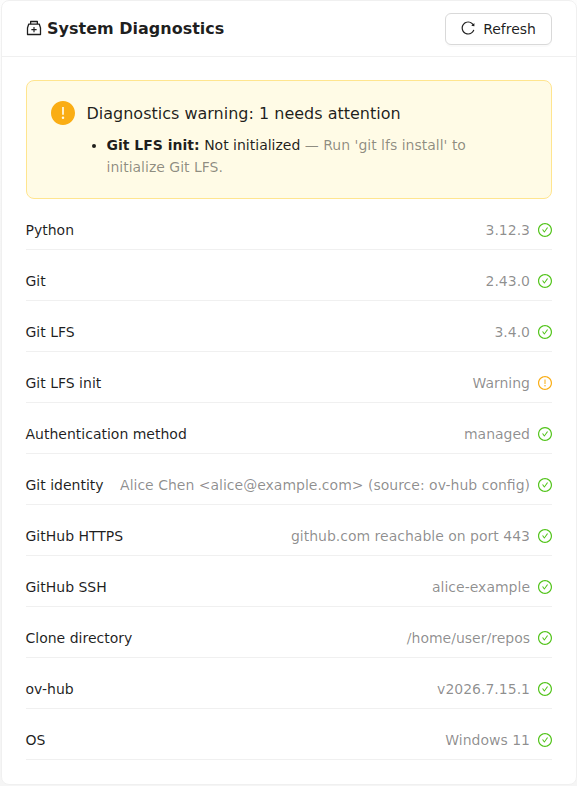
Common issues:
- GitHub HTTPS / GitHub SSH fail together — your network or VPN is down. Connect the VPN, then Refresh.
- Git LFS init warning — run
git lfs installin a terminal (one time only). - Git identity fails — fill in Name and Email on the Settings page.
- GitHub SSH fails — the SSH key is wrong or passphrase-protected. Use the key provided by your team; keys with a passphrase cannot be used.
- Clone directory fails — point Default Clone Directory on the Settings page to a folder you can write to.
Known Issues
OV Hub Server was blocked by your organization's Device Guard policy
Running ov-hub serve shows this error — possibly out of nowhere after a restart. Windows 11's Smart App Control is blocking OV Hub's launcher.
Turning it off is permanent
Smart App Control cannot be re-enabled without reinstalling Windows. On a company-managed computer, check with your IT department first.
- Open Windows Security → App & browser control → Smart App Control settings.
- Select Off.
- Run
ov-hub serveagain.