AI-POWERED DOCS
What do you want to know?
RS-232 Communication Setup
This page explains how to establish RS-232 communication between the OV80i camera and external devices using Node-RED and a serial converter.
Communication Overview
The camera can use Node-RED and a Serial Converter to communicate with other devices over RS232.
System Requirements:
- RS485 to RS232 Serial Converter (hardware purchase required)
- Node-RED configuration
- External device with RS232 port
Required Hardware
You'll need to purchase a RS485 to RS232 Serial Converter. We recommend the DTECH DT-9017. This device facilitates the conversion from RS485 signals, originating from the camera, to RS232.
Hardware Specifications:
- Converter Type: RS485 to RS232 Serial Converter
- Recommended Model: DTECH DT-9017
- Function: Converts RS485 signals from camera to RS232 format
- Source: Third-party purchase required
Physical Connection Setup
Step 1: Connect the Serial Converter to the Camera
Connect the serial converter to the camera as illustrated in the image below.
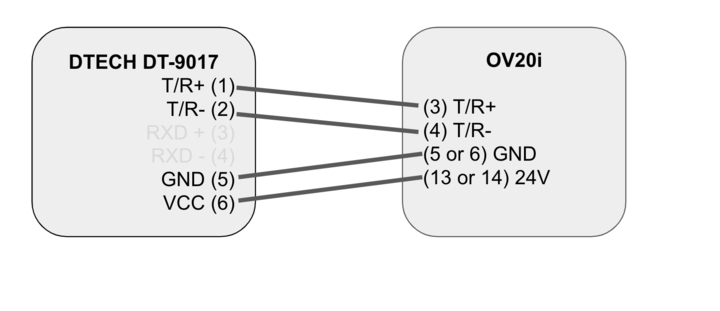
Step 2: Establish the Connection to the RS232 Port
Connect the other end of the serial converter to the desired RS232 port. This completes the physical connection between the camera and the RS232 port.
Connection Chain: OV80i Camera → RS485 Output → Serial Converter → RS232 Port → External Device
Configure Node-RED Logic
Navigate to the IO Block to configure the Node-RED logic. Follow the steps provided in the Node-RED Basics section to import the JSON file provided below:
Configuration Steps:
- Access IO Block in camera interface
- Open Node-RED configuration
- Import provided JSON configuration file
- Deploy the updated flow
Node-RED Configuration JSON
Copy and import the following JSON configuration to set up RS-232 communication:
[
    {
        "id": "7cb1ab03670cd840",
        "type": "tab",
        "label": "Flow 1",
        "disabled": false,
        "info": "",
        "env": []
    },
    {
        "id": "8aabc4c53d9cca67",
        "type": "ui_group",
        "name": "Home",
        "tab": "51b1608995f5ea89",
        "order": 1,
        "disp": true,
        "width": "27",
        "collapse": false
    },
    {
        "id": "51b1608995f5ea89",
        "type": "ui_tab",
        "name": "Home",
        "icon": "dashboard",
        "disabled": false,
        "hidden": false
    },
    {
        "id": "42dd086612a76167",
        "type": "ui_base",
        "theme": {
            "name": "theme-light",
            "lightTheme": {
                "default": "#0094CE",
                "baseColor": "#0094CE",
                "baseFont": "-apple-system,BlinkMacSystemFont,Segoe UI,Roboto,Oxygen-Sans,Ubuntu,Cantarell,Helvetica Neue,sans-serif",
                "edited": false
            },
            "darkTheme": {
                "default": "#097479",
                "baseColor": "#097479",
                "baseFont": "-apple-system,BlinkMacSystemFont,Segoe UI,Roboto,Oxygen-Sans,Ubuntu,Cantarell,Helvetica Neue,sans-serif",
                "edited": false
            },
            "customTheme": {
                "name": "Untitled Theme 1",
                "default": "#4B7930",
                "baseColor": "#4B7930",
                "baseFont": "-apple-system,BlinkMacSystemFont,Segoe UI,Roboto,Oxygen-Sans,Ubuntu,Cantarell,Helvetica Neue,sans-serif"
            },
            "themeState": {
                "base-color": {
                    "default": "#0094CE",
                    "value": "#0094CE",
                    "edited": false
                },
                "page-titlebar-backgroundColor": {
                    "value": "#0094CE",
                    "edited": false
                },
                "page-backgroundColor": {
                    "value": "#fafafa",
                    "edited": false
                },
                "page-sidebar-backgroundColor": {
                    "value": "#ffffff",
                    "edited": false
                },
                "group-textColor": {
                    "value": "#1bbfff",
                    "edited": false
                },
                "group-borderColor": {
                    "value": "#ffffff",
                    "edited": false
                },
                "group-backgroundColor": {
                    "value": "#ffffff",
                    "edited": false
                },
                "widget-textColor": {
                    "value": "#111111",
                    "edited": false
                },
                "widget-backgroundColor": {
                    "value": "#0094ce",
                    "edited": false
                },
                "widget-borderColor": {
                    "value": "#ffffff",
                    "edited": false
                },
                "base-font": {
                    "value": "-apple-system,BlinkMacSystemFont,Segoe UI,Roboto,Oxygen-Sans,Ubuntu,Cantarell,Helvetica Neue,sans-serif"
                }
            },
            "angularTheme": {
                "primary": "indigo",
                "accents": "blue",
                "warn": "red",
                "background": "grey",
                "palette": "light"
            }
        },
        "site": {
            "name": "Node-RED Dashboard",
            "hideToolbar": "false",
            "allowSwipe": "false",
            "lockMenu": "false",
            "allowTempTheme": "true",
            "dateFormat": "DD/MM/YYYY",
            "sizes": {
                "sx": 48,
                "sy": 48,
                "gx": 6,
                "gy": 6,
                "cx": 6,
                "cy": 6,
                "px": 0,
                "py": 0
            }
        }
    },
    {
        "id": "c47cc2d81c408a36",
        "type": "serial-port",
        "name": "",
        "serialport": "/dev/ttyTHS1",
        "serialbaud": "9600",
        "databits": "8",
        "parity": "none",
        "stopbits": "1",
        "waitfor": "",
        "dtr": "high",
        "rts": "low",
        "cts": "high",
        "dsr": "high",
        "newline": "\\\\n",
        "bin": "false",
        "out": "char",
        "addchar": "\\\\n",
        "responsetimeout": "10000"
    },
    {
        "id": "2baab5bd0cce1230",
        "type": "debug",
        "z": "7cb1ab03670cd840",
        "name": "debug 1",
        "active": false,
        "tosidebar": true,
        "console": false,
        "tostatus": false,
        "complete": "false",
        "statusVal": "",
        "statusType": "auto",
        "x": 580,
        "y": 580,
        "wires": []
    },
    {
        "id": "4e7d748dce95e6c6",
        "type": "change",
        "z": "7cb1ab03670cd840",
        "name": "set rts high",
        "rules": [
            {
                "p": "payload",
                "t": "set",
                "pt": "msg",
                "to": "{\\"rts\\": \\"high\\"}",
                "tot": "json"
            }
        ],
        "action": "",
        "property": "",
        "from": "",
        "to": "",
        "reg": false,
        "x": 630,
        "y": 400,
        "wires": [
            [
                "8e62d87d6be5a946"
            ]
        ]
    },
    {
        "id": "e3b7598d774c2bd6",
        "type": "delay",
        "z": "7cb1ab03670cd840",
        "name": "",
        "pauseType": "delay",
        "timeout": "20",
        "timeoutUnits": "milliseconds",
        "rate": "1",
        "nbRateUnits": "1",
        "rateUnits": "second",
        "randomFirst": "1",
        "randomLast": "5",
        "randomUnits": "seconds",
        "drop": false,
        "allowrate": false,
        "outputs": 1,
        "x": 630,
        "y": 320,
        "wires": [
            [
                "270a4fa8fb4a4978",
                "5325a871a1f84955"
            ]
        ]
    },
    {
        "id": "104dae3badcde04b",
        "type": "change",
        "z": "7cb1ab03670cd840",
        "name": "set rts low",
        "rules": [
            {
                "p": "payload",
                "t": "set",
                "pt": "msg",
                "to": "{\\"rts\\": \\"low\\"}",
                "tot": "json"
            }
        ],
        "action": "",
        "property": "",
        "from": "",
        "to": "",
        "reg": false,
        "x": 630,
        "y": 360,
        "wires": [
            [
                "8e62d87d6be5a946"
            ]
        ]
    },
    {
        "id": "651284218146186a",
        "type": "inject",
        "z": "7cb1ab03670cd840",
        "name": "",
        "props": [
            {
                "p": "payload"
            },
            {
                "p": "topic",
                "vt": "str"
            }
        ],
        "repeat": "",
        "crontab": "",
        "once": false,
        "onceDelay": 0.1,
        "topic": "",
        "payload": "GOOD",
        "payloadType": "str",
        "x": 250,
        "y": 360,
        "wires": [
            [
                "342f2ea893daee9b"
            ]
        ]
    },
    {
        "id": "270a4fa8fb4a4978",
        "type": "delay",
        "z": "7cb1ab03670cd840",
        "name": "",
        "pauseType": "delay",
        "timeout": "20",
        "timeoutUnits": "milliseconds",
        "rate": "1",
        "nbRateUnits": "1",
        "rateUnits": "second",
        "randomFirst": "1",
        "randomLast": "5",
        "randomUnits": "seconds",
        "drop": false,
        "allowrate": false,
        "outputs": 1,
        "x": 830,
        "y": 360,
        "wires": [
            [
                "104dae3badcde04b"
            ]
        ]
    },
    {
        "id": "17d922879e91c8a7",
        "type": "delay",
        "z": "7cb1ab03670cd840",
        "name": "",
        "pauseType": "rate",
        "timeout": "5",
        "timeoutUnits": "seconds",
        "rate": "1",
        "nbRateUnits": "0.5",
        "rateUnits": "second",
        "randomFirst": "1",
        "randomLast": "5",
        "randomUnits": "seconds",
        "drop": true,
        "allowrate": false,
        "outputs": 1,
        "x": 420,
        "y": 580,
        "wires": [
            [
                "2baab5bd0cce1230"
            ]
        ]
    },
    {
        "id": "342f2ea893daee9b",
        "type": "delay",
        "z": "7cb1ab03670cd840",
        "name": "",
        "pauseType": "rate",
        "timeout": "5",
        "timeoutUnits": "seconds",
        "rate": "1",
        "nbRateUnits": "0.5",
        "rateUnits": "second",
        "randomFirst": "1",
        "randomLast": "5",
        "randomUnits": "seconds",
        "drop": true,
        "allowrate": false,
        "outputs": 1,
        "x": 430,
        "y": 320,
        "wires": [
            [
                "e3b7598d774c2bd6",
                "4e7d748dce95e6c6"
            ]
        ]
    },
    {
        "id": "54165e10b820a5f5",
        "type": "inject",
        "z": "7cb1ab03670cd840",
        "name": "",
        "props": [
            {
                "p": "payload"
            },
            {
                "p": "topic",
                "vt": "str"
            }
        ],
        "repeat": "",
        "crontab": "",
        "once": false,
        "onceDelay": 0.1,
        "topic": "",
        "payload": "FAIL",
        "payloadType": "str",
        "x": 250,
        "y": 300,
        "wires": [
            [
                "342f2ea893daee9b"
            ]
        ]
    },
    {
        "id": "2549782ab378b378",
        "type": "serial in",
        "z": "7cb1ab03670cd840",
        "name": "",
        "serial": "c47cc2d81c408a36",
        "x": 260,
        "y": 580,
        "wires": [
            [
                "17d922879e91c8a7"
            ]
        ]
    },
    {
        "id": "5325a871a1f84955",
        "type": "serial out",
        "z": "7cb1ab03670cd840",
        "name": "",
        "serial": "c47cc2d81c408a36",
        "x": 820,
        "y": 320,
        "wires": []
    },
    {
        "id": "8e62d87d6be5a946",
        "type": "serial control",
        "z": "7cb1ab03670cd840",
        "name": "",
        "serial": "c47cc2d81c408a36",
        "x": 830,
        "y": 400,
        "wires": [
            []
        ]
    },
    {
        "id": "263de9e9ed71a09e",
        "type": "comment",
        "z": "7cb1ab03670cd840",
        "name": "Send any string here to pass it to the selected serial port.  The rest of the nodes just manage information flow.",
        "info": "",
        "x": 550,
        "y": 240,
        "wires": []
    },
    {
        "id": "15d30e67047b53fc",
        "type": "comment",
        "z": "7cb1ab03670cd840",
        "name": "Receive strings here.",
        "info": "",
        "x": 280,
        "y": 520,
        "wires": []
    }
]
- Port:
/dev/ttyTHS1 - Baud Rate: 9600
- Data Bits: 8
- Parity: None
- Stop Bits: 1
- Flow Control: RTS/CTS managed by flow logic
Set Up Communication
Sending Data
Use the FAIL/GOOD node to send camera results via the RS232 port to the receiving device.
Data Transmission:
- Source: Camera inspection results
- Method: FAIL/GOOD node output
- Destination: External device via RS232
- Content: Pass/fail status and inspection data
Receiving Data
Utilize the debug node to receive data from the RS232 port and integrate it into your system logic.
Data Reception:
- Source: External device via RS232 port
- Method: Debug node for monitoring
- Integration: Incorporate into Node-RED logic
- Usage: System control and feedback
✅ Setup Completion
By following these steps, you will have successfully established communication between the camera and the RS232 port.
Verification Checklist:
- ✅ Serial converter properly connected to camera
- ✅ RS232 port connection established
- ✅ Node-RED logic configured and deployed
- ✅ Data transmission tested (camera to external device)
- ✅ Data reception verified (external device to camera)
The Integration Builder can generate Node-RED flows for RS-232 communication from a plain English description. Describe what you need (e.g., "send pass/fail results over RS-232 to an external controller") and get a production-ready flow in seconds.