AI-POWERED DOCS
What do you want to know?
OV80i Technical Specifications
This document provides comprehensive technical specifications for the OV80i smart camera, including hardware capabilities, performance parameters, pinouts, and environmental requirements.
System Overview
Model: OV80i Industrial AI Vision Camera
Hardware Platform: Embedded compute platform
Application: Advanced machine vision with integrated AI capabilities
Physical Specifications
| Parameter | Specification | Notes |
|---|---|---|
| Height | 121 mm | |
| Width | 78 mm | |
| Depth | 49.31 mm | |
| Weight | ~700 g (1.5 lbs) | |
| Mounting | 4x M4 (front or rear) | See mounting documentation |
| Enclosure Rating | IP40 | Dust and moisture protection |
| Certifications | CE/FCC | Industrial compliance |
Power Specifications
| Parameter | Specification | Notes |
|---|---|---|
| Input Voltage | 19-24 VDC | Industrial standard |
| Maximum Power | 18W | Peak consumption |
| Typical Power | 15W | Normal operation |
| Current Draw | 1 A @ 24V | Approximate |
Environmental Specifications
| Parameter | Specification | Notes |
|---|---|---|
| Operating Temperature | 0-45°C | Industrial environment |
| Storage Temperature | -20 to +70°C | Non-operating |
| Humidity | 10-90% RH | Non-condensing |
| Vibration Resistance | Industrial grade | Suitable for production lines |
Image Sensor Specifications
| Parameter | Specification | Notes |
|---|---|---|
| Sensor Model | SONY IMX334 | Industrial grade |
| Resolution | 8.3 MP | 3840 x 2160 pixels |
| Frame Rate | 30 fps | Maximum |
| Sensor Size | 1/1.8" | |
| Shutter Type | Rolling Shutter | |
| Color/Mono | Color | RGB color sensor |
| Pixel Size | 2.0 μm x 2.0 μm |
Processor System Specifications
NVIDIA Orin NX Computing Module
| Component | Specification | Details |
|---|---|---|
| CPU | 6-core Cortex A78AE (64-bit ARM) | |
| GPU | 1024-core Ampere with 32 Tensor Cores | |
| AI Acceleration | 32 Tensor Cores | Deep learning optimization |
| Memory | 8 GB 128-bit LPDDR5 | System memory |
| Storage | 256 GB NVMe SSD | Internal storage |
Optical System Specifications
Lens System
| Parameter | Specification | Notes |
|---|---|---|
| Mount Type | C-Mount | Standard threading |
| Standard Lens | Varies | See order details |
| Available Options | Compatible C-mount lenses | |
| Focus Type | Manual — set on the lens focus ring. The camera has no focus control. | |
| Aperture | Manual/Auto (lens dependent) |
Connectivity Specifications
External Ports
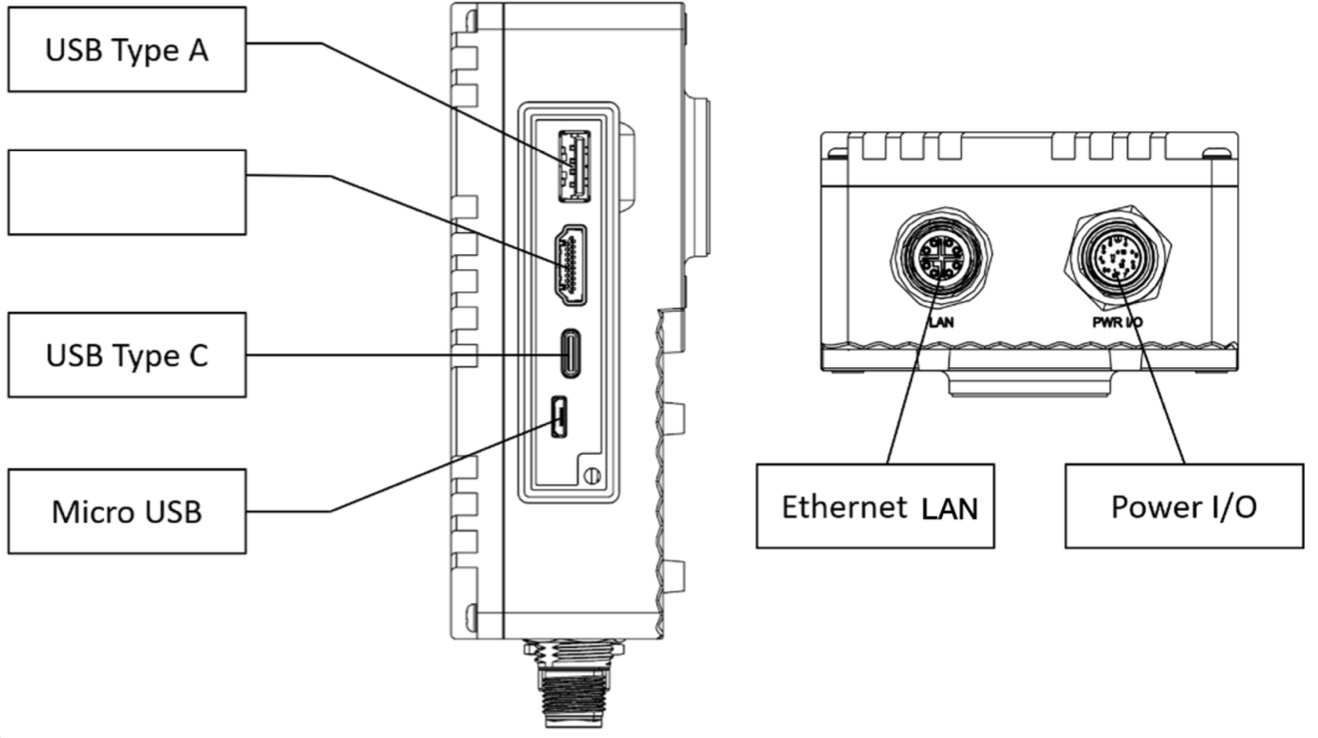
| Port # | Type | Connector | Description |
|---|---|---|---|
| 1 | USB Type-A | USB 3.0 | Reserved for future/support (not UI connectivity) |
| 2 | USB Type-C | USB 3.0 | Reserved for future/support (not UI connectivity) |
| 3 | Power I/O | M12 A-Coded 12 Pin | Power, Digital I/O |
| 4 | Ethernet | M12 X-Coded | Network, PLC communication |
Network Specifications
| Parameter | Specification | Notes |
|---|---|---|
| Ethernet | 10/100/1000 Base-T | Gigabit capable |
| Protocols | Ethernet/IP, Profinet | Industrial protocols |
| Default IP | 10.250.0.100 | Static default |
| Emergency USB IP | 192.168.55.1 | Micro-USB access to camera UI |
| DHCP Support | Yes | Configurable |
Digital I/O Specifications
| Signal | Pin | Count | Type | Specifications |
|---|---|---|---|---|
| Trigger Input | 10 | 1 | Digital Input | NPN Active Low - Pull to GND to activate |
| Digital Input | 1, 5 | 2 | Digital Input | NPN Active Low - Pull to GND to activate |
| Digital Output | 11, 12 | 2 | Digital Output | NPN Sinking |
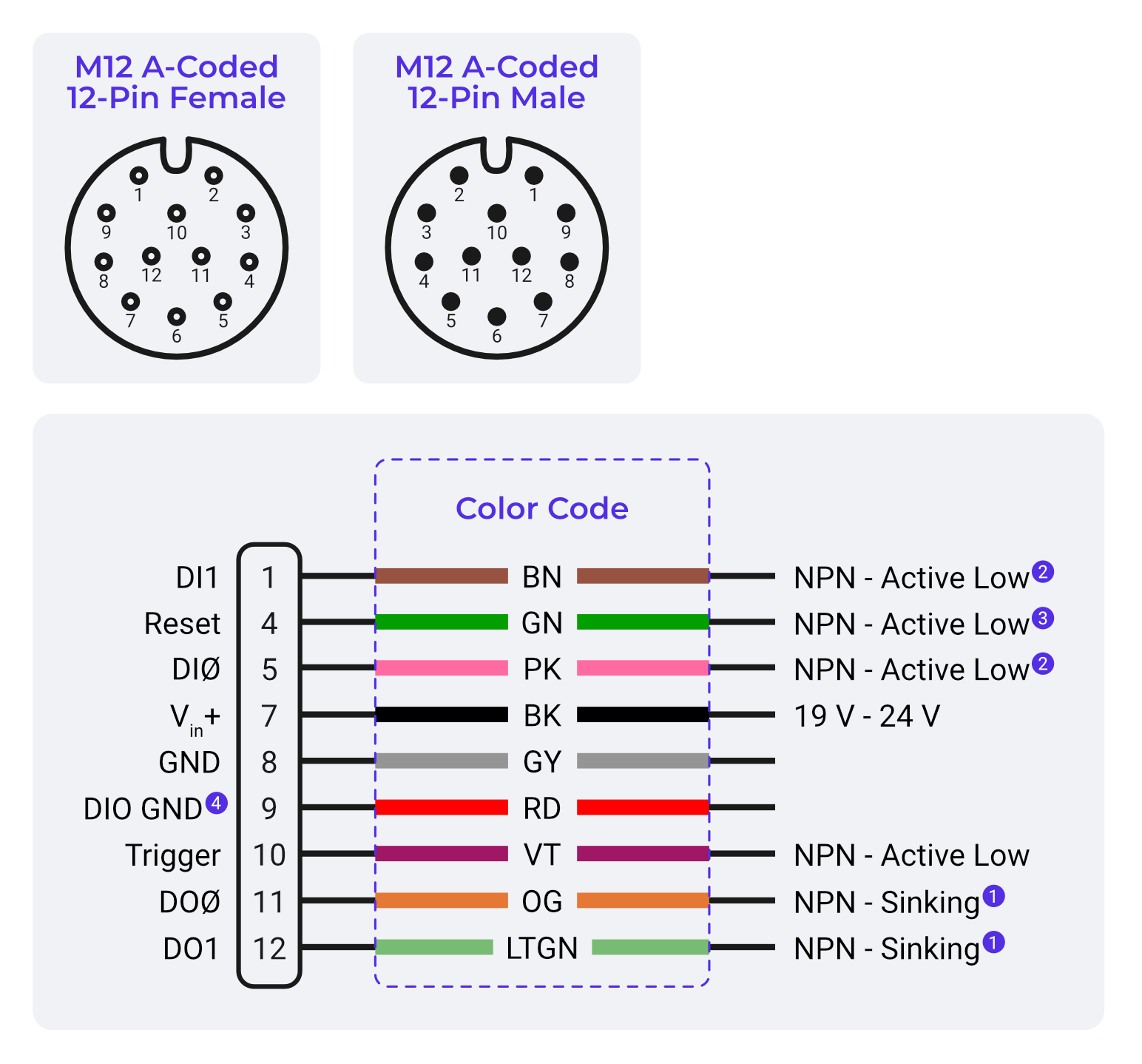
I/O Electrical Characteristics
| Parameter | Specification | Notes |
|---|---|---|
| Input Voltage Range | 0-24 VDC | |
| Input Logic | Pull to GND = Active | NPN compatible |
| Output Current | 100 mA maximum | Per output |
| Output Logic | Sinking to GND | When active |
| Output State | Floating | When inactive |
warning
- Digital outputs (DO0 / DO1) are NPN open-collector, sinking only. They pull the line to GND when active and cannot source +24 V. An external pull-up or load to +24 V must be provided for proper operation.
- DIO GND (Pin 9) must be connected to GND for digital input functionality to work
- DIO GND is tied to GND through a thermal fuse
- When connecting to systems with different power supplies, use DIO GND to tie grounds together
- Reset (Pin 4) - Pull to GND to reboot camera (not needed for most applications, keep floating to avoid unexpected restarts)
M12 A-Coded 12 Pin Connector Pinout
Pin Assignment Table
| Pin | Signal | Wire Color (Ref.) | Wire Color (3rd Party) | Function |
|---|---|---|---|---|
| 1 | DI1 | NPN Active Low | ||
| 4 | Reset | Reset System BTN | ||
| 5 | DI0 | NPN Active Low | ||
| 6 | Common In | |||
| 7 | Vin+ | BK | BK | Power Input Positive (19-24V) |
| 8 | GND | GY | GY | Power Ground |
| 9 | DIO GND | Digital I/O Ground | ||
| 10 | Trigger | Trigger Input - NPN Active Low | ||
| 11 | DO0 | Output, NPN Sinking | ||
| 12 | DO1 | Output, NPN Sinking | ||
| 2,3 | Reserved | - | - | Not connected |
Power Connections
Dual Power Input Design:
- Pin 7: Connected to Vin+ (19-24V positive)
- Pin 8: Connected to GND (power ground)
note
If there is insufficient power, modify the wiring to ensure that the 24V power supply is connected to Vin+ (pin 7).
Synchronization & Triggering
| Mode | Type | Description |
|---|---|---|
| Hardware Trigger | Digital Input | External signal triggering |
| Software Trigger | Network/Manual | PLC or manual or Node-Red triggering |
| Aligner Trigger | Software | Template-based triggering |
| Interval Trigger | Timer-based | Periodic triggering |
Standard Package Contents
| Item | Quantity | Description |
|---|---|---|
| OV80i Camera | 1 | Main camera unit |
| Mounting Plate | 1 | Hardware included |
| I/O Power Cable | 1 | M12 connector with terminal block |
| Ethernet Cable | 1 | M12 to RJ45 |
| Documentation | 1 | Quick start guide |
Compliance & Standards
| Standard | Compliance | Description |
|---|---|---|
| CE Marking | Yes | European conformity |
| FCC | Yes | US electromagnetic compatibility |
| IP Rating | IP40 | Dust and water protection |
| IEC 704-1:1982 | Yes | Sound pressure ≤ 70 dB(A) |
| Industrial Standards | Multiple | Ethernet/IP, Profinet |
🔗 See Also
Technical Support
For technical assistance:
- Overview Support: support@overview.ai
- Documentation: Available in this manual
Specifications subject to change without notice. For the most current specifications, consult the latest documentation.