AI-POWERED DOCS
What do you want to know?
Thiết Lập Giao Tiếp RS-232
Trang này giải thích cách thiết lập giao tiếp RS-232 giữa camera OV20i và các thiết bị bên ngoài bằng cách sử dụng Node-RED và bộ chuyển đổi serial.
Tổng Quan Về Giao Tiếp
Camera có thể sử dụng Node-RED và Serial Converter để giao tiếp với các thiết bị khác qua RS232.
Yêu Cầu Hệ Thống:
- Bộ chuyển đổi Serial RS485 sang RS232 (cần mua phần cứng)
- Cấu hình Node-RED
- Thiết bị bên ngoài có cổng RS232
Phần Cứng Cần Thiết
Bạn cần mua một bộ chuyển đổi Serial RS485 sang RS232. Chúng tôi khuyến nghị sử dụng DTECH DT-9017. Thiết bị này hỗ trợ chuyển đổi tín hiệu RS485 từ camera sang RS232.
Thông Số Phần Cứng:
- Loại Bộ Chuyển Đổi: Bộ chuyển đổi Serial RS485 sang RS232
- Model Khuyến Nghị: DTECH DT-9017
- Chức Năng: Chuyển đổi tín hiệu RS485 từ camera sang định dạng RS232
- Nguồn Cung Cấp: Cần mua từ bên thứ ba
Thiết Lập Kết Nối Vật Lý
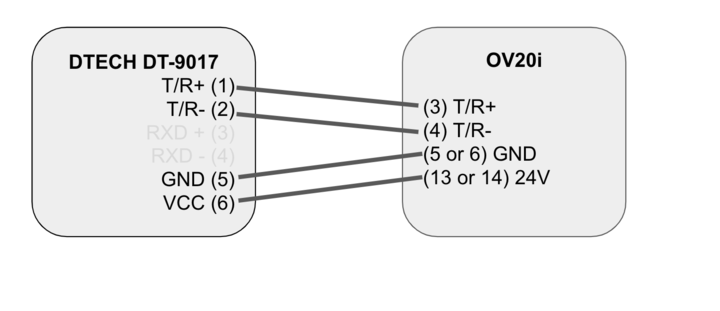
Bước 1: Kết Nối Bộ Chuyển Đổi Serial Với Camera
Kết nối bộ chuyển đổi serial với camera như minh họa trong hình bên dưới.
Bước 2: Thiết Lập Kết Nối Đến Cổng RS232
Kết nối đầu còn lại của bộ chuyển đổi serial với cổng RS232 mong muốn. Điều này hoàn tất kết nối vật lý giữa camera và cổng RS232.
Chuỗi Kết Nối: Camera OV20i → Đầu Ra RS485 → Bộ Chuyển Đổi Serial → Cổng RS232 → Thiết Bị Bên Ngoài
Cấu Hình Logic Node-RED
Điều hướng đến IO Block để cấu hình logic Node-RED. Làm theo các bước được cung cấp trong phần Node-RED Basics để import file JSON được cung cấp bên dưới:
Các Bước Cấu Hình:
- Truy cập IO Block trong giao diện camera
- Mở cấu hình Node-RED
- Import file cấu hình JSON được cung cấp
- Deploy flow đã cập nhật
JSON Cấu Hình Node-RED
Sao chép và import cấu hình JSON sau đây để thiết lập giao tiếp RS-232:
[
    {
        "id": "7cb1ab03670cd840",
        "type": "tab",
        "label": "Flow 1",
        "disabled": false,
        "info": "",
        "env": []
    },
    {
        "id": "8aabc4c53d9cca67",
        "type": "ui_group",
        "name": "Home",
        "tab": "51b1608995f5ea89",
        "order": 1,
        "disp": true,
        "width": "27",
        "collapse": false
    },
    {
        "id": "51b1608995f5ea89",
        "type": "ui_tab",
        "name": "Home",
        "icon": "dashboard",
        "disabled": false,
        "hidden": false
    },
    {
        "id": "42dd086612a76167",
        "type": "ui_base",
        "theme": {
            "name": "theme-light",
            "lightTheme": {
                "default": "#0094CE",
                "baseColor": "#0094CE",
                "baseFont": "-apple-system,BlinkMacSystemFont,Segoe UI,Roboto,Oxygen-Sans,Ubuntu,Cantarell,Helvetica Neue,sans-serif",
                "edited": false
            },
            "darkTheme": {
                "default": "#097479",
                "baseColor": "#097479",
                "baseFont": "-apple-system,BlinkMacSystemFont,Segoe UI,Roboto,Oxygen-Sans,Ubuntu,Cantarell,Helvetica Neue,sans-serif",
                "edited": false
            },
            "customTheme": {
                "name": "Untitled Theme 1",
                "default": "#4B7930",
                "baseColor": "#4B7930",
                "baseFont": "-apple-system,BlinkMacSystemFont,Segoe UI,Roboto,Oxygen-Sans,Ubuntu,Cantarell,Helvetica Neue,sans-serif"
            },
            "themeState": {
                "base-color": {
                    "default": "#0094CE",
                    "value": "#0094CE",
                    "edited": false
                },
                "page-titlebar-backgroundColor": {
                    "value": "#0094CE",
                    "edited": false
                },
                "page-backgroundColor": {
                    "value": "#fafafa",
                    "edited": false
                },
                "page-sidebar-backgroundColor": {
                    "value": "#ffffff",
                    "edited": false
                },
                "group-textColor": {
                    "value": "#1bbfff",
                    "edited": false
                },
                "group-borderColor": {
                    "value": "#ffffff",
                    "edited": false
                },
                "group-backgroundColor": {
                    "value": "#ffffff",
                    "edited": false
                },
                "widget-textColor": {
                    "value": "#111111",
                    "edited": false
                },
                "widget-backgroundColor": {
                    "value": "#0094ce",
                    "edited": false
                },
                "widget-borderColor": {
                    "value": "#ffffff",
                    "edited": false
                },
                "base-font": {
                    "value": "-apple-system,BlinkMacSystemFont,Segoe UI,Roboto,Oxygen-Sans,Ubuntu,Cantarell,Helvetica Neue,sans-serif"
                }
            },
            "angularTheme": {
                "primary": "indigo",
                "accents": "blue",
                "warn": "red",
                "background": "grey",
                "palette": "light"
            }
        },
        "site": {
            "name": "Node-RED Dashboard",
            "hideToolbar": "false",
            "allowSwipe": "false",
            "lockMenu": "false",
            "allowTempTheme": "true",
            "dateFormat": "DD/MM/YYYY",
            "sizes": {
                "sx": 48,
                "sy": 48,
                "gx": 6,
                "gy": 6,
                "cx": 6,
                "cy": 6,
                "px": 0,
                "py": 0
            }
        }
    },
    {
        "id": "c47cc2d81c408a36",
        "type": "serial-port",
        "name": "",
        "serialport": "/dev/ttyTHS1",
        "serialbaud": "9600",
        "databits": "8",
        "parity": "none",
        "stopbits": "1",
        "waitfor": "",
        "dtr": "high",
        "rts": "low",
        "cts": "high",
        "dsr": "high",
        "newline": "\\\\n",
        "bin": "false",
        "out": "char",
        "addchar": "\\\\n",
        "responsetimeout": "10000"
    },
    {
        "id": "2baab5bd0cce1230",
        "type": "debug",
        "z": "7cb1ab03670cd840",
        "name": "debug 1",
        "active": false,
        "tosidebar": true,
        "console": false,
        "tostatus": false,
        "complete": "false",
        "statusVal": "",
        "statusType": "auto",
        "x": 580,
        "y": 580,
        "wires": []
    },
    {
        "id": "4e7d748dce95e6c6",
        "type": "change",
        "z": "7cb1ab03670cd840",
        "name": "set rts high",
        "rules": [
            {
                "p": "payload",
                "t": "set",
                "pt": "msg",
                "to": "{\\"rts\\": \\"high\\"}",
                "tot": "json"
            }
        ],
        "action": "",
        "property": "",
        "from": "",
        "to": "",
        "reg": false,
        "x": 630,
        "y": 400,
        "wires": [
            [
                "8e62d87d6be5a946"
            ]
        ]
    },
    {
        "id": "e3b7598d774c2bd6",
        "type": "delay",
        "z": "7cb1ab03670cd840",
        "name": "",
        "pauseType": "delay",
        "timeout": "20",
        "timeoutUnits": "milliseconds",
        "rate": "1",
        "nbRateUnits": "1",
        "rateUnits": "second",
        "randomFirst": "1",
        "randomLast": "5",
        "randomUnits": "seconds",
        "drop": false,
        "allowrate": false,
        "outputs": 1,
        "x": 630,
        "y": 320,
        "wires": [
            [
                "270a4fa8fb4a4978",
                "5325a871a1f84955"
            ]
        ]
    },
    {
        "id": "104dae3badcde04b",
        "type": "change",
        "z": "7cb1ab03670cd840",
        "name": "set rts low",
        "rules": [
            {
                "p": "payload",
                "t": "set",
                "pt": "msg",
                "to": "{\\"rts\\": \\"low\\"}",
                "tot": "json"
            }
        ],
        "action": "",
        "property": "",
        "from": "",
        "to": "",
        "reg": false,
        "x": 630,
        "y": 360,
        "wires": [
            [
                "8e62d87d6be5a946"
            ]
        ]
    },
    {
        "id": "651284218146186a",
        "type": "inject",
        "z": "7cb1ab03670cd840",
        "name": "",
        "props": [
            {
                "p": "payload"
            },
            {
                "p": "topic",
                "vt": "str"
            }
        ],
        "repeat": "",
        "crontab": "",
        "once": false,
        "onceDelay": 0.1,
        "topic": "",
        "payload": "GOOD",
        "payloadType": "str",
        "x": 250,
        "y": 360,
        "wires": [
            [
                "342f2ea893daee9b"
            ]
        ]
    },
    {
        "id": "270a4fa8fb4a4978",
        "type": "delay",
        "z": "7cb1ab03670cd840",
        "name": "",
        "pauseType": "delay",
        "timeout": "20",
        "timeoutUnits": "milliseconds",
        "rate": "1",
        "nbRateUnits": "1",
        "rateUnits": "second",
        "randomFirst": "1",
        "randomLast": "5",
        "randomUnits": "seconds",
        "drop": false,
        "allowrate": false,
        "outputs": 1,
        "x": 830,
        "y": 360,
        "wires": [
            [
                "104dae3badcde04b"
            ]
        ]
    },
    {
        "id": "17d922879e91c8a7",
        "type": "delay",
        "z": "7cb1ab03670cd840",
        "name": "",
        "pauseType": "rate",
        "timeout": "5",
        "timeoutUnits": "seconds",
        "rate": "1",
        "nbRateUnits": "0.5",
        "rateUnits": "second",
        "randomFirst": "1",
        "randomLast": "5",
        "randomUnits": "seconds",
        "drop": true,
        "allowrate": false,
        "outputs": 1,
        "x": 420,
        "y": 580,
        "wires": [
            [
                "2baab5bd0cce1230"
            ]
        ]
    },
    {
        "id": "342f2ea893daee9b",
        "type": "delay",
        "z": "7cb1ab03670cd840",
        "name": "",
        "pauseType": "rate",
        "timeout": "5",
        "timeoutUnits": "seconds",
        "rate": "1",
        "nbRateUnits": "0.5",
        "rateUnits": "second",
        "randomFirst": "1",
        "randomLast": "5",
        "randomUnits": "seconds",
        "drop": true,
        "allowrate": false,
        "outputs": 1,
        "x": 430,
        "y": 320,
        "wires": [
            [
                "e3b7598d774c2bd6",
                "4e7d748dce95e6c6"
            ]
        ]
    },
    {
        "id": "54165e10b820a5f5",
        "type": "inject",
        "z": "7cb1ab03670cd840",
        "name": "",
        "props": [
            {
                "p": "payload"
            },
            {
                "p": "topic",
                "vt": "str"
            }
        ],
        "repeat": "",
        "crontab": "",
        "once": false,
        "onceDelay": 0.1,
        "topic": "",
        "payload": "FAIL",
        "payloadType": "str",
        "x": 250,
        "y": 300,
        "wires": [
            [
                "342f2ea893daee9b"
            ]
        ]
    },
    {
        "id": "2549782ab378b378",
        "type": "serial in",
        "z": "7cb1ab03670cd840",
        "name": "",
        "serial": "c47cc2d81c408a36",
        "x": 260,
        "y": 580,
        "wires": [
            [
                "17d922879e91c8a7"
            ]
        ]
    },
    {
        "id": "5325a871a1f84955",
        "type": "serial out",
        "z": "7cb1ab03670cd840",
        "name": "",
        "serial": "c47cc2d81c408a36",
        "x": 820,
        "y": 320,
        "wires": []
    },
    {
        "id": "8e62d87d6be5a946",
        "type": "serial control",
        "z": "7cb1ab03670cd840",
        "name": "",
        "serial": "c47cc2d81c408a36",
        "x": 830,
        "y": 400,
        "wires": [
            []
        ]
    },
    {
        "id": "263de9e9ed71a09e",
        "type": "comment",
        "z": "7cb1ab03670cd840",
        "name": "Send any string here to pass it to the selected serial port.  The rest of the nodes just manage information flow.",
        "info": "",
        "x": 550,
        "y": 240,
        "wires": []
    },
    {
        "id": "15d30e67047b53fc",
        "type": "comment",
        "z": "7cb1ab03670cd840",
        "name": "Receive strings here.",
        "info": "",
        "x": 280,
        "y": 520,
        "wires": []
    }
]
- Port:
/dev/ttyTHS1 - Baud Rate: 9600
- Data Bits: 8
- Parity: None
- Stop Bits: 1
- Flow Control: RTS/CTS được quản lý bởi flow logic
Thiết Lập Giao Tiếp
Gửi Dữ Liệu
Sử dụng node FAIL/GOOD để gửi kết quả của camera qua cổng RS232 đến thiết bị nhận.
Truyền Dữ Liệu:
- Nguồn: Kết quả kiểm tra của camera
- Phương thức: Đầu ra của node FAIL/GOOD
- Đích: Thiết bị bên ngoài qua RS232
- Nội dung: Trạng thái pass/fail và dữ liệu kiểm tra
Nhận Dữ Liệu
Sử dụng node debug để nhận dữ liệu từ cổng RS232 và tích hợp vào logic hệ thống của bạn.
Nhận Dữ Liệu:
- Nguồn: Thiết bị bên ngoài qua cổng RS232
- Phương thức: Node debug để giám sát
- Tích hợp: Tích hợp vào logic Node-RED
- Sử dụng: Điều khiển hệ thống và phản hồi
✅ Hoàn Tất Thiết Lập
Bằng cách làm theo các bước này, bạn sẽ thiết lập thành công giao tiếp giữa camera và cổng RS232.
Danh Sách Kiểm Tra Xác Minh:
- ✅ Bộ chuyển đổi serial được kết nối đúng cách với camera
- ✅ Kết nối cổng RS232 đã được thiết lập
- ✅ Logic Node-RED đã được cấu hình và triển khai
- ✅ Đã kiểm tra truyền dữ liệu (camera đến thiết bị bên ngoài)
- ✅ Đã xác minh nhận dữ liệu (thiết bị bên ngoài đến camera)
Integration Builder có thể tạo các flow Node-RED cho giao tiếp RS-232 từ mô tả bằng tiếng Anh thông thường. Hãy mô tả những gì bạn cần (ví dụ: "send pass/fail results over RS-232 to an external controller") và nhận được flow sẵn sàng để triển khai chỉ trong vài giây.