AI-POWERED DOCS
What do you want to know?
OV Spark Technical Specifications
Complete hardware specifications for the OV Spark industrial AI camera, including sensor, processor, optics, I/O, power, dimensions, and field of view.
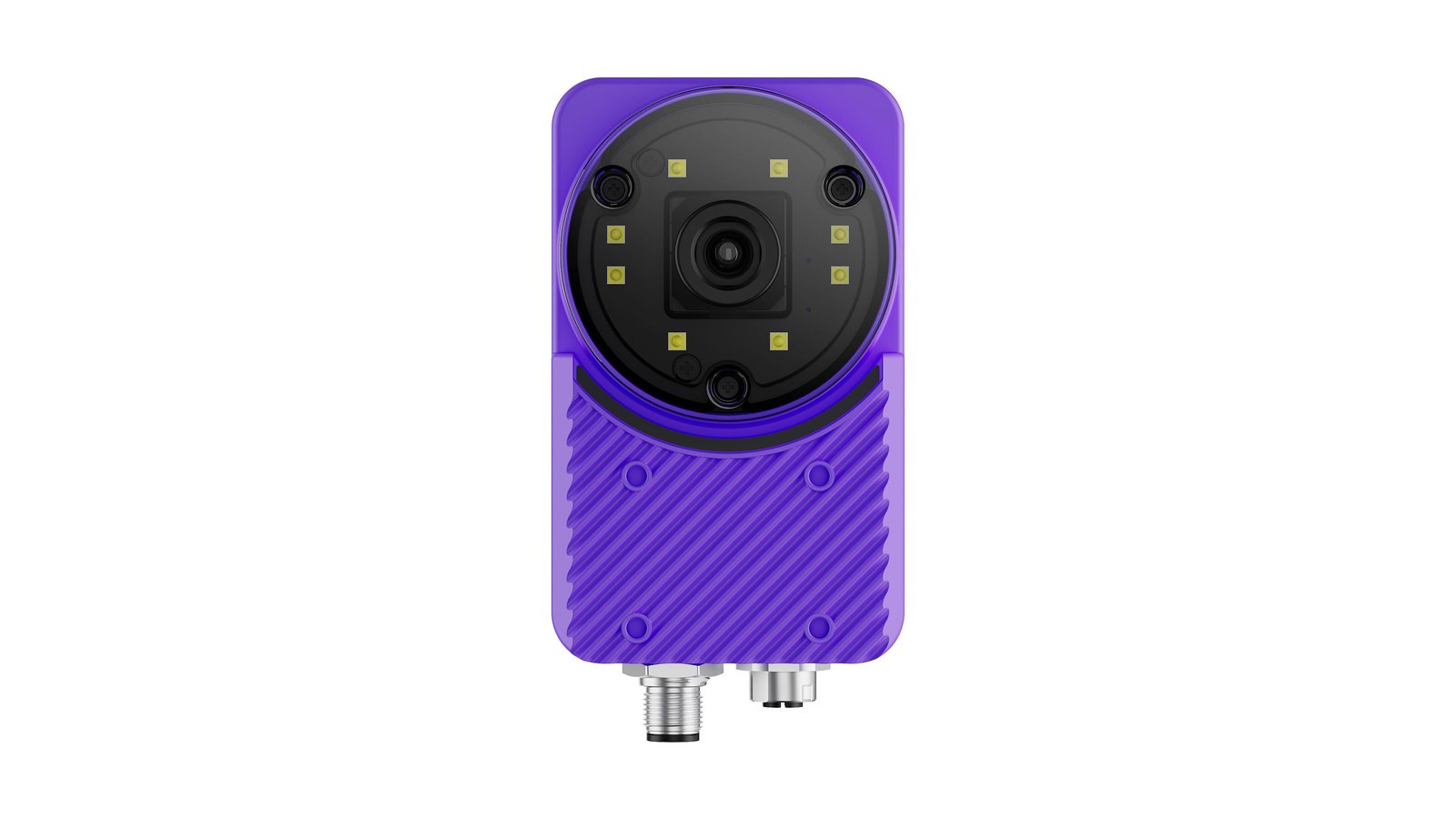
Image sensor
| Parameter | Specification | Notes |
|---|---|---|
| Sensor | OmniVision OG05B20 | Industrial grade |
| Capture resolution | 1.2 MP, 1280 (H) x 960 (V) | The full field of view, scaled down from the 5 MP sensor |
| Frame rate | 30 fps | Maximum |
| Sensor size | 1/2.53" | |
| Pixel size | 2.2 x 2.2 µm | |
| Shutter type | Global shutter | Motion immunity, no skew on moving parts |
| Color / mono | Color | RGB |
OV Spark and OV Spark Pro
OV Spark comes in two models on identical hardware. The only difference today is how many pixels each capture has.
| OV Spark | OV Spark Pro | |
|---|---|---|
| Capture resolution | 1280 x 960 (1.2 MP) | 2592 x 1944 (5 MP) |
| Frame rate | 30 fps | 30 fps |
| Field of view | The same full field of view, with the same lens | The same full field of view, with the same lens |
| Detail across a 1 m wide frame | about 0.8 mm per pixel | about 0.4 mm per pixel |
| Zoom | Not available | 1x, 2x or 4x centre |
| Tools, I/O, housing, software | Identical | Identical |
OV Spark captures the whole scene and scales it down, so nothing is cropped; each pixel simply covers twice the distance. Pick OV Spark when the smallest thing you need to see still spans a few pixels at 1280 x 960, and OV Spark Pro when it does not.
To see which model you have, look at the name at the top left of the camera's interface: it says OV Spark or OV Spark Pro.
Regions and templates are stored in sensor pixels and are never rescaled, so a recipe only imports onto a camera with the same resolution. Build each recipe on the model it will run on.
Processor system
| Component | Specification | Details |
|---|---|---|
| Platform | Qualcomm QCS6490 | |
| AI acceleration | 6th Gen AI Engine, up to 12 TOPS | On-device inference |
| CPU | 8-core Kryo 670 (ARM v8.2, 64-bit) | Up to 2.1 GHz |
| GPU | Adreno 643L, up to 812 MHz | OpenGL ES 3.2, Vulkan, OpenCL 2.0, DirectX 12 |
| DSP | Hexagon Processor | |
| ISP | Spectra ISP 570L | Hardware image signal processing |
| Memory | 8 GB LPDDR5 | |
| Storage | 128 GB UFS |
Optical system
| Parameter | Specification | Notes |
|---|---|---|
| Lens | 6 mm as standard | 12, 16 and 25 mm also available, fitted by Overview before the camera ships. Contact support@overview.ai to talk to an Overview engineer |
| Focus | Closed-loop VCM autofocus | Set in software; no manual focus ring |
| Lighting | 8 x PWM white LEDs, programmable | Built into the camera |
| Synchronization | Free-run or software trigger |
Unlike the OV80i, which uses a C-mount lens focused by hand, OV Spark has a voice coil motor with closed-loop feedback. You set focus in the interface and the camera holds it. There is no focus ring to turn.
Field of view
With the 6 mm lens, the field of view is 54.2° x 40.6°:
| Working distance | Field of view (H x V), 6 mm lens |
|---|---|
| 200 mm | 211.8 x 154.1 mm |
| 1000 mm | 1030.6 x 745.7 mm |
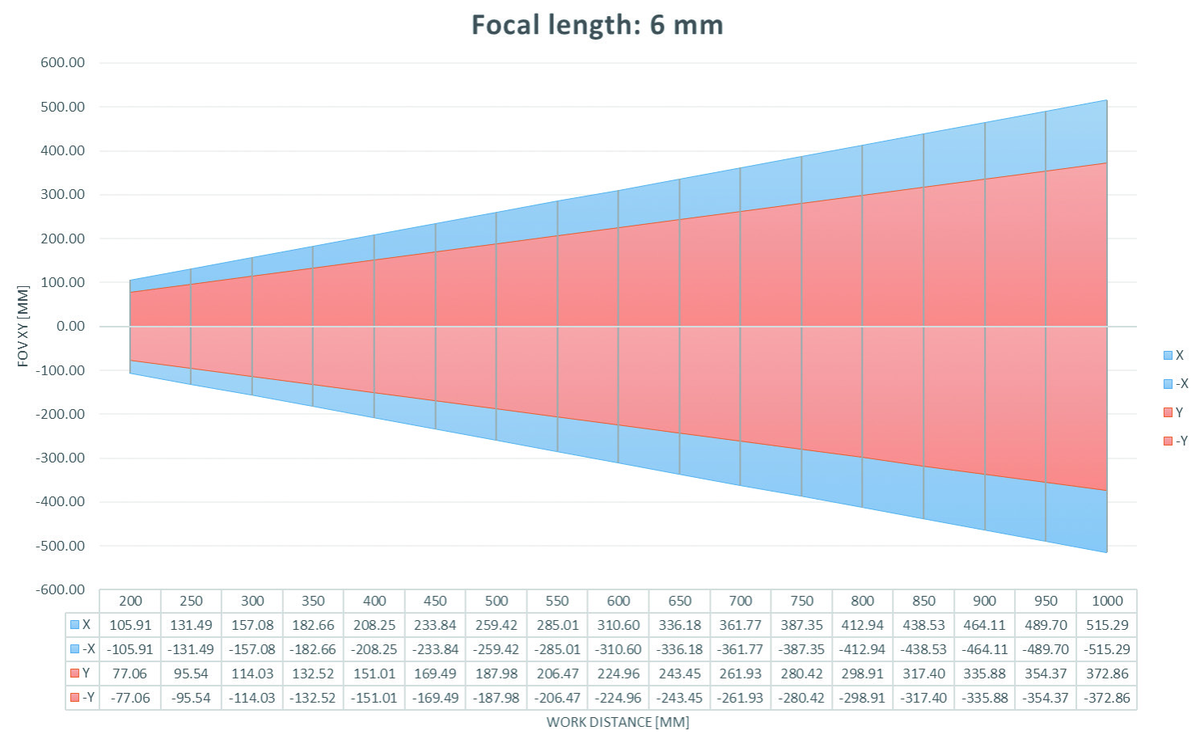
Use the chart to check that your part fills a useful portion of the frame at your intended mounting height. If the part is small in the frame, the AI has fewer pixels to learn from.
Field of view calculator
Move the slider to your mounting distance to see how much the camera sees. Add your part size to check it fits.
Field of view calculator
How much the camera sees from your mounting distance, with the standard 6 mm lens.
Enter your part size to see it in the camera's view.
Working distance is measured from the front of the lens to the part. Figures are for the full frame with the 6 mm lens, and match Overview's optics calculators, which also work out mounting distance, minimum defect size and maximum part speed.
Moving the camera back shows more of the part, but spreads the same pixels over more millimetres, so small defects get harder to see. Mount the camera as close as you can while the whole part still fits.
For mounting distance, minimum defect size and maximum part speed, use Overview's optics calculators and choose your camera under Camera Model.
Power
| Parameter | Specification | Notes |
|---|---|---|
| Input voltage | 19–24 VDC | Via the M12 12-pin Power & I/O connector |
| Maximum power | 17 W | Datasheet rating |
| Measured peak draw | about 12 W | What a real camera draws in normal operation |
| Power over Ethernet | IEEE 802.3af / 802.3at | Requires the Overview PoE adapter CB-POE25-RJ45F-M12A12F-1 |
The measured peak is what matters when sizing a PoE source: about 12 W fits inside the 12.95 W that 802.3af guarantees at the device. See Power over Ethernet.
I/O and connectivity
| Interface | Specification |
|---|---|
| Ethernet | 1 x 10/100/1000 Base-T (M12 connector) |
| USB | 1 x USB 3.0 Type A |
| Micro USB | Recovery mode only |
| Digital inputs | 2 (opto-isolated) |
| Digital outputs | 1, plus 1 shared digital output / strobe out |
| Power & I/O | M12 12-pin connector |
| PoE | 802.3af / 802.3at, via the Overview adapter |
Full pin assignments and wiring circuits are on the Pinouts page.
Environment and compliance
| Parameter | Specification |
|---|---|
| Operating temperature | 0 to 45 °C |
| Vibration during operation | 5 Grms |
| Enclosure rating | IP66 |
| Compliance | CE, FCC |
Dimensions
70 mm (W) x 116 mm (H) x 53 mm (D)
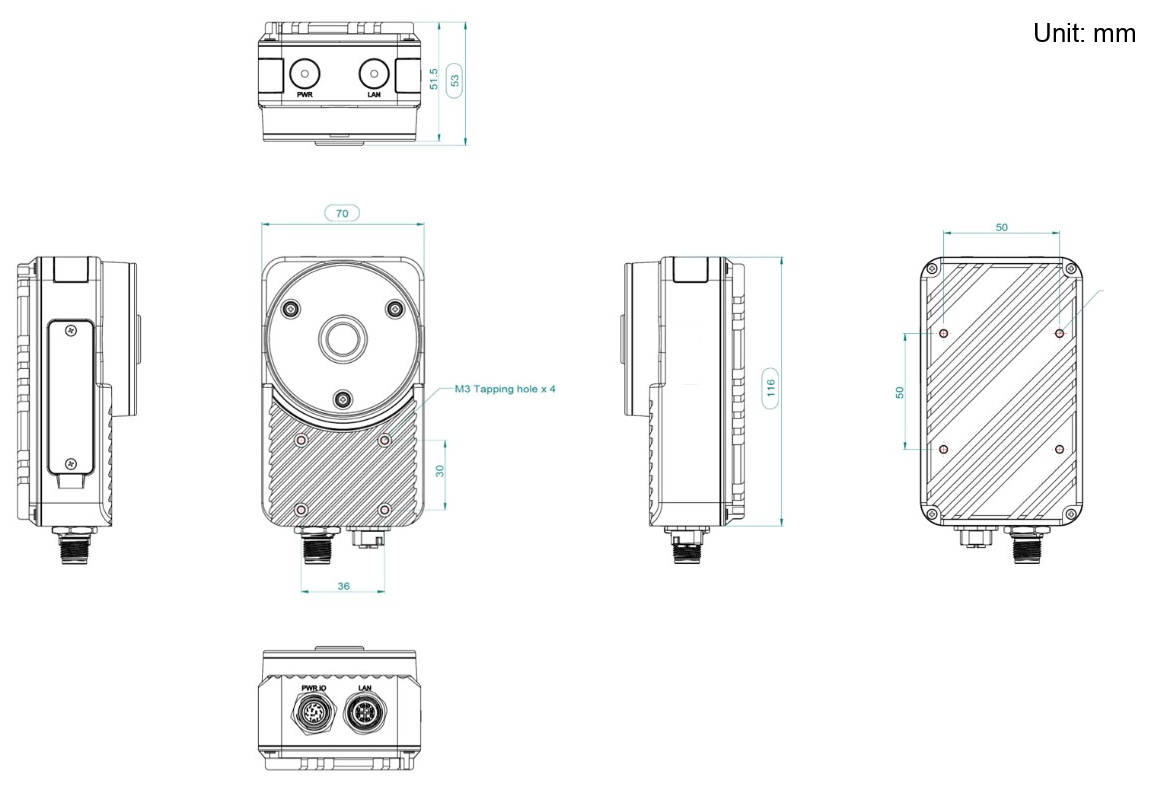
Mounting is via M3 tapped holes, four on each face:
| Face | Pattern |
|---|---|
| Rear | 4 x M3 on a 50 x 50 mm pattern |
| Front | 4 x M3 on a 36 x 30 mm pattern |
The power/IO and Ethernet connectors both exit the bottom of the housing.
3D models and 2D drawings of the camera and the three mounting brackets are in CAD models and 2D drawings.
The M12 connectors add roughly 30 mm below the 116 mm body height once cables are attached. Allow for the bend radius of the cable when planning a bracket.
Software
| Item | Specification |
|---|---|
| Operating system | Yocto-based BSP, Linux kernel 6.6 |
| Interface | Browser-based, no client software to install |