AI 驅動文件
您想了解什麼?
裁剪 ROI 端點(僅分類)
概覽
端點 cropped_roi 提供對在裝置上執行的 Haystack 中由 classification results(分類結果) 生成的 cropped Regions of Interest (ROIs) 的訪問。
僅分類
Haystack 目前不支援 segmentation 結果。本端點僅適用於 classification-type 結果。如需以程式設計方式處理 segmenter 輸出,請改用標準的 inspection results API。
基礎 URL 格式為:
http://{device-ip}/edge/haystack/cropped_roi/{classification_result_id}
工作原理
當相機完成一個 classification capture(分類捕獲) 時,Node-RED 流透過將裝置 IP 與 classification result ID(分類結果 ID) 配對,動態構造裁剪 ROI 影象的 URL:
const imageUrl = `http://${baseUrl}/edge/haystack/cropped_roi/${result.id}`;
每個 URL 提供一個對應於單個 classification ROI(分類 ROI) 的裁剪影象,通常表示一次檢查。
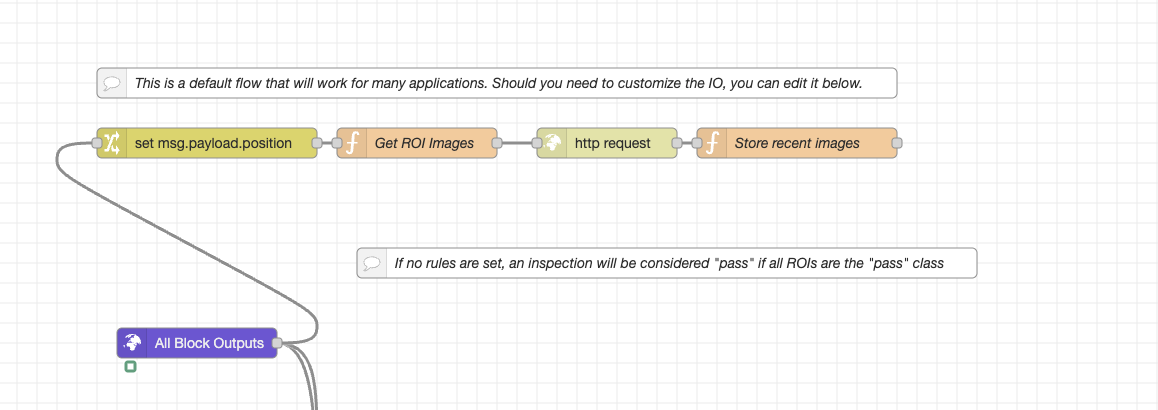
Node-RED Flow 摘要
ROI_Crop 流執行以下操作:
-
提取裝置 IP
- 解析
image_url欄位以找到 IP(如192.168.0.101) - 將其全域性儲存以便複用
- 解析
-
查詢最新捕獲資料
-
向裝置的 PostgREST API 傳送 GET 請求:
http://{device-ip}/postgrest/captures?select=...
&order=id.desc&limit=1 -
檢索最近的捕獲以及所有 classification_result 條目
-
-
僅篩選 classification_result 條目
-
跳過 segmentation 或 alignment 結果
-
對每個 classification_result 條目進行迭代:
classificationResults.forEach(result => {
  const roiName = result.roi_result?.inspection_region?.name || `ROI_${result.id}`;
  const imageUrl = `http://${baseUrl}/edge/haystack/cropped_roi/${result.id}`;
  imageMap[roiName] = imageUrl;
});
-
-
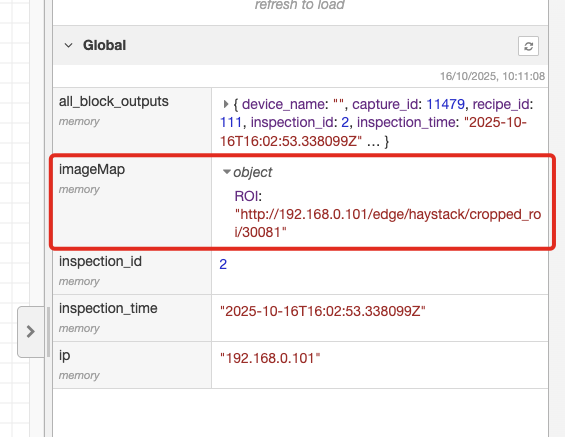
輸出裁剪後的 ROI URLs
- 將所有 ROI 影象連結儲存到全域性
imageMap - 返回最新裁剪 ROI 影象 URL 的列表
- 將所有 ROI 影象連結儲存到全域性
示例用法
獲取一個裁剪後的 ROI 影象
curl http://192.168.0.101/edge/haystack/cropped_roi/42 -o roi_42.jpg
在 Web 介面中的使用
<img src="http://192.168.0.101/edge/haystack/cropped_roi/42" alt="Cropped ROI 42">
輸出示例
{
  "ROI_1": "http://192.168.0.101/edge/haystack/cropped_roi/1",
  "ROI_2": "http://192.168.0.101/edge/haystack/cropped_roi/2"
}
引數
| 引數 | 型別 | 描述 |
|---|---|---|
device-ip | string | 相機的 IP 地址(例如 192.168.0.101) |
整合流程
- 透過
/postgrest/captures獲取最新捕獲後設資料。 - 標識可用的
classification_resultID。 - 為每個結果構造裁剪 ROI URL。
- 顯示或下載這些影象用於分析、訓練資料,或 QA 檢查。
下載 Node-RED Flow
- ROI Crop Flow (JSON) - 提取裁剪 ROI 影象的完整 Node-RED Flow
- 將此 Flow 直接匯入到 Node-RED 以訪問裁剪的 classification ROIs
- Works with both OV20i and OV80i systems