AI 驅動文件
您想了解什麼?
程式指令碼
程式指令碼是一段簡短的 JavaScript 程式碼,在某個程式的每次檢測中,在工具執行後執行。它可以:
- 用您自己的邏輯決定通過或失敗,並說明原因
- 為 PLC 的 User Results 寫入您自己的位元組
- 隨捕獲儲存後設資料和標籤,以便您在庫中查詢
每個程式最多有一個指令碼,並隨程式一起匯出。
開啟編輯器
在程式的 判定 步驟中,滾動到 程式指令碼 並點選 開啟指令碼編輯器。
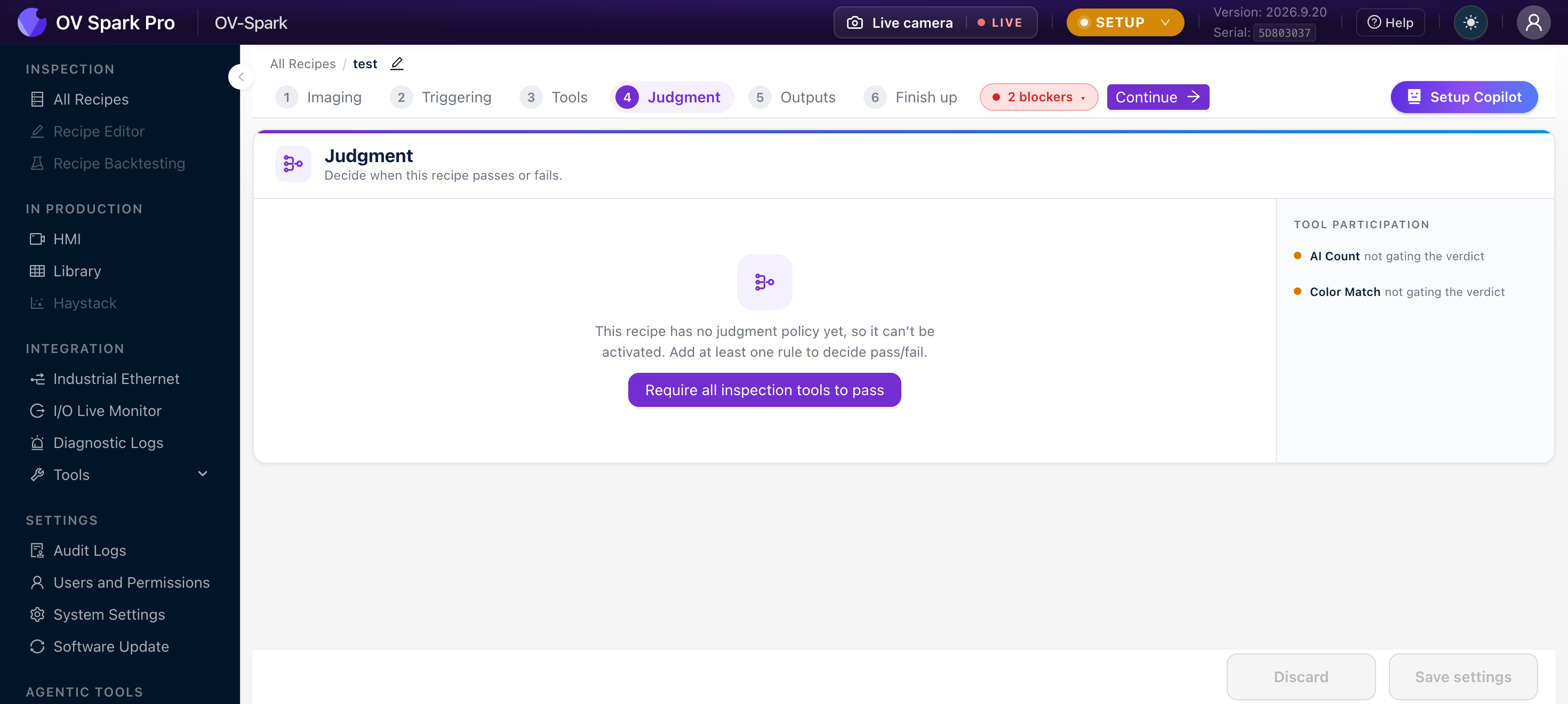
在判定步驟的頂部,您可以選擇由什麼決定判定結果:規則 或 程式指令碼。規則始終執行,指令碼會看到規則的判定結果。如果將設定保留為 規則,指令碼無法更改通過或失敗,但其原因、後設資料、標籤和 PLC 位元組仍然生效。這是一個安全的起點:新增指令碼以提供原因和位元組,並讓規則主導判定。
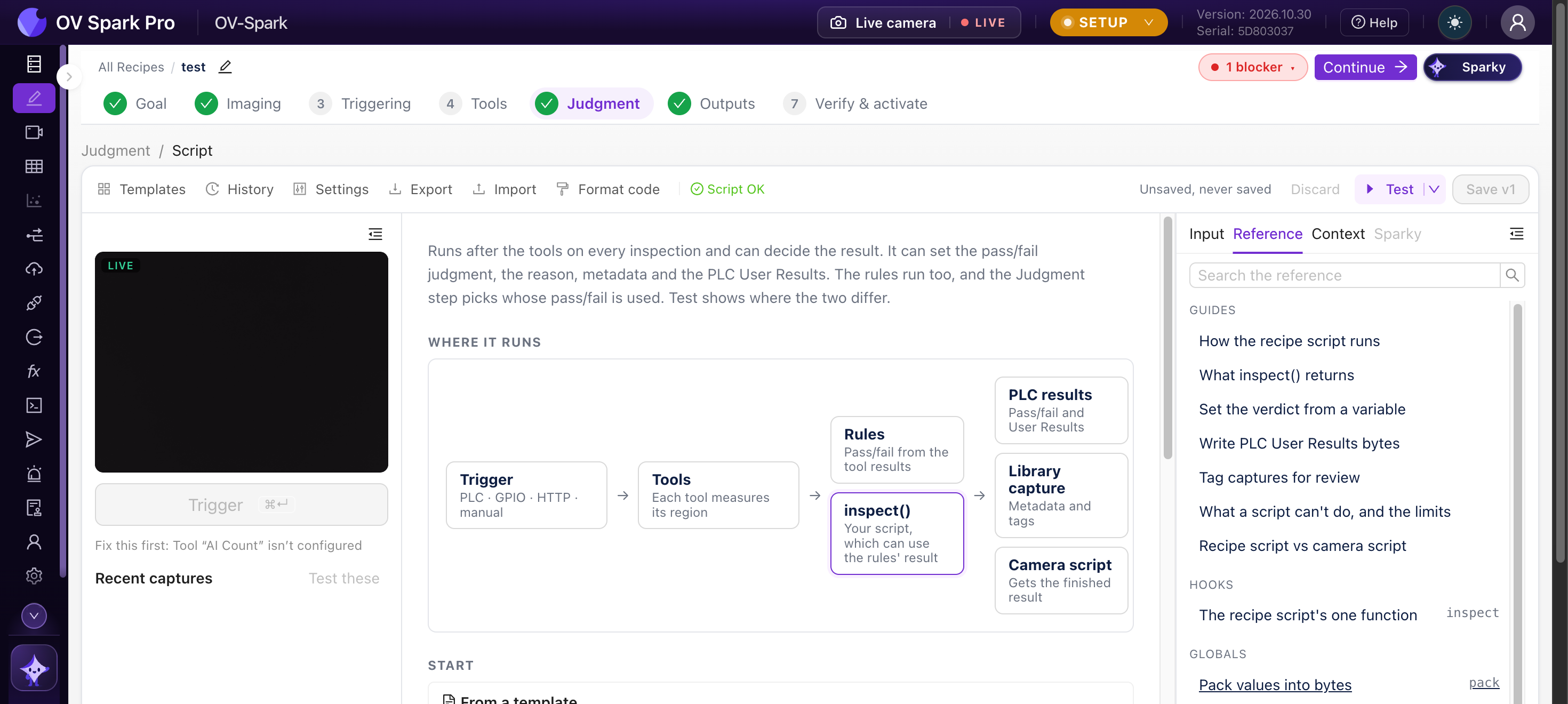
執行方式
Trigger → Capture and tools → Pass/fail rules → inspect(input) → Verdict, PLC User Results, Library, MQTT
指令碼匯出一個函式 inspect(input)。相機在程式的每次檢測中,在工具和規則之後呼叫它。產線會等待其執行完成,因此它必須是 同步且快速的:預設有 25 ms,在指令碼的 設定 中最多可達 200 ms,其耗時會計入節拍時間。
input 包含到目前為止的所有內容。它是隻讀的:
| 欄位 | 含義 |
|---|---|
tools | 每個工具的結果,按工具執行順序排列 |
tools_by_name | 按工具名稱索引的相同結果 |
rules | 規則的判定結果:judgment、pass、not_inspected |
vars | 按名稱索引的 變數。無值的變數為 null |
vars_info | 每個變數的 received_at、age_ms 和 source |
recipe | id、uuid 和 name |
trigger | id、source(例如 plc、gpio、http、manual)和 metadata |
每個工具結果都有 name、type、judgment、pass、score、plc_slot、execute_ms、error、skipped_by,以及一個 detail 物件,其結構取決於具體工具。在讀取 detail 之前先檢查 type,例如 ai_fast_classifier(帶 detail.regions)、ai_ocr(帶 detail.fields)、ai_counting(帶 detail.count)或 classical.barcode(帶 detail.data)。
返回內容
每個欄位都是可選的。省略的欄位將保持相機的正常行為,因此指令碼可以只設定原因而將判定留給規則。不返回任何內容則不做任何更改。
| 欄位 | 含義 | 限制 |
|---|---|---|
judgment | "pass"、"fail" 或 "not_inspected"(true、false 和 null 含義相同)。僅當判定步驟設定為程式指令碼時使用 | |
reason | 在庫中顯示並在結果訊息中傳送的文字(MQTT、HTTP API、相機指令碼) | 64 個字元 |
plc_user_results | PLC 的 User Results 位元組,通常使用 pack() 構建 | 已配置的 User Results 大小 |
metadata | 隨捕獲儲存並顯示在其庫詳情中的鍵值對。鍵為字母、數字和下劃線,以字母開頭;值為文字、數字或 true/false | 32 個鍵,文字值最多 256 個字元 |
tags | 在庫中顯示為標籤晶片,您可以按其過濾 | 16 個標籤,每個 32 個字元 |
export function inspect({ tools_by_name, vars }) {

  const ocr = tools_by_name["Serial"];
  if (ocr?.type !== "ai_ocr" || !ocr.detail) {
    return { judgment: false, reason: "no OCR result" };
  }
  const expected = vars["serial"];
  if (typeof expected !== "string") {
    return { judgment: null, reason: "serial not received" };
  }
  const read = ocr.detail.fields.map((f) => f.text_judged).join("");
  const match = read === expected;
  return { judgment: match, reason: match ? "serial matches" : "serial differs" };
}
試一試
程式指令碼除錯臺
更換部件、編輯指令碼,然後按執行。指令碼接收與相機傳給 inspect() 相同的輸入,並在相同的規則下執行。
一個具有 10 個區域的 AI 分類工具,每個引腳一個。點選引腳可翻轉其狀態。
顯示輸入物件
{
  "recipe": {
    "id": 3,
    "uuid": "01a15a44-9a3c-72bb-ab4f-5481cce20093",
    "name": "Sample recipe"
  },
  "trigger": {
    "id": 4182,
    "source": "plc",
    "metadata": {}
  },
  "rules": {
    "judgment": "fail",
    "pass": false,
    "not_inspected": false
  },
  "vars": {},
  "vars_info": {},
  "tools": [
    {
      "type": "ai_fast_classifier",
      "id": "01a1-pins",
      "name": "Pins",
      "plc_slot": 1,
      "judgment": "fail",
      "pass": false,
      "score": 0.9,
      "execute_ms": 6,
      "error": "none",
      "skipped_by": "",
      "detail": {
        "regions": [
          {
            "label": "Pin 1",
            "class_label": "seated",
            "confidence": 0.97,
            "verdict": "pass",
            "threshold": 0.5,
            "pass": true
          },
          {
            "label": "Pin 2",
            "class_label": "seated",
            "confidence": 0.93,
            "verdict": "pass",
            "threshold": 0.5,
            "pass": true
          },
          {
            "label": "Pin 3",
            "class_label": "seated",
            "confidence": 0.95,
            "verdict": "pass",
            "threshold": 0.5,
            "pass": true
          },
          {
            "label": "Pin 4",
            "class_label": "bent",
            "confidence": 0.81,
            "verdict": "fail",
            "threshold": 0.5,
            "pass": false
          },
          {
            "label": "Pin 5",
            "class_label": "seated",
            "confidence": 0.91,
            "verdict": "pass",
            "threshold": 0.5,
            "pass": true
          },
          {
            "label": "Pin 6",
            "class_label": "seated",
            "confidence": 0.96,
            "verdict": "pass",
            "threshold": 0.5,
            "pass": true
          },
          {
            "label": "Pin 7",
            "class_label": "seated",
            "confidence": 0.94,
            "verdict": "pass",
            "threshold": 0.5,
            "pass": true
          },
          {
            "label": "Pin 8",
            "class_label": "seated",
            "confidence": 0.89,
            "verdict": "pass",
            "threshold": 0.5,
            "pass": true
          },
          {
            "label": "Pin 9",
            "class_label": "seated",
            "confidence": 0.98,
            "verdict": "pass",
            "threshold": 0.5,
            "pass": true
          },
          {
            "label": "Pin 10",
            "class_label": "seated",
            "confidence": 0.92,
            "verdict": "pass",
            "threshold": 0.5,
            "pass": true
          }
        ],
        "overall": "fail"
      }
    }
  ],
  "tools_by_name": {
    "Pins": {
      "type": "ai_fast_classifier",
      "id": "01a1-pins",
      "name": "Pins",
      "plc_slot": 1,
      "judgment": "fail",
      "pass": false,
      "score": 0.9,
      "execute_ms": 6,
      "error": "none",
      "skipped_by": "",
      "detail": {
        "regions": [
          {
            "label": "Pin 1",
            "class_label": "seated",
            "confidence": 0.97,
            "verdict": "pass",
            "threshold": 0.5,
            "pass": true
          },
          {
            "label": "Pin 2",
            "class_label": "seated",
            "confidence": 0.93,
            "verdict": "pass",
            "threshold": 0.5,
            "pass": true
          },
          {
            "label": "Pin 3",
            "class_label": "seated",
            "confidence": 0.95,
            "verdict": "pass",
            "threshold": 0.5,
            "pass": true
          },
          {
            "label": "Pin 4",
            "class_label": "bent",
            "confidence": 0.81,
            "verdict": "fail",
            "threshold": 0.5,
            "pass": false
          },
          {
            "label": "Pin 5",
            "class_label": "seated",
            "confidence": 0.91,
            "verdict": "pass",
            "threshold": 0.5,
            "pass": true
          },
          {
            "label": "Pin 6",
            "class_label": "seated",
            "confidence": 0.96,
            "verdict": "pass",
            "threshold": 0.5,
            "pass": true
          },
          {
            "label": "Pin 7",
            "class_label": "seated",
            "confidence": 0.94,
            "verdict": "pass",
            "threshold": 0.5,
            "pass": true
          },
          {
            "label": "Pin 8",
            "class_label": "seated",
            "confidence": 0.89,
            "verdict": "pass",
            "threshold": 0.5,
            "pass": true
          },
          {
            "label": "Pin 9",
            "class_label": "seated",
            "confidence": 0.98,
            "verdict": "pass",
            "threshold": 0.5,
            "pass": true
          },
          {
            "label": "Pin 10",
            "class_label": "seated",
            "confidence": 0.92,
            "verdict": "pass",
            "threshold": 0.5,
            "pass": true
          }
        ],
        "overall": "fail"
      }
    }
  }
}按執行以檢視此檢測最終的結果。
瀏覽器中的模擬。在相機上,儲存之前請使用指令碼編輯器中的 Test 對實際捕獲的影象執行草稿。
為 PLC 寫入位元組
返回 plc_user_results,使用 pack(layout, values) 構建。PLC 會在檢測完成邊沿之前隨結果一起讀取。
將位元組描述為一個佈局:由 { name, type } 欄位組成的有序列表。
| 型別 | 位元組數 |
|---|---|
u8、i8、bool | 1 |
u16le、u16be、i16le、i16be | 2 |
u32le、u32be、i32le、i32be、f32le、f32be | 4 |
u64le、u64be、i64le、i64be、f64le、f64be | 8 |
帶 count 的 bits | 每個值佔一位,第一個值位於最低位 |
帶 length 的 ascii 或 utf8 | 文字,填充或(設定 truncate: true 時)截斷至指定長度 |
帶 length 的 bytes | 原始位元組 |
帶 length 的 pad | 零位元組,用於跳過空隙 |
const OUT = [
  { name: "regionOk", type: "bits", count: 80 },
  { name: "count", type: "u16le" },
];

export function inspect({ tools_by_name }) {

  const classifier = tools_by_name["Classifier"];
  if (classifier?.type !== "ai_fast_classifier" || !classifier.detail) return;
  const regionOk = classifier.detail.regions.map((r) => r.pass).slice(0, 80);
  return { plc_user_results: pack(OUT, { regionOk, count: regionOk.length }) };
}
每種多位元組型別都顯式指定其位元組序,相機不會為您自動交換位元組。在 EtherNet/IP 上使用 le 型別,在 PROFINET 上使用 be 型別。當型別與相機的現場匯流排不匹配時,指令碼檢查會發出警告。
- 位元組 0 在 EtherNet/IP 上位於輸入裝配位元組 288,在 PROFINET 上位於 User Results 模組的位元組 0。該區域的其餘部分將被清零
- 當值不適合其欄位時,
pack會丟擲RangeError。儲存前請先用不合格件進行測試 unpack(layout, bytes)可反向讀取位元組,crc(bytes, "crc16-modbus" | "crc32")可計算校驗和
出錯時
如果 inspect 丟擲異常、超時、記憶體耗盡(8 MiB),或返回相機無法接受的內容(例如原因超過 64 個字元或 judgment: "PASS"):
- 該部件被標記為未檢測
- PLC User Results 被清零
- 它返回的任何內容(原因、後設資料、標籤)都不會被使用
- 錯誤與捕獲一起儲存,因此您可以在庫中檢視
在模組級別儲存的值只能存留到程式重新載入前,例如儲存之後。不要在程式指令碼中計數部件或儲存歷史記錄。請使用相機指令碼,它可以在事件之間保持狀態。
程式指令碼不能做什麼
- 沒有網路、沒有定時器、也不能等待:沒有
fetch、setTimeout、import或eval,而且inspect不能是async - 它無法看到影象本身,只能看到工具的結果
- 它只能通過
input和變數讀取外部世界
模板
模板庫中有 14 個可用指令碼,按任務分組。選擇一個,填入它所使用的工具或變數,然後點選插入模板。
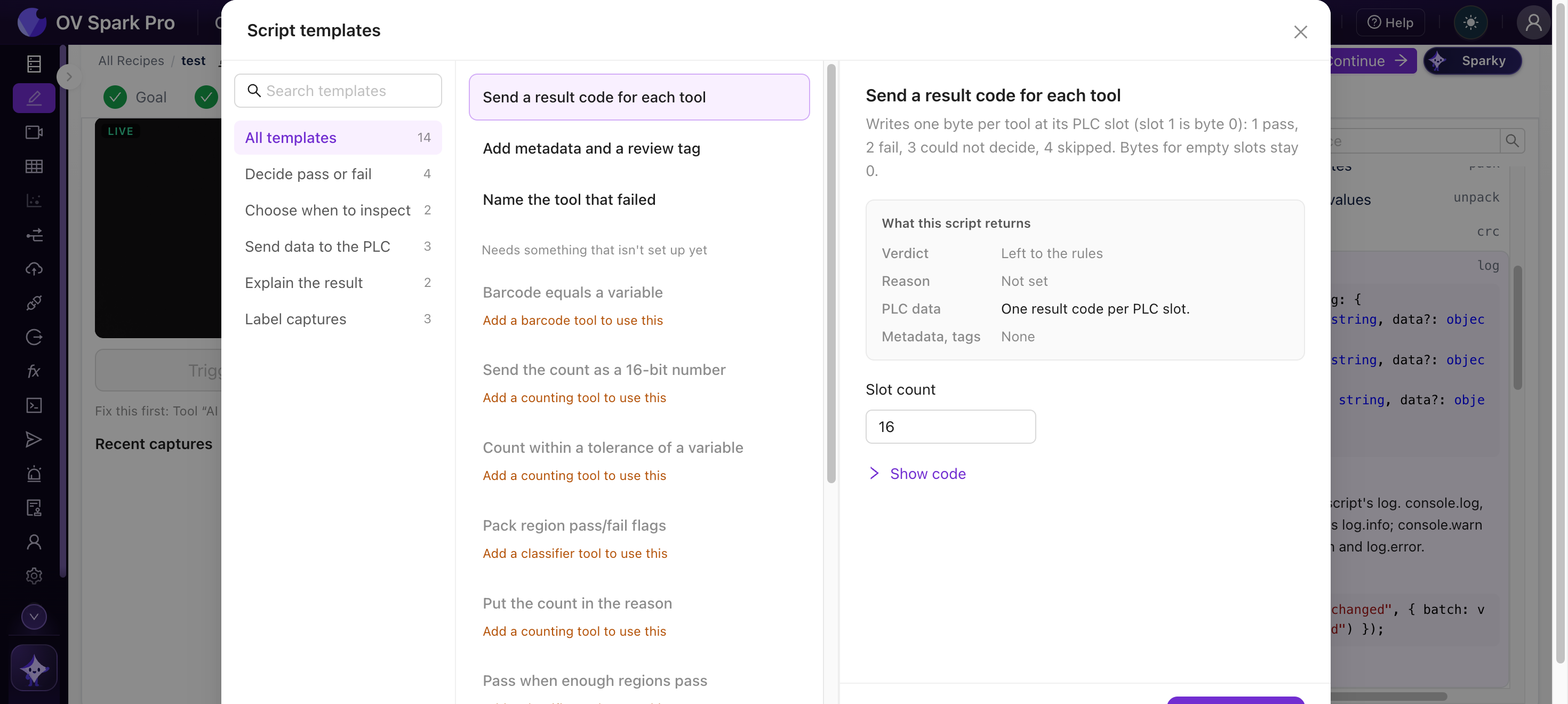
| 分組 | 模板 |
|---|---|
| 判定通過或失敗 | 足夠多區域通過時判為通過 · 序列號與 OCR 文字匹配 · 條碼等於變數 · 計數在變數的容差範圍內 |
| 選擇何時檢測 | 跳過其他部件型別 · 當變數缺失或過時時跳過 |
| 向 PLC 傳送資料 | 以 16 位數字傳送計數 · 打包區域通過/失敗標誌 · 為每個工具傳送結果程式碼 |
| 解釋結果 | 指明失敗的工具 · 將計數放入原因中 |
| 標記捕獲 | 新增後設資料和稽覈標籤 · 為臨界樣本新增稽覈標籤 · 為每次捕獲儲存一個變數 |
測試與歷史記錄
- 測試 可在實時觸發上執行草稿,也可在已儲存的捕獲上執行:最新的一張、最近 N 張(最多 500 張)、庫篩選結果或捕獲編號。它會顯示草稿的判定與每張捕獲所記錄的判定之間的差異,讓您在正式上線前看到它會做出什麼決定
- 歷史記錄 會保留您最近 20 個已儲存的版本
在判定步驟仍處於規則模式時編寫指令碼,並對已儲存的捕獲使用測試,將其判定與已記錄的判定進行比較。僅當它們在您期望的位置出現分歧時,才切換到程式指令碼。