AI-POWERED DOCS
What do you want to know?
Step 6: Finish up
The last step checks the recipe is complete, restates it in plain language, and lets you put it into production.
- Clear every blocker. Each one links to the step that fixes it
- Read What this recipe does as if you had never seen the recipe
- Activate, then watch real parts before you trust it
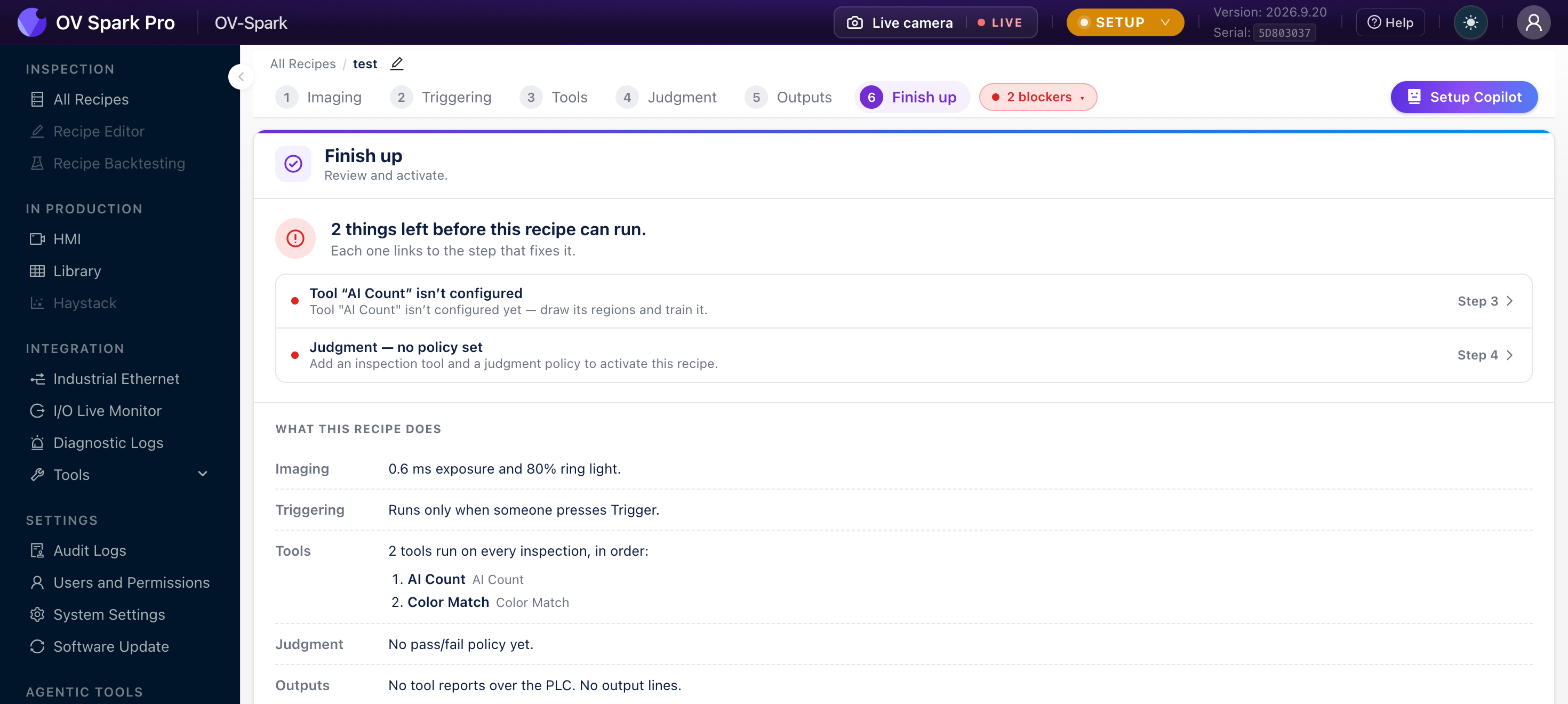
Blockers
A recipe cannot run while anything essential is missing. The page says how many things are left, for example 2 things left before this recipe can run, and lists each one with a link to the step that fixes it.
| Blocker | Fixed in |
|---|---|
| No inspection tool | Step 3: Tools |
| A tool is not configured yet | Step 3: Tools |
| No judgment policy | Step 4: Judgment |
Outputs never block activation. A recipe with no PLC slots and no output lines is valid, for example on a bench, or where only the HMI is used.
The same list appears in the header of every editor step as a blocker chip, so you do not need to reach this page to find out what is missing.
What this recipe does
Below the blockers, the camera restates the recipe in plain language:
| Line | Example |
|---|---|
| Imaging | 0.6 ms exposure and 80% ring light |
| Triggering | Runs only when someone presses Trigger, or waits for a trigger from the line |
| Tools | The tools that run on every inspection, in order, and which aligner locates the part first |
| Judgment | The pass or fail policy, or No pass/fail policy yet |
| Outputs | Which tools report over the PLC, and which output lines switch |
This summary is the fastest review you will get. If it says Runs only when someone presses Trigger on a recipe meant for a conveyor, or No tool reports over the PLC when a controller expects data, something earlier is wrong. Catch it here rather than on the line.
Activate
When nothing is blocking, the page reads This recipe is ready. From there:
- Activate makes it the recipe the camera runs. Only one recipe is active at a time
- Start production switches the camera from Setup to Production, where the HMI goes live and editing is locked
Once running, the page reads This recipe is running.
The Version panel shows the current committed version and when it was saved, which is the version the Audit Logs and the Library will refer to.
Before you trust it
- Run a batch of known-good parts and confirm they all pass
- Run known-bad parts, one of each defect you care about, and confirm each fails for the right reason
- Move parts around the frame to test alignment at the edges
- Watch the output reach the reject gate or PLC in the I/O Live Monitor
- Check timing at full line rate with the line rate check
A recipe that passes every good part has only proven half of its job. If you do not have a real example of a defect, you have not tested that the camera catches it.