AI-POWERED DOCS
What do you want to know?
Step 4: Judgment
Tools produce results. Judgment turns them into the single pass or fail the line acts on. The simulator opens on the one trap worth understanding before you go live: change the presets, flip the aligner, and watch the verdict.
Judgment simulator
Set what each tool found, build the rules, and see the verdict the camera would reach.
When the aligner misses, every tool that follows it is skipped rather than run. Tools that do not follow it run as normal.
- For most recipes, press Require all inspection tools to pass, save, and you are done
- Rules combine with AND; order does not matter
- An all rule quietly leaves skipped tools out. Use must run and pass for any check that must never be skipped
- Tool participation shows which tools actually decide the verdict
Judgment lives at the recipe level rather than inside tools, so there is exactly one place that decides the verdict, and one place to look when a verdict surprises you.
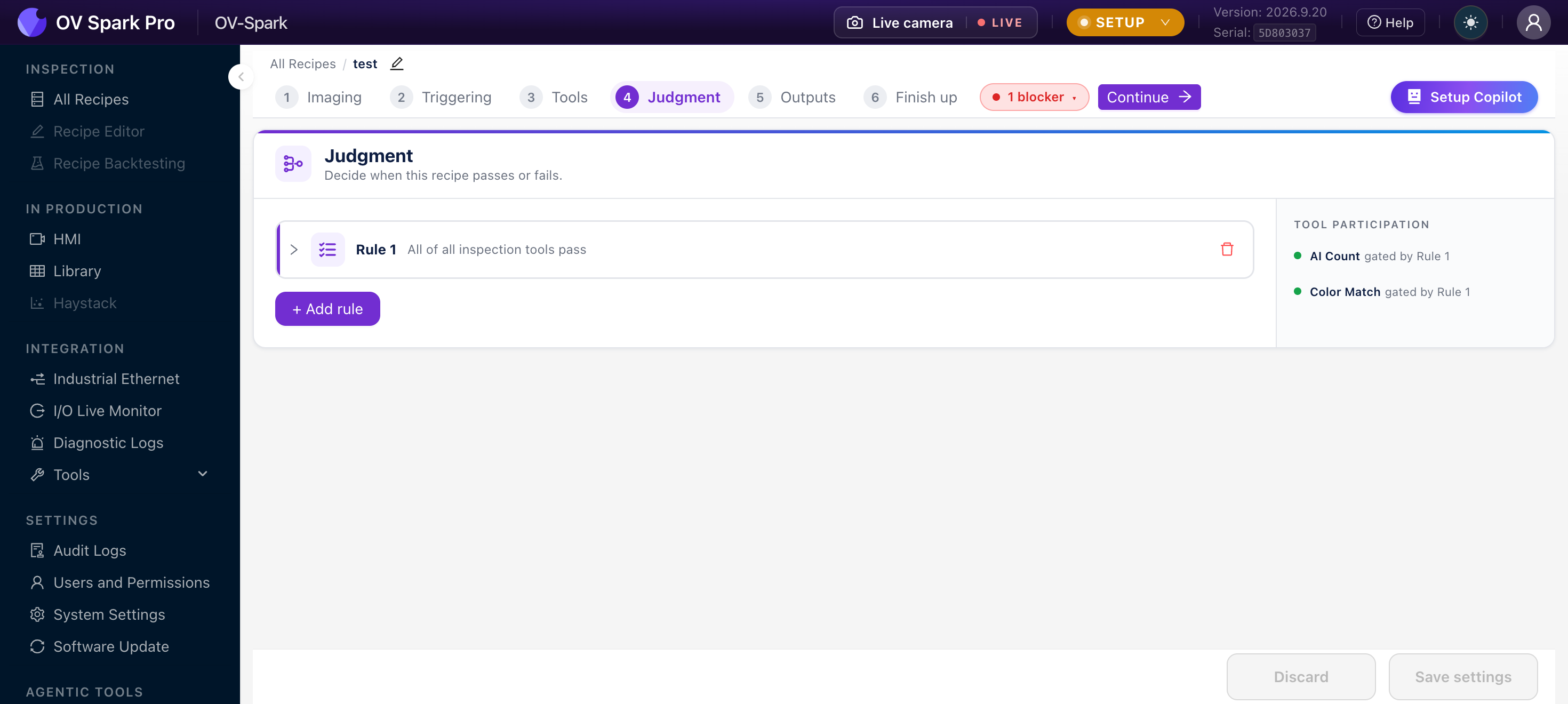
Start from the empty state
A new recipe has no policy, and the camera is blunt about what that means:
This recipe has no judgment policy yet, so it can't be activated. Add at least one rule to decide pass/fail.
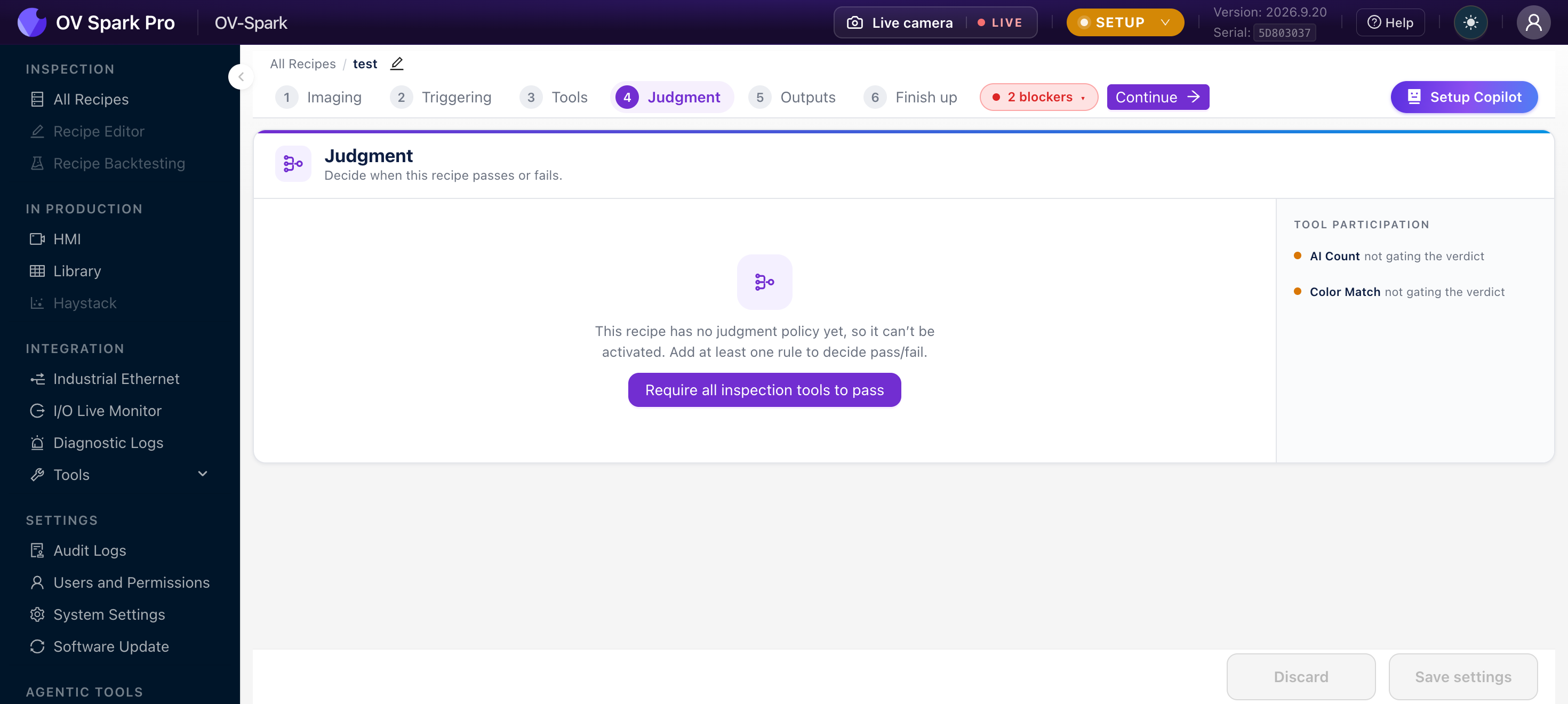
There is one button, and for most recipes it is the right answer:
Require all inspection tools to pass creates a single rule covering every tool, now and in future. Click it, click Save settings, and the recipe is activatable. That is the whole job for a straightforward inspection.
Do not go looking for more configuration because the screen looks too simple. One "all tools must pass" rule is the correct policy for the majority of inspections. Add complexity only when you have a specific reason below.
How a rule reads
Expand a rule and it is a sentence you fill in:
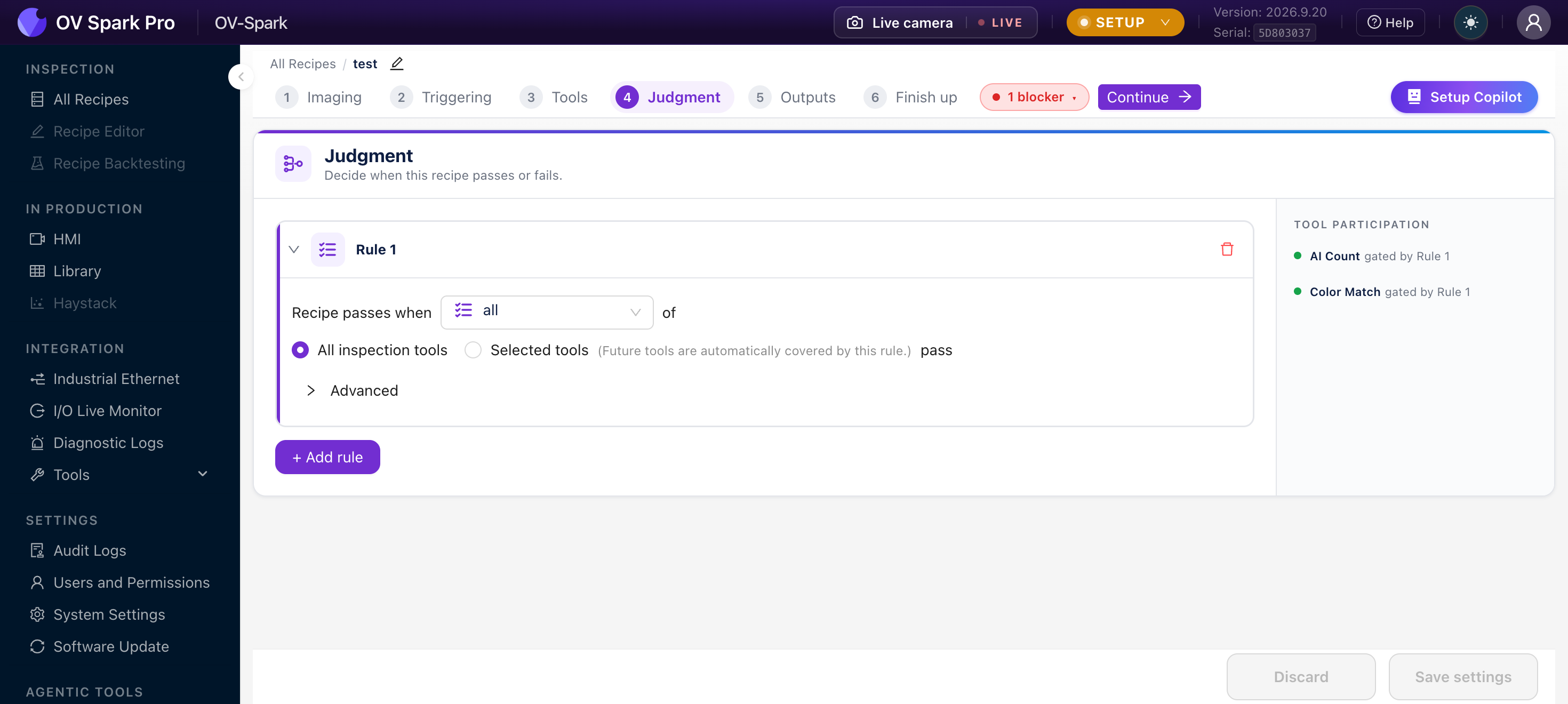
Recipe passes when
[all]of(•) All inspection tools ( ) Selected toolspass
Three decisions: the kind of rule, the scope of tools it covers, and what happens to tools that could not run.
The four rule kinds
| Kind | Reads as | Use it when |
|---|---|---|
| all | All of {scope} pass | The normal choice. Every tool in scope must be good |
| any | Any of {scope} passes | Redundant or alternative checks, where one good read is enough |
| at least | At least N of {scope} pass | N-of-M sampling, such as at least 3 of 4 fasteners detected |
| must run and pass | These tools must run and pass | Safety-critical checks, where "the tool did not run" must itself be a failure |
This is the one conceptual trap in the whole step, and it only bites in production.
If a tool produces no result at all, usually because alignment failed and the tool was skipped:
- An all rule is vacuously true over that tool. The rule passes.
- A must run and pass rule fails.
So a recipe built entirely on all rules can pass a part that was never actually inspected. If a particular check must never be silently skipped, add a second rule of kind must run and pass naming it.
Scope: which tools the rule covers
All inspection tools is the default, and carries a note worth reading:
(Future tools are automatically covered by this rule.)
That is usually what you want. Add a tool on Step 3 next month and it is gated automatically, with nothing to remember.
Selected tools narrows the rule to a list you pick. Use it when one tool should be informational rather than gating.
Once a rule names specific tools, tools added later are not covered by it. That is the trade-off for being able to exclude one tool today.
Two things the picker will not offer you:
- Aligners never appear here. They are governed entirely by the Part detection block further down the page
- Disabled tools still appear, tagged as disabled, so you can see what a rule would cover if re-enabled
Tool participation
The rail on the right answers the question people actually arrive with: I added a tool, why does it not affect the result?
Every tool is listed with either gated by Rule 1 (or several rules) or not gating the verdict.
A tool outside every rule still runs, still records its own pass or fail in the Library, and still reports on its own PLC bit. It simply has no influence on whether the recipe passes.
That is a legitimate configuration for a measurement you want logged but not enforced. It is also a common accident, which is why the camera puts it in front of you.
Multiple rules
You can add as many rules as you like. They combine with AND: every rule must hold for the recipe to pass. Once you have two or more, the camera says so in a banner above the list.
Rules are numbered by position, but order has no effect on the verdict and there is no reorder control. Do not go looking for one.
A worked example, for a recipe with a barcode read, a classifier, and a cosmetic check that is informational only:
| Rule | Kind | Scope | Why |
|---|---|---|---|
| Rule 1 | all | Selected: barcode, classifier | Both real checks must pass |
| Rule 2 | must run and pass | Barcode | A missing barcode read must fail, not be skipped |
The cosmetic tool appears in the rail as not gating the verdict, still logged, still visible in the Library.
Advanced: tools that could not run
Each rule has a collapsed Advanced section with one setting:
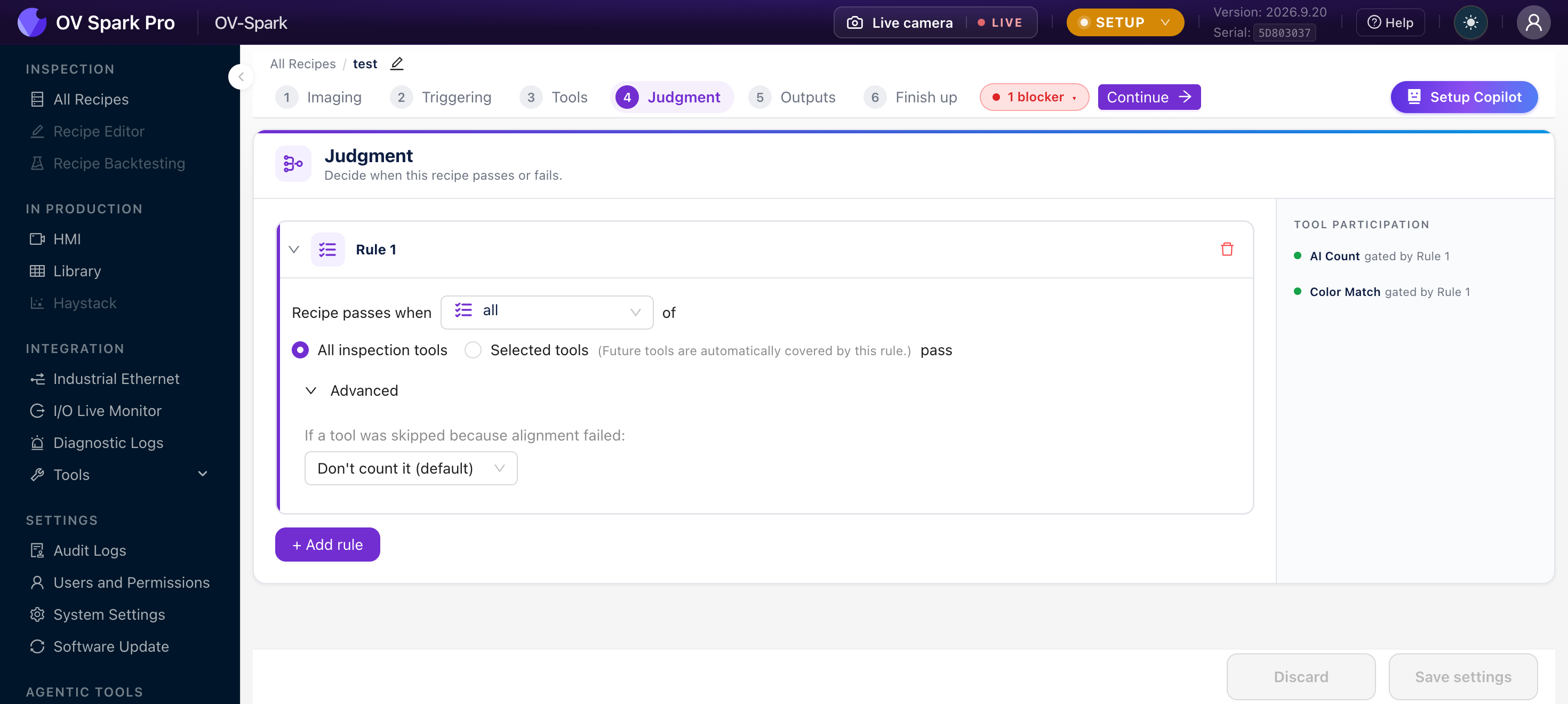
If a tool was skipped because alignment failed:
| Option | Effect |
|---|---|
| Don't count it (default) | The tool is removed from this rule entirely, including from the denominator of an "at least N" rule |
| Count it as fail | The skipped tool contributes a fail |
| Count it as pass | The skipped tool contributes a pass |
The label mentions alignment, but this setting also governs a tool that ran and could not decide, for example a tool that could not find its reference feature. Both land in the same bucket.
This setting does not rescue a must run and pass rule. Under that kind, a tool that did not run fails the gate regardless of what you choose here, which is the entire point of that kind.
Part detection: when the aligner misses
This block appears only if the recipe contains an alignment tool.
When an alignment tool does not find its part, should the inspection fail?
With one aligner you get two options:
| Option | Behaviour |
|---|---|
| Never (default) | Tools behind the aligner are skipped, and the inspection is decided by whatever did run. If nothing could run, the capture counts as neither pass nor fail |
| Always | The alignment tool must find its part, or the inspection fails |
With two or more aligners, the second option splits:
| Option | Behaviour |
|---|---|
| Only when no part is found at all | One aligner finding its part is enough to inspect |
| When any of these alignment tools misses its part | Tick the aligners that are load-bearing. A miss on any ticked one fails |
Choosing anything other than Never adds a read-only card to the rule list labelled Part must be found. You change it from the radio buttons, not from the card.
This trips people up. With Never, a miss does not fail the inspection by itself, but the capture still passes or fails on the tools that did run.
Separately, if a recipe has inspection tools and every one was skipped, the capture is recorded as a fail and bucketed under Not Inspected, which is kept out of your yield figure.
The distinction matters commercially: with Never, an empty fixture lands in Not Inspected and does not dent yield. With Only when no part is found at all, the same frame is an ordinary fail that counts against yield.
Warnings the camera will show you
These do not block saving, and all three are worth acting on.
Every tool in this rule is disabled, so the rule is skipped. The most dangerous state on the page: the rule reads like a gate and gates nothing. The camera skips it entirely and it passes vacuously.
A named tool is disabled. Under a must run and pass rule that will fail; under all or any it is ignored.
Only N matching tools, so this rule can never pass today. An "at least N" rule where N exceeds the number of tools in scope. It is a warning rather than an error because an all-tools scope may gain tools later.
Errors that block saving
| Message | Cause |
|---|---|
| Select at least one tool | "Selected tools" chosen with nothing picked |
| Select at least one tool that must run and pass | A must-run-and-pass rule with an empty list |
| References a tool that no longer exists | A tool in the rule was deleted from Step 3 |
| Must be at least 1 | An "at least N" rule with N below 1 |
| Select at least one alignment tool | The last aligner was unticked in Part detection |
Things that will surprise you later
Delete a tool on Step 3 and the camera removes it from every rule that named it. If that empties a rule's explicit scope, the whole rule is dropped, because an empty scope would otherwise silently mean "all tools".
A rule can therefore vanish from this page after a change you made on a different page. Re-check Judgment after deleting any tool.
Judgment saves only when you press Save settings. Leaving with unsaved edits prompts you first. Discard is immediate and is not confirmed.
A rule written by newer firmware than the interface renders read-only, with a note saying it cannot be edited here. Saving from this screen preserves it rather than dropping it.