AI-POWERED DOCS
What do you want to know?
Recipe Script
A recipe script is a short piece of JavaScript that runs after the tools on every inspection of one recipe. It can:
- decide pass or fail with your own logic, and say why
- write your own bytes for the PLC's User Results
- save metadata and tags with the capture, so you can find it in the Library
Each recipe has at most one script, and it is exported with the recipe.
Open the editor
On the recipe's Judgment step, scroll to Recipe script and click Open script editor.
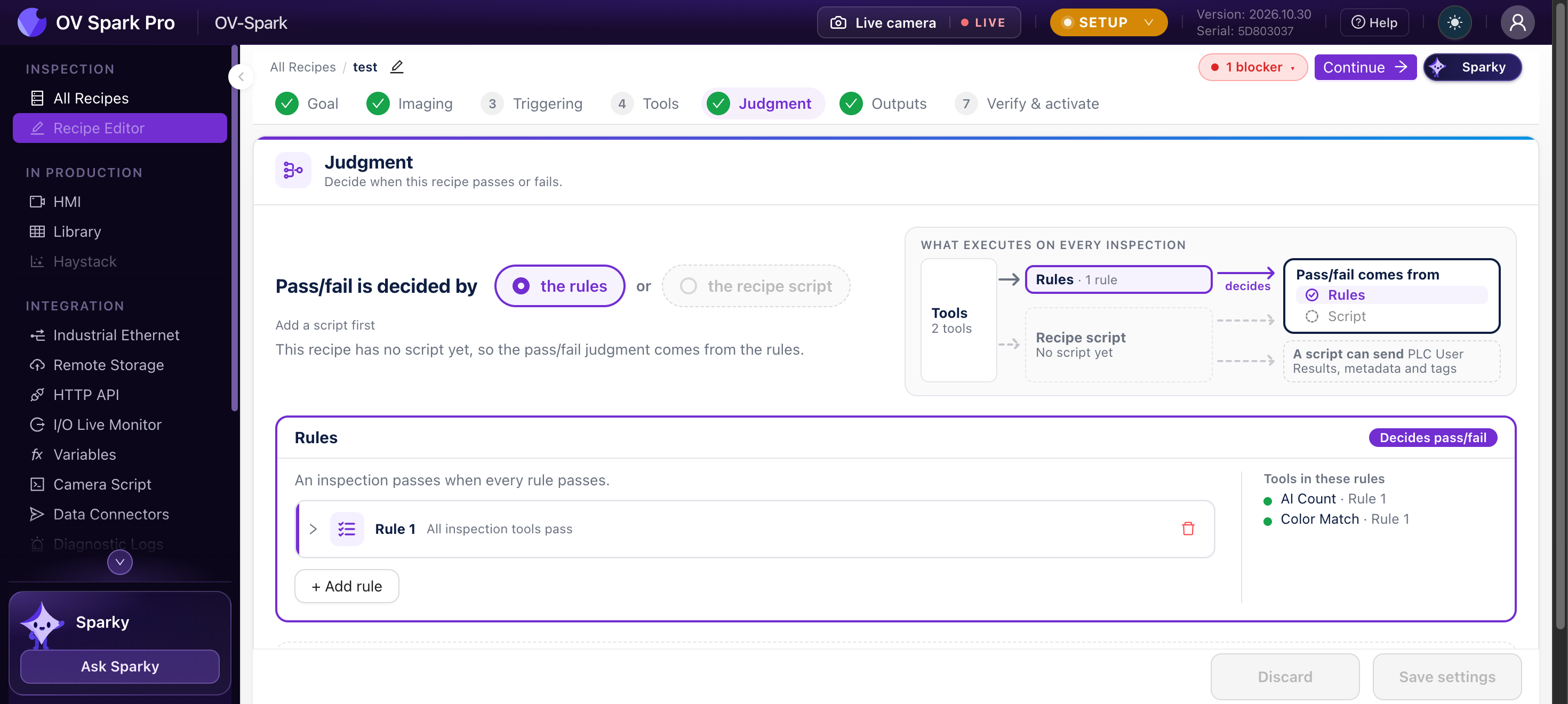
At the top of the Judgment step you choose what decides the verdict: the rules or the recipe script. The rules always run, and the script sees their verdict. If you leave the setting on the rules, the script cannot change pass or fail, but its reason, metadata, tags and PLC bytes still apply. That is a safe way to start: add a script for the reason and the bytes, and keep the rules in charge.
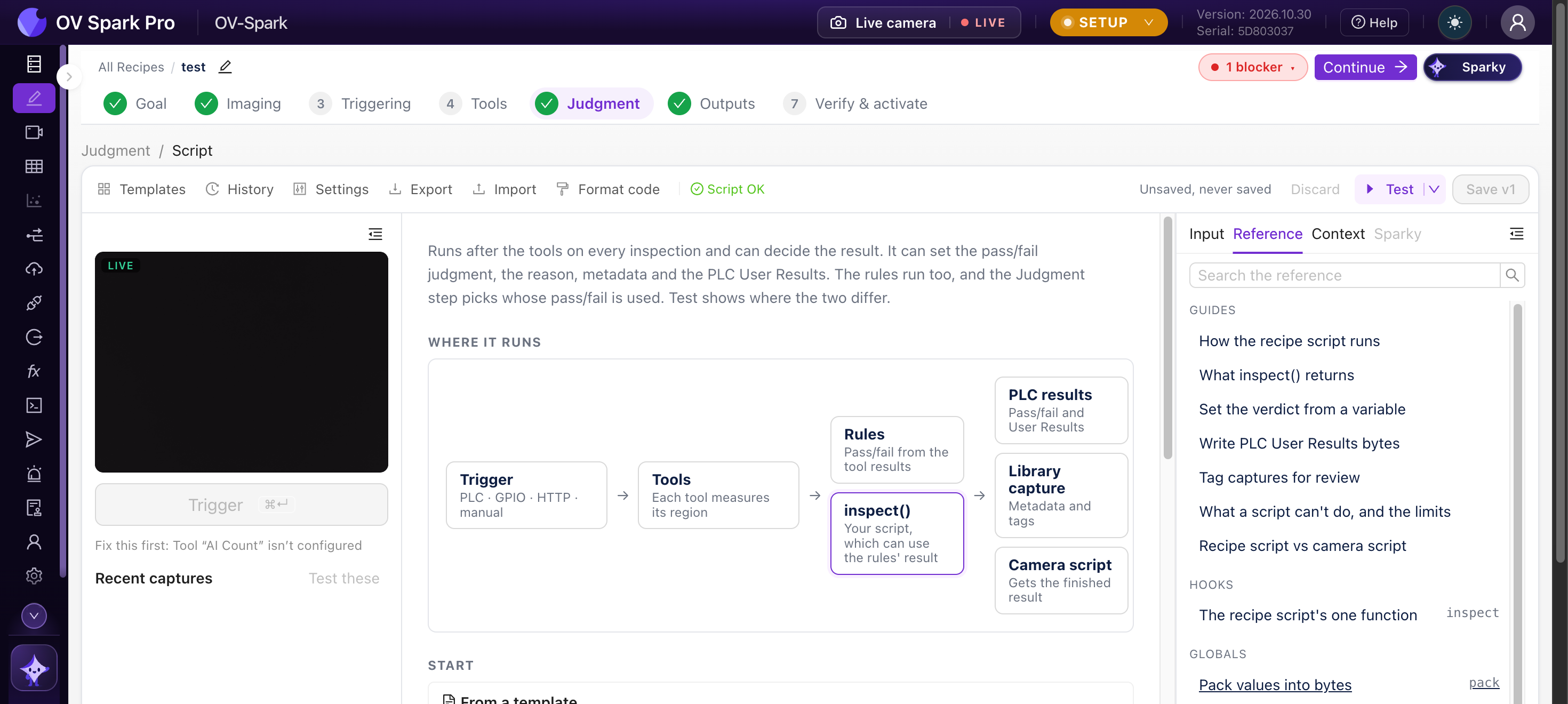
How it runs
Trigger → Capture and tools → Pass/fail rules → inspect(input) → Verdict, PLC User Results, Library, MQTT
The script exports one function, inspect(input). The camera calls it on every inspection of the recipe, after the tools and the rules. The line waits for it, so it must be synchronous and quick: it has 25 ms by default, up to 200 ms in the script's Settings, and its time adds to the cycle time.
input holds everything so far. It is read-only:
| Field | What it is |
|---|---|
tools | Each tool's result, in the order the tools ran |
tools_by_name | The same results by tool name |
rules | The rules' verdict: judgment, pass, not_inspected |
vars | Your variables by name. A variable with no value is null |
vars_info | For each variable: received_at, age_ms and source |
recipe | id, uuid and name |
trigger | id, source (for example plc, gpio, http, manual) and metadata |
Each tool result has name, type, judgment, pass, score, plc_slot, execute_ms, error, skipped_by, and a detail object whose shape depends on the tool. Check type before you read detail, for example ai_fast_classifier (with detail.regions), ai_ocr (with detail.fields), ai_counting (with detail.count) or classical.barcode (with detail.data).
What it returns
Every field is optional. A field you leave out keeps the camera's normal behaviour, so a script can set only the reason and leave the verdict to the rules. Return nothing to change nothing.
| Field | Meaning | Limit |
|---|---|---|
judgment | "pass", "fail" or "not_inspected" (true, false and null mean the same). Used only when the Judgment step is set to the recipe script | |
reason | Text shown in the Library and sent in result messages (MQTT, HTTP API, camera script) | 64 characters |
plc_user_results | Bytes for the PLC's User Results, usually built with pack() | The configured User Results size |
metadata | Key-value pairs saved with the capture and shown in its Library details. Keys are letters, digits and underscores, starting with a letter; values are text, numbers or true/false | 32 keys, text values up to 256 characters |
tags | Labels shown as chips in the Library, where you can filter by them | 16 tags, 32 characters each |
export function inspect({ tools_by_name, vars }) {
  const ocr = tools_by_name["Serial"];
  if (ocr?.type !== "ai_ocr" || !ocr.detail) {
    return { judgment: false, reason: "no OCR result" };
  }
  const expected = vars["serial"];
  if (typeof expected !== "string") {
    return { judgment: null, reason: "serial not received" };
  }
  const read = ocr.detail.fields.map((f) => f.text_judged).join("");
  const match = read === expected;
  return { judgment: match, reason: match ? "serial matches" : "serial differs" };
}
Try it
Recipe script playground
Change the part, edit the script, press Run. The script gets the same input the camera passes to inspect(), and runs under the same rules.
An AI Classification tool with 10 regions, one per pin. Click a pin to flip it.
Show the input object
{
  "recipe": {
    "id": 3,
    "uuid": "01a15a44-9a3c-72bb-ab4f-5481cce20093",
    "name": "Sample recipe"
  },
  "trigger": {
    "id": 4182,
    "source": "plc",
    "metadata": {}
  },
  "rules": {
    "judgment": "fail",
    "pass": false,
    "not_inspected": false
  },
  "vars": {},
  "vars_info": {},
  "tools": [
    {
      "type": "ai_fast_classifier",
      "id": "01a1-pins",
      "name": "Pins",
      "plc_slot": 1,
      "judgment": "fail",
      "pass": false,
      "score": 0.9,
      "execute_ms": 6,
      "error": "none",
      "skipped_by": "",
      "detail": {
        "regions": [
          {
            "label": "Pin 1",
            "class_label": "seated",
            "confidence": 0.97,
            "verdict": "pass",
            "threshold": 0.5,
            "pass": true
          },
          {
            "label": "Pin 2",
            "class_label": "seated",
            "confidence": 0.93,
            "verdict": "pass",
            "threshold": 0.5,
            "pass": true
          },
          {
            "label": "Pin 3",
            "class_label": "seated",
            "confidence": 0.95,
            "verdict": "pass",
            "threshold": 0.5,
            "pass": true
          },
          {
            "label": "Pin 4",
            "class_label": "bent",
            "confidence": 0.81,
            "verdict": "fail",
            "threshold": 0.5,
            "pass": false
          },
          {
            "label": "Pin 5",
            "class_label": "seated",
            "confidence": 0.91,
            "verdict": "pass",
            "threshold": 0.5,
            "pass": true
          },
          {
            "label": "Pin 6",
            "class_label": "seated",
            "confidence": 0.96,
            "verdict": "pass",
            "threshold": 0.5,
            "pass": true
          },
          {
            "label": "Pin 7",
            "class_label": "seated",
            "confidence": 0.94,
            "verdict": "pass",
            "threshold": 0.5,
            "pass": true
          },
          {
            "label": "Pin 8",
            "class_label": "seated",
            "confidence": 0.89,
            "verdict": "pass",
            "threshold": 0.5,
            "pass": true
          },
          {
            "label": "Pin 9",
            "class_label": "seated",
            "confidence": 0.98,
            "verdict": "pass",
            "threshold": 0.5,
            "pass": true
          },
          {
            "label": "Pin 10",
            "class_label": "seated",
            "confidence": 0.92,
            "verdict": "pass",
            "threshold": 0.5,
            "pass": true
          }
        ],
        "overall": "fail"
      }
    }
  ],
  "tools_by_name": {
    "Pins": {
      "type": "ai_fast_classifier",
      "id": "01a1-pins",
      "name": "Pins",
      "plc_slot": 1,
      "judgment": "fail",
      "pass": false,
      "score": 0.9,
      "execute_ms": 6,
      "error": "none",
      "skipped_by": "",
      "detail": {
        "regions": [
          {
            "label": "Pin 1",
            "class_label": "seated",
            "confidence": 0.97,
            "verdict": "pass",
            "threshold": 0.5,
            "pass": true
          },
          {
            "label": "Pin 2",
            "class_label": "seated",
            "confidence": 0.93,
            "verdict": "pass",
            "threshold": 0.5,
            "pass": true
          },
          {
            "label": "Pin 3",
            "class_label": "seated",
            "confidence": 0.95,
            "verdict": "pass",
            "threshold": 0.5,
            "pass": true
          },
          {
            "label": "Pin 4",
            "class_label": "bent",
            "confidence": 0.81,
            "verdict": "fail",
            "threshold": 0.5,
            "pass": false
          },
          {
            "label": "Pin 5",
            "class_label": "seated",
            "confidence": 0.91,
            "verdict": "pass",
            "threshold": 0.5,
            "pass": true
          },
          {
            "label": "Pin 6",
            "class_label": "seated",
            "confidence": 0.96,
            "verdict": "pass",
            "threshold": 0.5,
            "pass": true
          },
          {
            "label": "Pin 7",
            "class_label": "seated",
            "confidence": 0.94,
            "verdict": "pass",
            "threshold": 0.5,
            "pass": true
          },
          {
            "label": "Pin 8",
            "class_label": "seated",
            "confidence": 0.89,
            "verdict": "pass",
            "threshold": 0.5,
            "pass": true
          },
          {
            "label": "Pin 9",
            "class_label": "seated",
            "confidence": 0.98,
            "verdict": "pass",
            "threshold": 0.5,
            "pass": true
          },
          {
            "label": "Pin 10",
            "class_label": "seated",
            "confidence": 0.92,
            "verdict": "pass",
            "threshold": 0.5,
            "pass": true
          }
        ],
        "overall": "fail"
      }
    }
  }
}Press Run to see what this inspection would end up with.
A simulation in your browser. On the camera, use Test in the script editor to run the draft on real captures before you save.
Write bytes for the PLC
Return plc_user_results, built with pack(layout, values). The PLC reads it with the result, before the Inspection Completed edge.
Describe the bytes once as a layout: an ordered list of { name, type } fields.
| Type | Bytes |
|---|---|
u8, i8, bool | 1 |
u16le, u16be, i16le, i16be | 2 |
u32le, u32be, i32le, i32be, f32le, f32be | 4 |
u64le, u64be, i64le, i64be, f64le, f64be | 8 |
bits with count | One bit per value, the first value in the lowest bit |
ascii or utf8 with length | Text, padded or (with truncate: true) cut to length |
bytes with length | Raw bytes |
pad with length | Zero bytes, to skip a gap |
const OUT = [
  { name: "regionOk", type: "bits", count: 80 },
  { name: "count", type: "u16le" },
];

export function inspect({ tools_by_name }) {
  const classifier = tools_by_name["Classifier"];
  if (classifier?.type !== "ai_fast_classifier" || !classifier.detail) return;
  const regionOk = classifier.detail.regions.map((r) => r.pass).slice(0, 80);
  return { plc_user_results: pack(OUT, { regionOk, count: regionOk.length }) };
}
Each multi-byte type names its own byte order, and the camera never swaps bytes for you. Use the le types on EtherNet/IP and the be types on PROFINET. The script check warns when a type does not match the camera's fieldbus.
- Byte 0 lands at input assembly byte 288 on EtherNet/IP, and at byte 0 of the User Results module on PROFINET. The rest of the region is zeroed
packthrows aRangeErrorwhen a value does not fit its field. Test with a failing part before you saveunpack(layout, bytes)reads bytes back, andcrc(bytes, "crc16-modbus" | "crc32")computes a checksum
When something goes wrong
If inspect throws, runs out of time, runs out of memory (8 MiB), or returns something the camera cannot accept (such as a reason over 64 characters or judgment: "PASS"):
- the part is Not inspected
- the PLC User Results are zeroed
- nothing it returned (reason, metadata, tags) is used
- the error is saved with the capture, so you can see it in the Library
Values kept at module level last only until the recipe reloads, for example after a save. Do not count parts or keep history in a recipe script. Use the camera script, which keeps state between events.
What a recipe script can't do
- No network, no timers and no waiting: there is no
fetch,setTimeout,importoreval, andinspectcannot beasync - It cannot see the image itself, only the tools' results
- It reads the outside world only through
inputand variables
Templates
The Templates gallery has 14 working scripts, grouped by job. Pick one, fill in the tool or variable it uses, and Insert template.
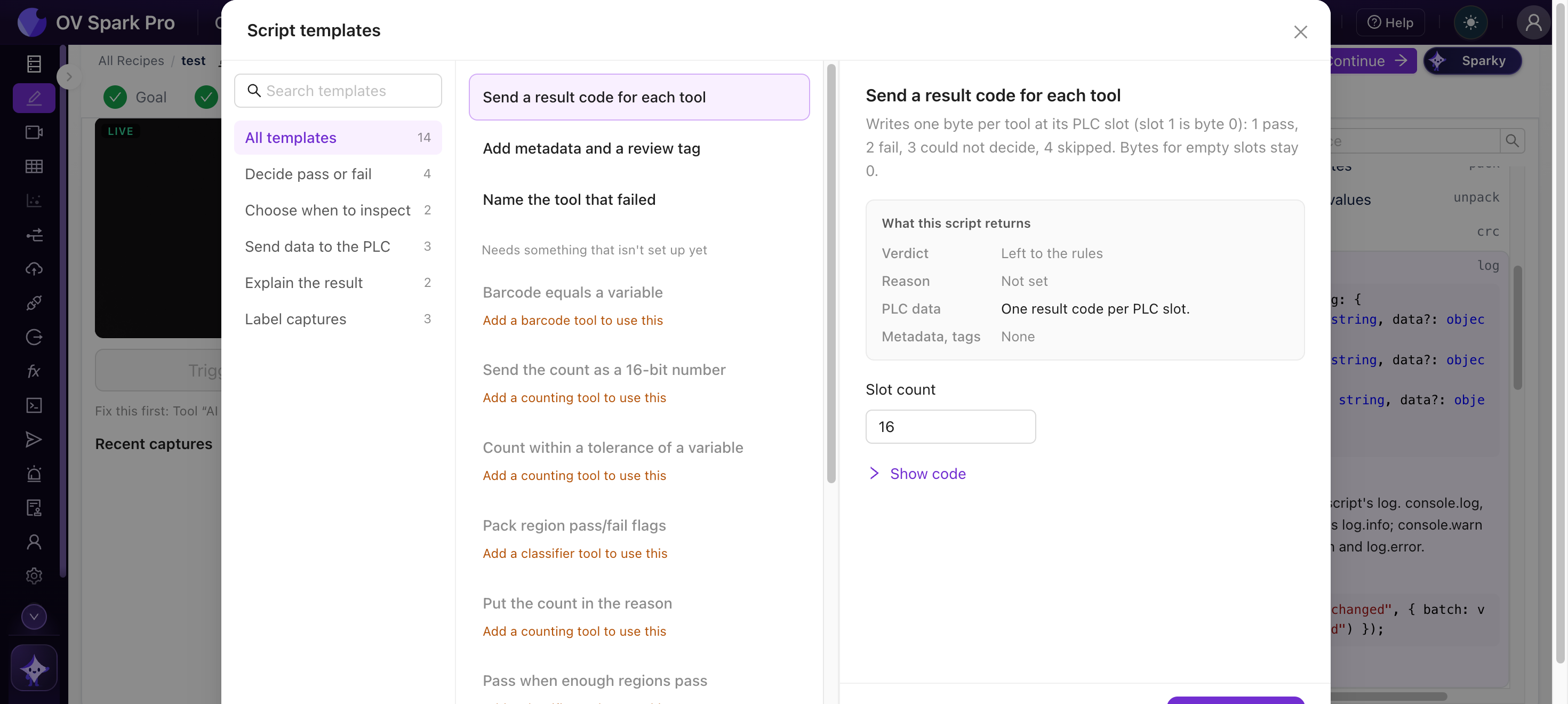
| Group | Templates |
|---|---|
| Decide pass or fail | Pass when enough regions pass · Serial number matches the OCR text · Barcode equals a variable · Count within a tolerance of a variable |
| Choose when to inspect | Skip other part types · Skip when a variable is missing or out of date |
| Send data to the PLC | Send the count as a 16-bit number · Pack region pass/fail flags · Send a result code for each tool |
| Explain the result | Name the tool that failed · Put the count in the reason |
| Label captures | Add metadata and a review tag · Tag near-misses for review · Save a variable with every capture |
Test and History
- Test runs the draft on a live Trigger, or on stored captures: the latest, the last N (up to 500), a Library filter, or capture numbers. It shows where the draft's verdict differs from the verdict each capture recorded, so you see what it would have decided before it goes live
- History keeps your last 20 saved versions
Write the script with the Judgment step still on the rules, and use Test on stored captures to compare its verdict with what was recorded. Switch to the recipe script only when they disagree where you want them to.
Where to go next
- Camera script, for anything that needs the network or memory across parts
- Variables
- Step 5: Judgment
- PLC Handshakes, for when the PLC reads User Results