AI 驱动文档
您想了解什么?
程序脚本
程序脚本是一小段 JavaScript 代码,在某个程序每次检测的所有工具运行之后执行。它可以:
- 使用您自己的逻辑判定通过或失败,并说明原因
- 写入您自己的字节到 PLC 的 User Results
- 将元数据和标签与捕获一同保存,以便您可以在库中查找
每个程序最多有一个脚本,并且该脚本会随程序一起导出。
打开编辑器
在程序的 判定 步骤中,滚动到 程序脚本,然后单击 打开脚本编辑器。
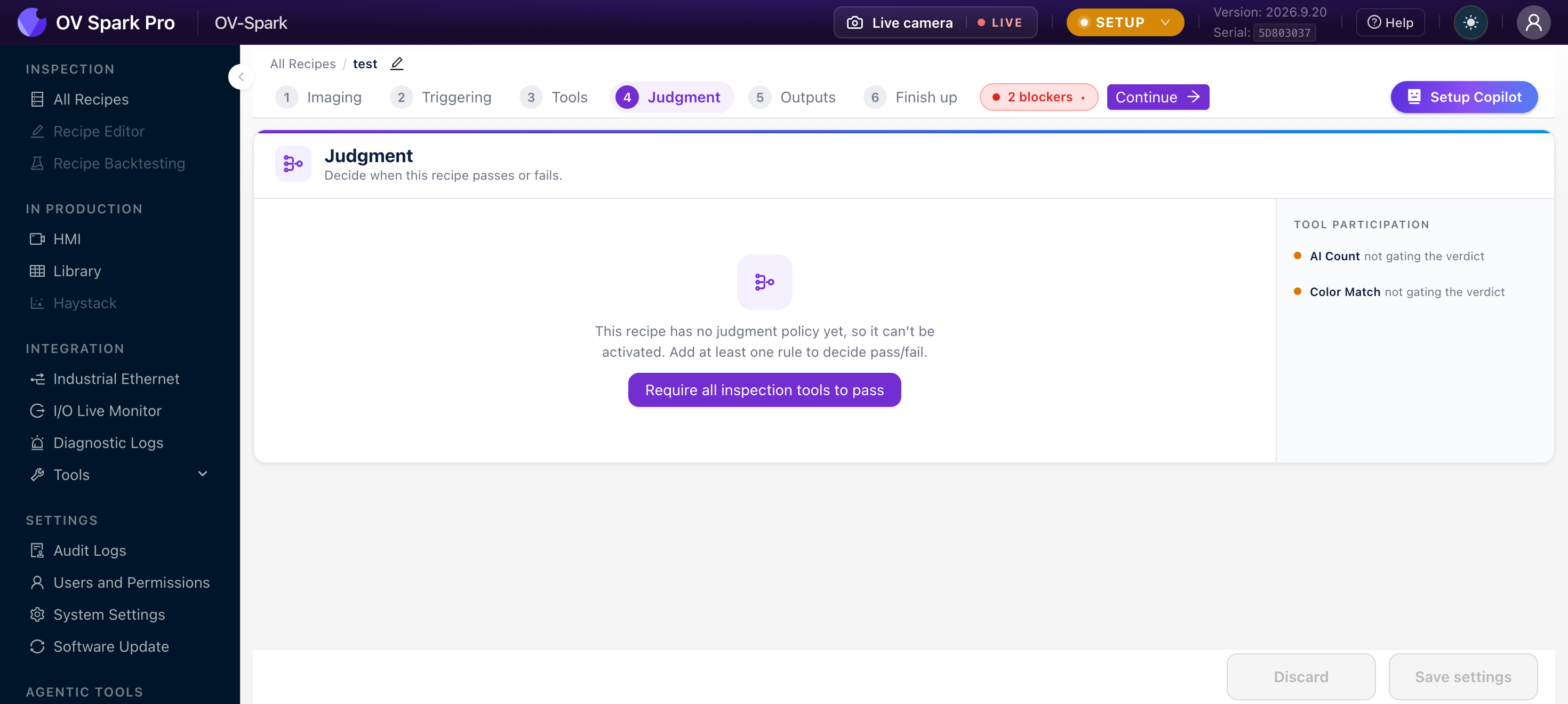
在判定步骤的顶部,您可以选择由谁决定判定结果:规则或程序脚本。规则始终运行,脚本可以看到它们的判定结果。如果您将设置保留为规则,则脚本无法更改通过或失败,但其原因、元数据、标签和 PLC 字节仍然适用。这是一种安全的入门方式:添加脚本用于设置原因和字节,并让规则主导判定。
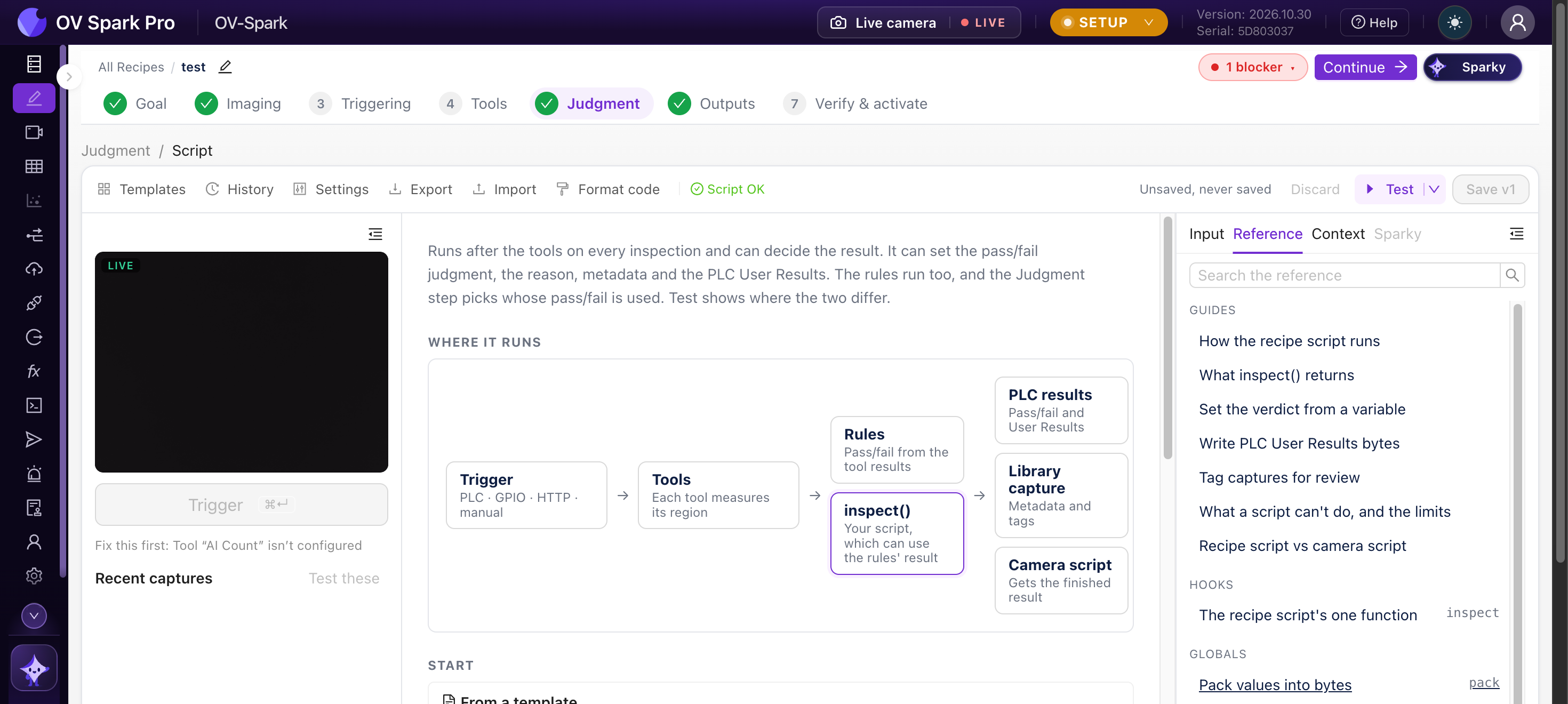
运行方式
Trigger → Capture and tools → Pass/fail rules → inspect(input) → Verdict, PLC User Results, Library, MQTT
脚本导出一个函数 inspect(input)。相机在该程序的每次检测中,在工具和规则之后调用它。产线会等待它完成,因此它必须同步且快速:默认有 25 毫秒,在脚本的设置中最多可达 200 毫秒,其耗时会计入节拍时间。
input 包含到目前为止的所有信息。它是只读的:
| 字段 | 含义 |
|---|---|
tools | 每个工具的结果,按工具运行的顺序排列 |
tools_by_name | 按工具名称索引的相同结果 |
rules | 规则的判定结果:judgment、pass、not_inspected |
vars | 按名称索引的变量。没有值的变量为 null |
vars_info | 每个变量的信息:received_at、age_ms 和 source |
recipe | id、uuid 和 name |
trigger | id、source(例如 plc、gpio、http、manual)和 metadata |
每个工具结果都有 name、type、judgment、pass、score、plc_slot、execute_ms、error、skipped_by,以及一个 detail 对象,其结构取决于具体的工具。在读取 detail 之前先检查 type,例如 ai_fast_classifier(带有 detail.regions)、ai_ocr(带有 detail.fields)、ai_counting(带有 detail.count)或 classical.barcode(带有 detail.data)。
返回值
每个字段都是可选的。省略的字段会保持相机的正常行为,因此脚本可以仅设置原因并将判定留给规则。不返回任何内容则不更改任何内容。
| 字段 | 含义 | 限制 |
|---|---|---|
judgment | "pass"、"fail" 或 "not_inspected"(true、false 和 null 含义相同)。仅在判定步骤设置为程序脚本时使用 | |
reason | 显示在库中并在结果消息(MQTT、HTTP API、相机脚本)中发送的文本 | 64 个字符 |
plc_user_results | 发送到 PLC 的 User Results 的字节,通常使用 pack() 构建 | 已配置的 User Results 大小 |
metadata | 与捕获一同保存并显示在其库详情中的键值对。键由字母、数字和下划线组成,以字母开头;值为文本、数字或 true/false | 32 个键,文本值最多 256 个字符 |
tags | 在库中显示为标签芯片的标签,可用于筛选 | 16 个标签,每个 32 个字符 |
export function inspect({ tools_by_name, vars }) {

  const ocr = tools_by_name["Serial"];
  if (ocr?.type !== "ai_ocr" || !ocr.detail) {
    return { judgment: false, reason: "no OCR result" };
  }
  const expected = vars["serial"];
  if (typeof expected !== "string") {
    return { judgment: null, reason: "serial not received" };
  }
  const read = ocr.detail.fields.map((f) => f.text_judged).join("");
  const match = read === expected;
  return { judgment: match, reason: match ? "serial matches" : "serial differs" };
}
试一试
程序脚本调试台
更换部件、编辑脚本,然后按运行。脚本接收与相机传给 inspect() 相同的输入,并在相同的规则下运行。
一个具有 10 个区域的 AI 分类工具,每个引脚一个。点击引脚可翻转其状态。
显示输入对象
{
  "recipe": {
    "id": 3,
    "uuid": "01a15a44-9a3c-72bb-ab4f-5481cce20093",
    "name": "Sample recipe"
  },
  "trigger": {
    "id": 4182,
    "source": "plc",
    "metadata": {}
  },
  "rules": {
    "judgment": "fail",
    "pass": false,
    "not_inspected": false
  },
  "vars": {},
  "vars_info": {},
  "tools": [
    {
      "type": "ai_fast_classifier",
      "id": "01a1-pins",
      "name": "Pins",
      "plc_slot": 1,
      "judgment": "fail",
      "pass": false,
      "score": 0.9,
      "execute_ms": 6,
      "error": "none",
      "skipped_by": "",
      "detail": {
        "regions": [
          {
            "label": "Pin 1",
            "class_label": "seated",
            "confidence": 0.97,
            "verdict": "pass",
            "threshold": 0.5,
            "pass": true
          },
          {
            "label": "Pin 2",
            "class_label": "seated",
            "confidence": 0.93,
            "verdict": "pass",
            "threshold": 0.5,
            "pass": true
          },
          {
            "label": "Pin 3",
            "class_label": "seated",
            "confidence": 0.95,
            "verdict": "pass",
            "threshold": 0.5,
            "pass": true
          },
          {
            "label": "Pin 4",
            "class_label": "bent",
            "confidence": 0.81,
            "verdict": "fail",
            "threshold": 0.5,
            "pass": false
          },
          {
            "label": "Pin 5",
            "class_label": "seated",
            "confidence": 0.91,
            "verdict": "pass",
            "threshold": 0.5,
            "pass": true
          },
          {
            "label": "Pin 6",
            "class_label": "seated",
            "confidence": 0.96,
            "verdict": "pass",
            "threshold": 0.5,
            "pass": true
          },
          {
            "label": "Pin 7",
            "class_label": "seated",
            "confidence": 0.94,
            "verdict": "pass",
            "threshold": 0.5,
            "pass": true
          },
          {
            "label": "Pin 8",
            "class_label": "seated",
            "confidence": 0.89,
            "verdict": "pass",
            "threshold": 0.5,
            "pass": true
          },
          {
            "label": "Pin 9",
            "class_label": "seated",
            "confidence": 0.98,
            "verdict": "pass",
            "threshold": 0.5,
            "pass": true
          },
          {
            "label": "Pin 10",
            "class_label": "seated",
            "confidence": 0.92,
            "verdict": "pass",
            "threshold": 0.5,
            "pass": true
          }
        ],
        "overall": "fail"
      }
    }
  ],
  "tools_by_name": {
    "Pins": {
      "type": "ai_fast_classifier",
      "id": "01a1-pins",
      "name": "Pins",
      "plc_slot": 1,
      "judgment": "fail",
      "pass": false,
      "score": 0.9,
      "execute_ms": 6,
      "error": "none",
      "skipped_by": "",
      "detail": {
        "regions": [
          {
            "label": "Pin 1",
            "class_label": "seated",
            "confidence": 0.97,
            "verdict": "pass",
            "threshold": 0.5,
            "pass": true
          },
          {
            "label": "Pin 2",
            "class_label": "seated",
            "confidence": 0.93,
            "verdict": "pass",
            "threshold": 0.5,
            "pass": true
          },
          {
            "label": "Pin 3",
            "class_label": "seated",
            "confidence": 0.95,
            "verdict": "pass",
            "threshold": 0.5,
            "pass": true
          },
          {
            "label": "Pin 4",
            "class_label": "bent",
            "confidence": 0.81,
            "verdict": "fail",
            "threshold": 0.5,
            "pass": false
          },
          {
            "label": "Pin 5",
            "class_label": "seated",
            "confidence": 0.91,
            "verdict": "pass",
            "threshold": 0.5,
            "pass": true
          },
          {
            "label": "Pin 6",
            "class_label": "seated",
            "confidence": 0.96,
            "verdict": "pass",
            "threshold": 0.5,
            "pass": true
          },
          {
            "label": "Pin 7",
            "class_label": "seated",
            "confidence": 0.94,
            "verdict": "pass",
            "threshold": 0.5,
            "pass": true
          },
          {
            "label": "Pin 8",
            "class_label": "seated",
            "confidence": 0.89,
            "verdict": "pass",
            "threshold": 0.5,
            "pass": true
          },
          {
            "label": "Pin 9",
            "class_label": "seated",
            "confidence": 0.98,
            "verdict": "pass",
            "threshold": 0.5,
            "pass": true
          },
          {
            "label": "Pin 10",
            "class_label": "seated",
            "confidence": 0.92,
            "verdict": "pass",
            "threshold": 0.5,
            "pass": true
          }
        ],
        "overall": "fail"
      }
    }
  }
}按运行以查看此检测最终的结果。
浏览器中的模拟。在相机上,保存之前请使用脚本编辑器中的 Test 对实际捕获的图像运行草稿。
为 PLC 写入字节
返回 plc_user_results,使用 pack(layout, values) 构建。PLC 会在 Inspection Completed 边沿之前随结果一起读取它。
将字节结构一次性描述为布局(layout):一个由 { name, type } 字段组成的有序列表。
| 类型 | 字节数 |
|---|---|
u8、i8、bool | 1 |
u16le、u16be、i16le、i16be | 2 |
u32le、u32be、i32le、i32be、f32le、f32be | 4 |
u64le、u64be、i64le、i64be、f64le、f64be | 8 |
带 count 的 bits | 每个值占一位,第一个值位于最低位 |
带 length 的 ascii 或 utf8 | 文本,按长度填充或(当 truncate: true 时)截断 |
带 length 的 bytes | 原始字节 |
带 length 的 pad | 零字节,用于跳过间隙 |
const OUT = [
  { name: "regionOk", type: "bits", count: 80 },
  { name: "count", type: "u16le" },
];

export function inspect({ tools_by_name }) {

  const classifier = tools_by_name["Classifier"];
  if (classifier?.type !== "ai_fast_classifier" || !classifier.detail) return;
  const regionOk = classifier.detail.regions.map((r) => r.pass).slice(0, 80);
  return { plc_user_results: pack(OUT, { regionOk, count: regionOk.length }) };
}
每种多字节类型都指定了自己的字节序,相机不会自动为您交换字节。在 EtherNet/IP 上使用 le 类型,在 PROFINET 上使用 be 类型。当类型与相机的现场总线不匹配时,脚本检查会发出警告。
- 字节 0 在 EtherNet/IP 上位于输入组件的第 288 字节,在 PROFINET 上位于 User Results 模块的第 0 字节。该区域的其余部分会被清零
- 当某个值无法容纳到其字段中时,
pack会抛出RangeError。请在保存前用一个失败件进行测试 unpack(layout, bytes)可将字节重新读回,crc(bytes, "crc16-modbus" | "crc32")可计算校验和
出现问题时
如果 inspect 抛出异常、超时、超出内存(8 MiB),或返回了相机无法接受的内容(例如原因超过 64 个字符或 judgment: "PASS"):
- 该部件会被标记为 Not inspected(未检测)
- PLC User Results 被清零
- 它返回的任何内容(原因、元数据、标签)都不会被使用
- 错误会与捕获一起保存,您可以在库中查看
模块级保留的值仅在程序重新加载前有效,例如保存之后。不要在程序脚本中计数部件或保留历史记录。请使用相机脚本,它会在事件之间保持状态。
程序脚本不能做什么
- 没有网络、没有计时器、也不能等待:没有
fetch、setTimeout、import或eval,并且inspect不能为async - 它看不到图像本身,只能看到各工具的结果
- 它只能通过
input和变量读取外部信息
模板
Templates 库包含 14 个可用脚本,按任务分组。选择一个,填入它使用的工具或变量,然后点击 Insert template。
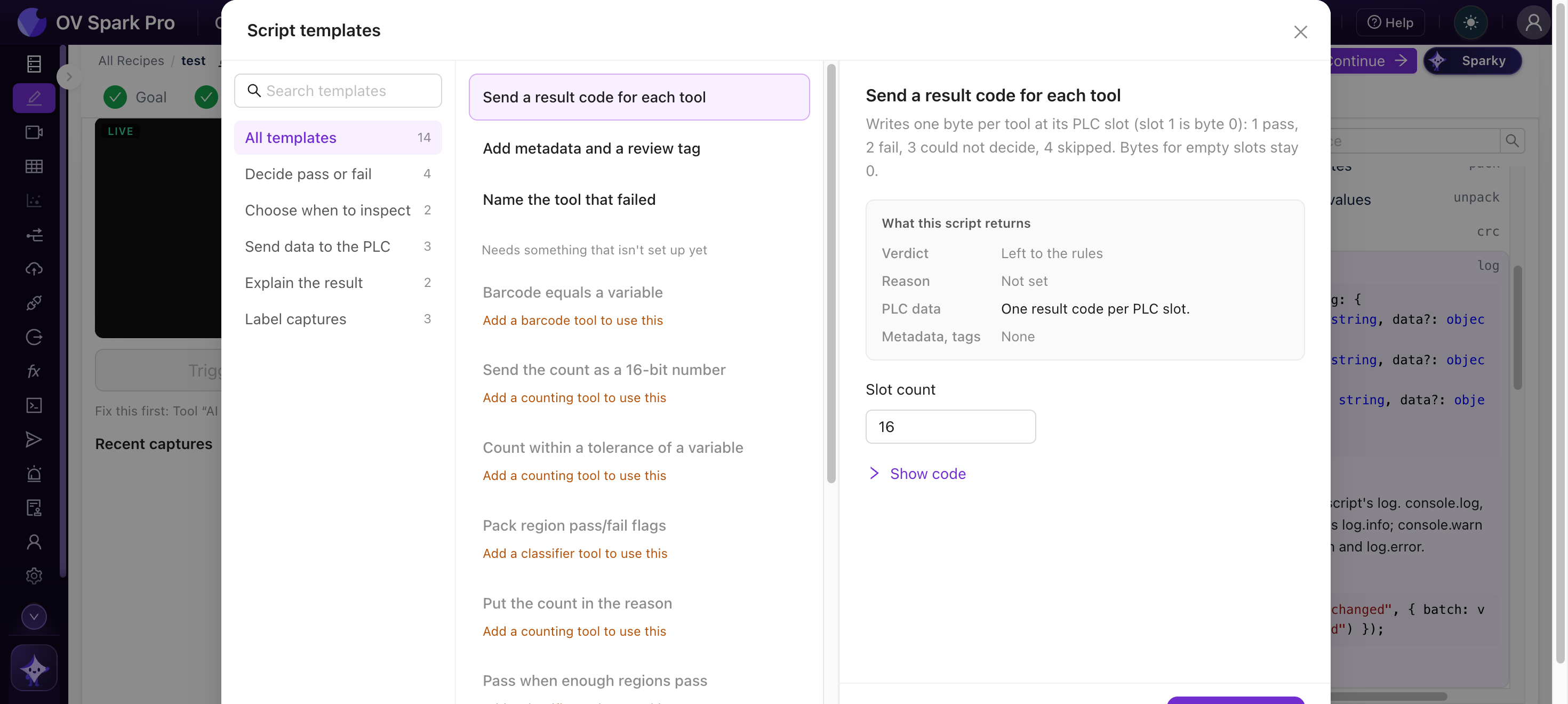
| 分组 | 模板 |
|---|---|
| 判定通过或失败 | 当足够多的区域通过时判为通过 · 序列号与 OCR 文本匹配 · 条码等于某个变量 · 计数在某个变量的容差范围内 |
| 选择何时检测 | 跳过其他部件类型 · 当变量缺失或过时时跳过 |
| 向 PLC 发送数据 | 以 16 位数字发送计数 · 打包各区域的通过/失败标志 · 为每个工具发送一个结果代码 |
| 解释结果 | 指出失败的工具名称 · 将计数写入原因 |
| 标记捕获 | 添加元数据和复查标签 · 为临界件打上复查标签 · 为每次捕获保存一个变量 |
测试与历史记录
- 测试可在实时触发上运行草稿,也可在已存储的捕获上运行:最新的一张、最近 N 张(最多 500 张)、库筛选结果或指定捕获编号。它会显示草稿的判定与每张捕获记录的判定不一致的位置,让您在上线前就能看到它会做出什么决定
- 历史记录保留您最近 20 个已保存版本
在判定步骤仍处于规则模式时编写脚本,并在已存储的捕获上使用测试,将其判定与已记录的判定进行比较。仅当两者在您希望出现分歧的位置出现分歧时,才切换到程序脚本。