AI-POWERED DOCS
What do you want to know?
Camera Script
The camera script is one script for the whole camera. It reacts to every finished inspection and to incoming messages, and it can:
- publish to any MQTT topic, in your own format
- set variables, for a recipe script to read
- raise alerts, which appear in Diagnostic Logs
- run timers and keep state, such as counters and the last values seen
It never changes a verdict: deciding pass or fail is the recipe script's job. It keeps running across recipe changeovers.
Open Integration > Camera Script. Nothing runs until you turn the script on, so you can write and test it first.
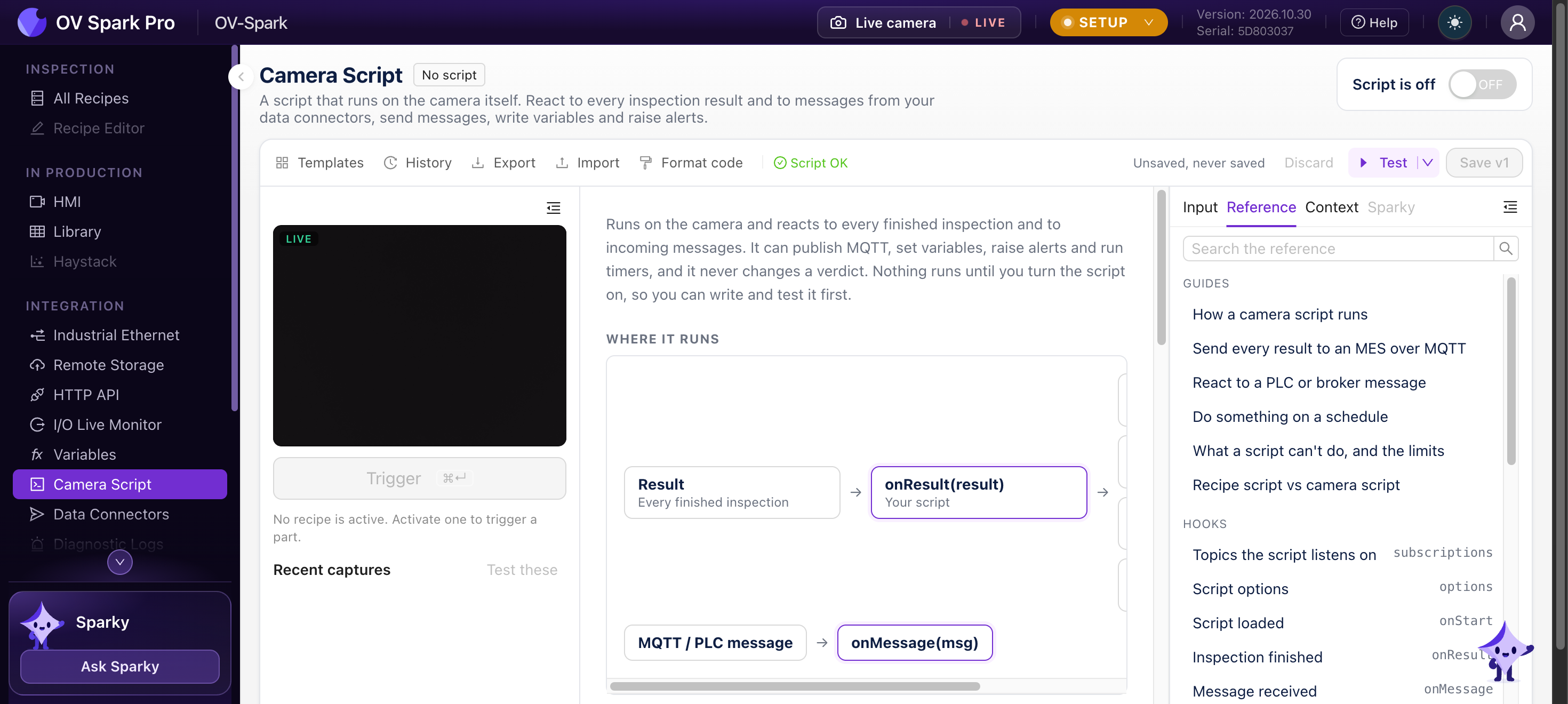
How it runs
The script exports hooks. Every hook is optional: a script can export only onResult, or only subscriptions and onMessage.
| Hook | Runs |
|---|---|
onStart() | When the script loads: after a save, when you turn it on, and when the camera starts. Start timers and set up state here |
onResult(result) | After every production inspection. Export options = { setup_results: true } to get Setup results too |
onMessage(msg) | For a message on a topic in subscriptions, or a change of the PLC's User Data |
onTimer(name) | When a timer fires |
onStop() | Before a new version takes over, when you turn the script off, and at shutdown (not on power loss) |
export const subscriptions = ["plant/line3/cmd"]; // MQTT topics this script listens on

export function onStart() {
  state.results = 0;
  timers.set("heartbeat", 30 * 1000, { repeat: true });
}

export function onResult(result) {
  state.results = Number(state.results ?? 0) + 1;
}

export async function onTimer(name) {
  if (name !== "heartbeat" || mqtt.status() !== "connected") return;
  await mqtt.publish("plant/line3/alive", { alive: true, results: state.results }, { qos: 0 });
}
One at a time. Hooks run one at a time, so state never changes while a hook is running. New events wait in a queue of up to 64 results and 256 messages; when a queue is full, the oldest event is dropped and counted.
Awaiting. While a hook awaits mqtt.publish or vars.set, the next event's hook can run. Read state again after an await, not before it.
Time. A hook has 1 second until its first await, and 50 ms for each part after one. A hook that runs longer is stopped.
Failures. When a hook throws or is stopped, the error appears in the script's Log and as an alert, the calls it started are cancelled, and the next event runs as usual.
What it can use
| Global | What it does |
|---|---|
mqtt.publish(topic, payload, opts?) | Publish text, bytes or an object (sent as JSON). Options: qos (0, 1 or 2), retain, and the MQTT v5 properties content_type, response_topic, correlation_data, user_properties, message_expiry_s |
mqtt.status() | "disabled", "connecting", "connected" or "disconnected" |
subscriptions | A list of topics to listen on, as string literals. + and # wildcards are allowed |
vars.get(name) / vars.set(name, value) | Read any variable; set the ones whose source is Camera script |
timers.set(name, ms, { repeat }) / timers.clear(name) | Named timers, at least 100 ms |
alert.raise(title, detail?) | Raise an alert. The same title is raised at most once a minute |
state | Scratch memory that lasts between events, until the script reloads |
csv(rows), xml.build(), xml.parse() | Build CSV text, and build or parse XML |
pack, unpack, crc, log | The same helpers as the recipe script |
result in onResult has the same shape as a result message: the recipe, the trigger, the final judgment and reason, each tool's result, vars, metadata, tags, image.url and more. See MQTT.
What a camera script can't do
- Change a verdict or write PLC User Results. Only the recipe script can
- Reach the camera's files, or the network other than through MQTT
- Keep state across a reload or a restart:
stateand timers start again - Trigger an inspection or switch recipes. The PLC and the HTTP API still do that
Its limits: 16 MiB of memory including state, up to 16 calls in flight, 32 timers, 256 KiB per received MQTT message, 50 log lines a second, and 10 alert titles a minute.
If the script runs out of memory it is reset: state and timers are cleared and onStart runs again. Keep state small, for example counts rather than lists of every result.
Templates
| Group | Templates |
|---|---|
| Publish results | Publish each result to an MQTT topic · Publish a heartbeat on a timer |
| Receive data from the line | Answer JSON-RPC requests over MQTT · Copy a field of a vendor's JSON message into a variable |
| Monitor production | Count pass and fail per shift and publish a CSV · Raise an alert after consecutive rejects |
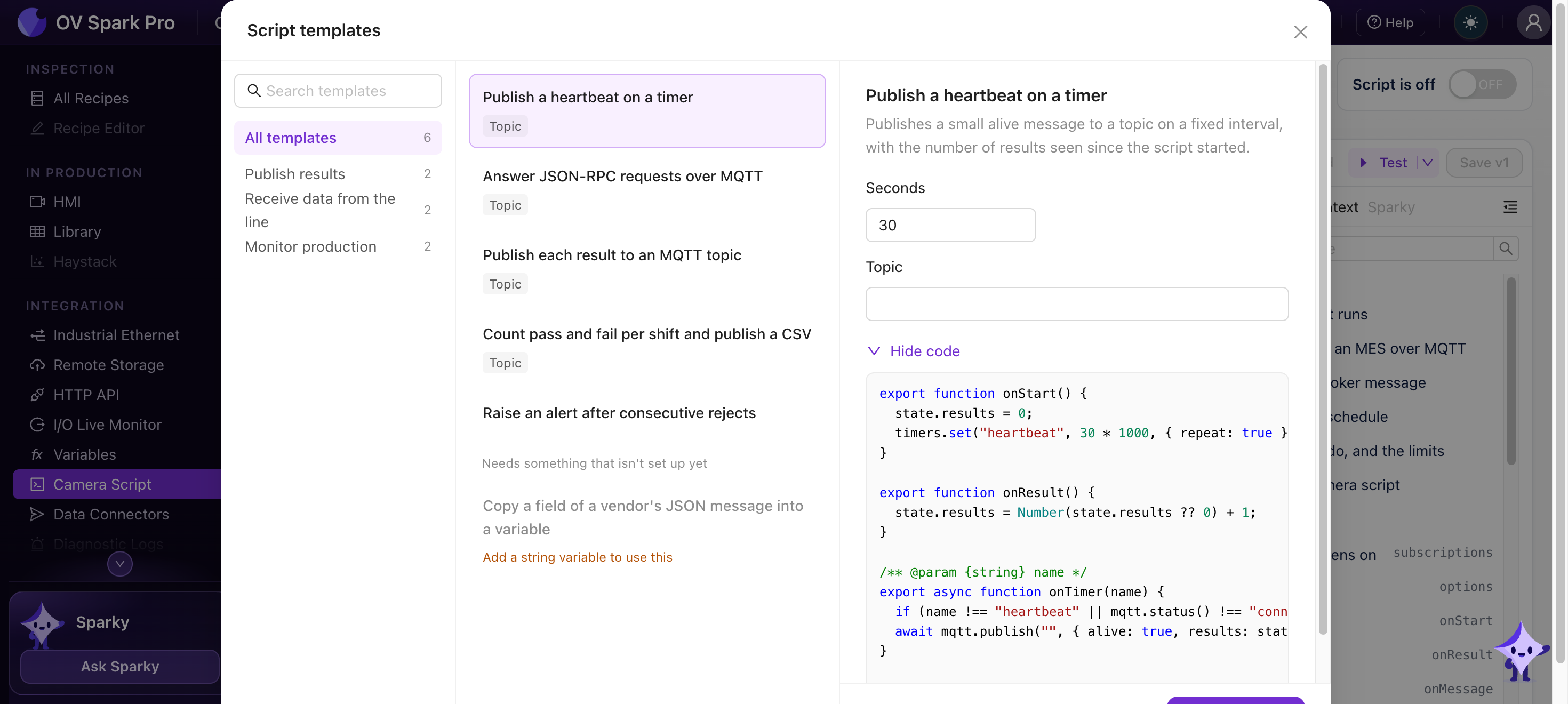
// Raise an alert after consecutive rejects
export function onResult(result) {
  state.streak = result.judgment === "fail" ? Number(state.streak ?? 0) + 1 : 0;
  if (state.streak === 3) {
    alert.raise("Reject streak", {
      streak: state.streak,
      recipe: result.recipe.name,
      reason: result.reason,
    });
  }
}
Dry run
Test runs your draft as a dry run: it replays recent results through onStart, onResult and onStop, and records every publish, variable write, timer, alert and log line without sending anything. The recent results are kept in memory, so the list is empty after a restart.
Guard publishes with mqtt.status() === "connected", as the templates do, and await them or add .catch(). A publish that fails with nothing waiting on it is logged as an error.