genai-tools
title: GenAI 工具包 sidebar_position: 14 slug: /guides/ov10i/genai-tools
GenAI 工具包
用时: 5 分钟(阅读)
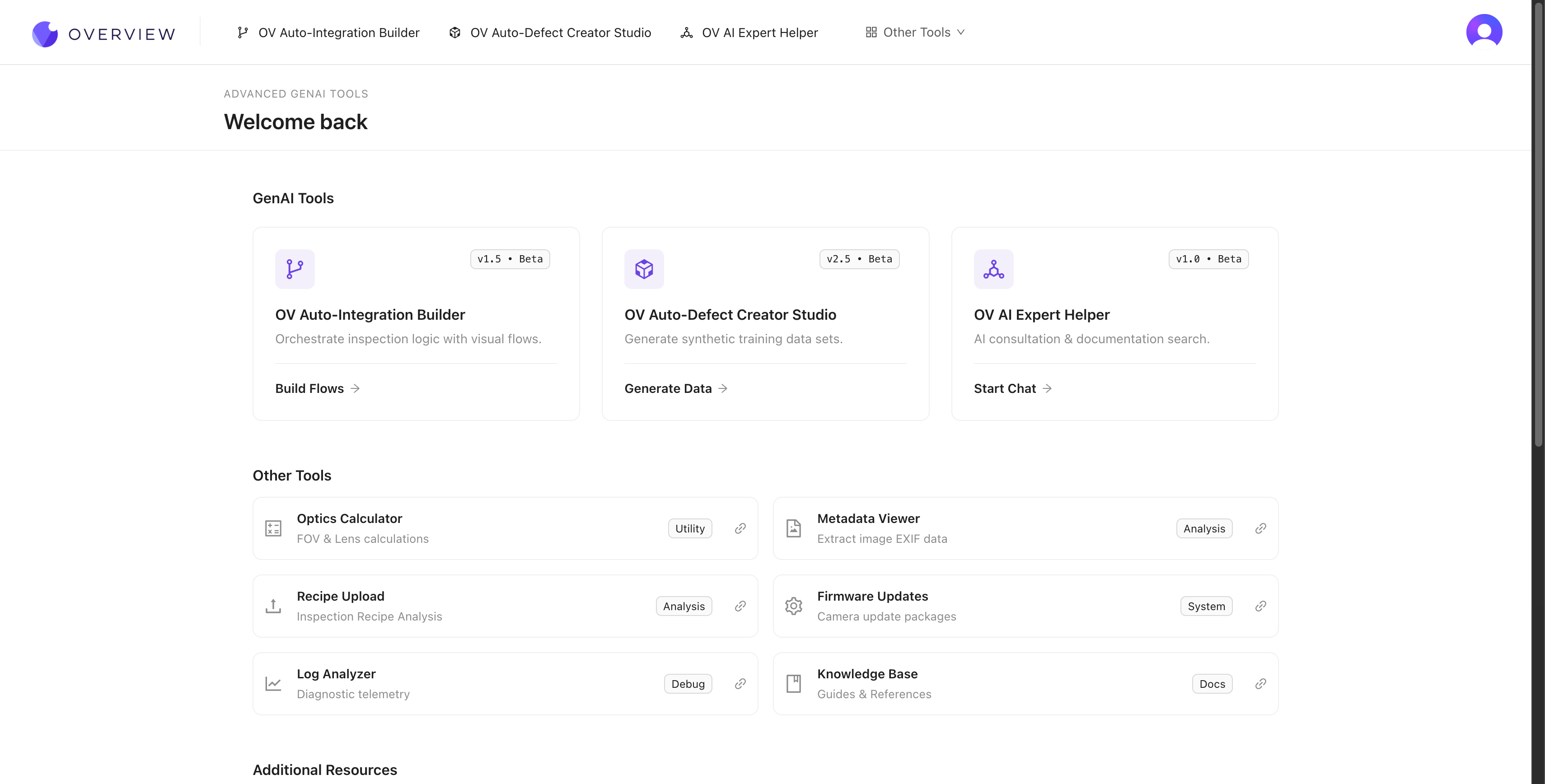
Three AI-powered tools at tools.overview.ai accelerate every stage of your inspection workflow. Generate synthetic training data, build factory integrations from plain English, and get instant expert help -- all without waiting for support tickets or specialized expertise.
OV Auto-Defect Creator Studio
Problem it solves: You need training data for rare defects, but waiting for them to happen naturally takes weeks or months.
What it does: Generates photorealistic synthetic defect images from a single good image + a plain English description. Upload a good part, mark where the defect should appear, describe it ("hairline crack along the weld seam"), and get dozens of realistic training images in seconds -- up to 10,000x faster than waiting for real defects.
How it works
- Upload a good image of your part
- Mark the area where the defect should appear
- Describe the defect in plain English (e.g., "deep scratch across the surface" or "missing solder joint")
- Generate the defect variations (the AI creates photorealistic results)
- Export the synthetic images directly into your training set
When to use it
- You need to train for defects you haven't seen yet (new product launch)
- Rare defects that happen once per 1,000+ parts
- You want to improve accuracy on specific borderline failure modes
- You need to supplement a small dataset with more variety
Why synthetic data works
The generated images aren't just "pasted on" artifacts. They're photorealistic variations that match your actual lighting, camera angle, and part surface. The AI understands the physics of how defects look under your specific imaging conditions.
The best approach: train with your initial 3-5 real images first, identify where the AI struggles, then use Defect Studio to generate targeted synthetic examples for those specific failure modes. Real data teaches the baseline; synthetic data fills the gaps.
Defect Studio images are powerful for filling gaps in your training set, but they should never be your only source of training data. Always validate your model's performance against real production images. A model trained exclusively on synthetic data may miss subtle variations that only appear in real-world conditions.
See it in action
Where it fits in the workflow: You'll use Defect Studio during Step 4: Train Your AI Model to build training data faster.
OV Auto-Integration Builder
Problem it solves: Setting up factory integrations (PLC communication, email alerts, data logging) requires Node-RED expertise you might not have.
What it does: Generates complete, production-ready Node-RED flows from plain English descriptions. Supports 50+ node types including MQTT, Modbus, OPC-UA, HTTP, RS232, and more.
How it works
- Open tools.overview.ai and select Auto-Integration Builder
- Describe what you want in plain English. For example: "Send an email when 3 failures happen in a row" or "Save fail images to an FTP server with the part serial number"
- The AI generates a complete Node-RED flow using 50+ available node types
- Review the flow, deploy it to your camera with one click
What it supports
| Category | Examples |
|---|---|
| 通信协议 | MQTT, Modbus TCP, OPC-UA, HTTP/HTTPS, RS232, RS485 |
| 数据路由 | FTP, 数据库, MES 系统, 云存储 |
| 逻辑 | 时间序列分析, 条件分支, 聚合 |
| 通知 | 邮件, Microsoft Teams, Slack, webhooks |
| 硬件 I/O | 指示灯, 拒绝门, 传送带, PLCs |
Integration Builder generates standard Node-RED flows that you can customize further after generation. Use the generated flow as a starting point, then open it in the Node-RED editor on your camera to tweak timing, add error handling, or integrate additional nodes.
Modify Mode
Already have a flow? Use Modify Mode: paste an existing flow and describe what you want changed. The builder updates the flow while preserving your existing logic.
See it in action
Where it fits in the workflow: You'll use the Integration Builder during Step 5: Setting Up Outputs to configure factory communication.
OV AI Expert Helper
Problem it solves: You have a question at 2 AM and need help now.
What it does: AI-powered assistant that knows everything about the OV camera -- setup, troubleshooting, best practices, and advanced configurations. Available 24/7 at tools.overview.ai.
When to use it
- Anytime you're stuck or unsure about a setting
- When troubleshooting complex multi-step issues
- For best-practice recommendations specific to your use case
- When you need step-by-step guidance for advanced configurations
What it knows
The AI Expert Helper is trained on the complete OV camera documentation, including:
- Hardware installation and wiring
- Network configuration and connectivity
- Recipe creation, alignment, and inspection setup
- AI model training and optimization
- Node-RED flow design and debugging
- PLC integration and communication protocols
- Troubleshooting and maintenance procedures
Where it fits in the workflow: Use the AI Expert Helper anytime during your setup journey. It's also referenced in Troubleshooting & FAQ as your first line of support.
GenAI 工具包的优势
Together, these three tools can reduce your deployment time from days to hours:
| Without GenAI tools | With GenAI tools |
|---|---|
| Wait weeks for rare defect samples | Generate synthetic defects in seconds |
| Learn Node-RED from scratch | Describe flows in plain English |
| Wait for support during business hours | Get instant AI expert help 24/7 |
| Multiple iterations over days | Rapid iteration in a single session |
All three tools are available at tools.overview.ai.