AI 驱动文档
您想了解什么?
分类器 vs. 分割器
这是创建程序时最常见的问题。以下是一个清晰的框架。
分类器
分类器会查看每个 ROI 裁剪图像,并将其归入一个类别:通过、失败、存在、缺失、划伤、合格,或你定义的任何类别。
可以把它想象成把卡片分成几堆。 AI 查看整个裁剪图像,然后说"这个归入通过堆"或"这个归入失败堆"。
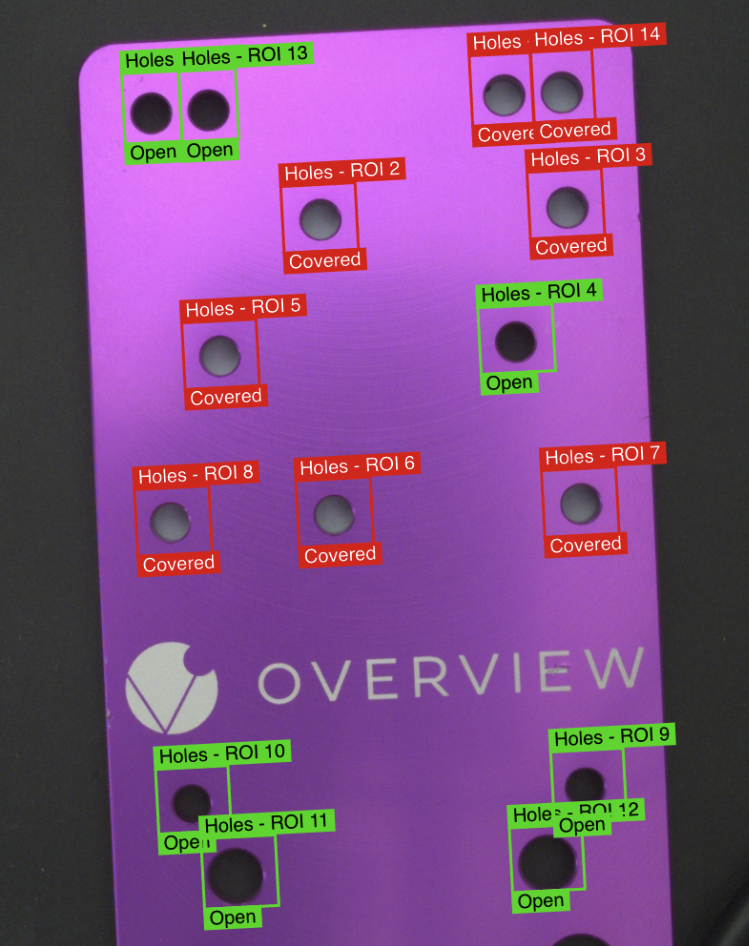
何时使用分类器:
- 需要通过/失败或多类别判定
- ROI 足够小,能清楚显示缺陷
- 标注速度很重要(分类器的标注速度要快得多)
- 检查某个特征的存在/缺失
- 示例:螺丝存在/缺失、连接器到位/未到位、标签正确/错误
如需配合交互式实操平台进行更深入的讲解,请阅读 理解分类器。
使用 Defect Creator Studio 为任一方法生成逼真的合成缺陷图像 — 用简明英语描述缺陷,几秒钟即可获得可供训练的图像。
训练模式
分类提供两种不同的训练方式:
Fast Classifier
- 用途: 快速设置和测试
- 使用场景: 快速原型开发和概念验证
- 速度: 训练时间较短
- 准确度: 精度较低
- 生产就绪: 不推荐用于生产
Accurate/Production Classifier
- 用途: 生产就绪的检测
- 使用场景: 最终部署和生产制造
- 速度: 训练时间较长
- 准确度: 精度较高
- 生产就绪: 用于获得最佳效果的主要训练模型
生产中的分类示例
螺母松动检测 (OEM 装配)
任务: 识别机械装配中的松动螺母
设置:
- ROI: 螺母区域周围的矩形
- 类别:
- Good - 正确拧紧的螺母 (Pass 100%)
- Defect - 松动的螺母 (Fail 98%)
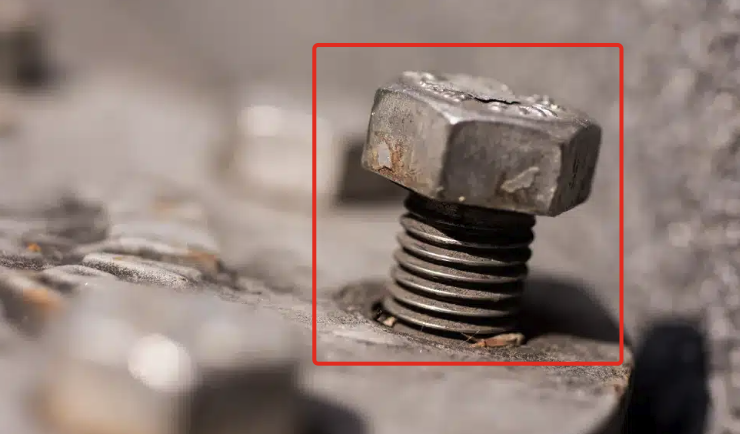
结果: 二元判定 - 螺母是否正确就位或松动
轴座就位验证 (OEM 装配)
任务: 识别部分就位的轴
设置:
- ROI: 覆盖轴安装区域的矩形
- 类别:
- Good - 完全就位的轴
- Defect - 部分就位的轴
- Defect - 完全脱出的轴
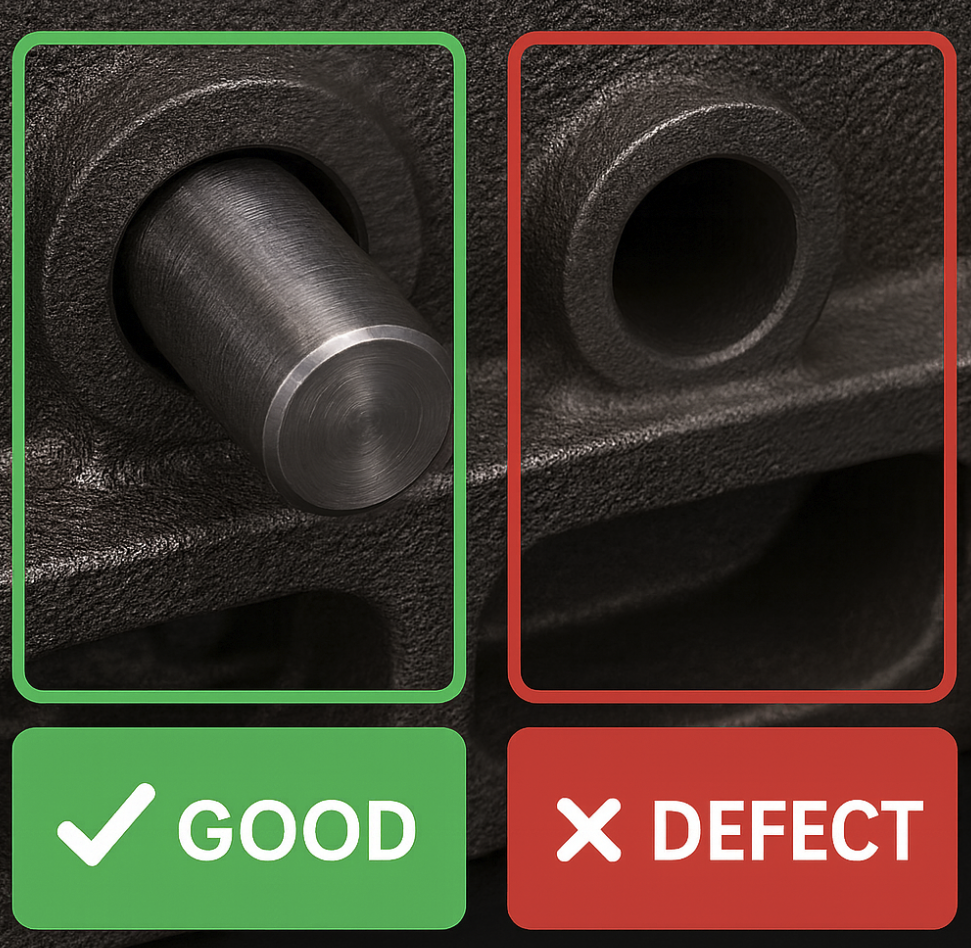
结果: 部件被归类为正确安装或有缺陷
弯曲针脚检测 (T1 供应商制造)
任务: 检查弯曲的针脚
设置:
- ROI: 覆盖散热器针脚阵列的矩形
- 类别:
- Good - 未损坏的针脚 (Straight)
- Defect - 弯曲/损坏的针脚 (Bent)
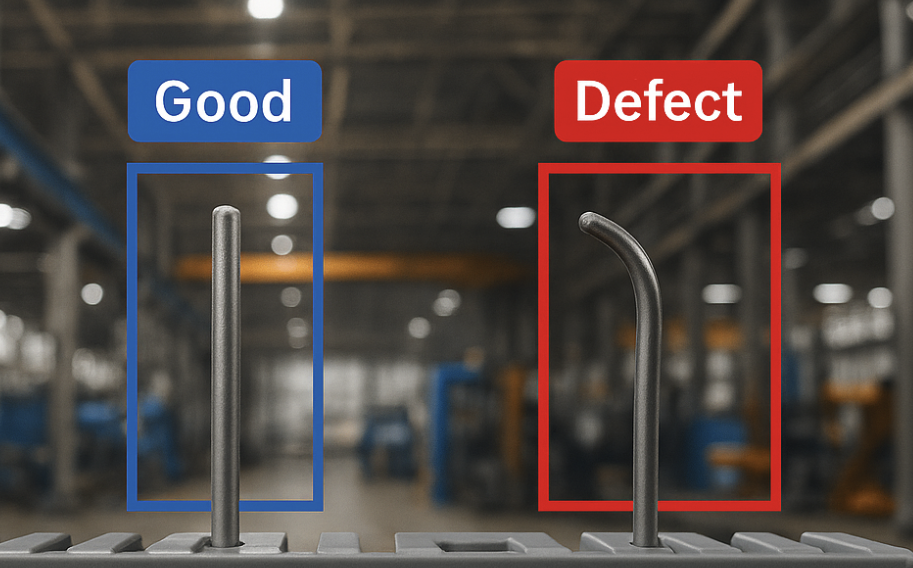
结果: 分类器能区分合格和不合格的针脚
分割器
分割器在像素级别检查每个 ROI 裁剪图像,并精确识别哪些像素属于缺陷。
可以把它想象成用马克笔做标记。 AI 精确地圈出缺陷所在的位置,而不仅仅是判断是否存在缺陷。
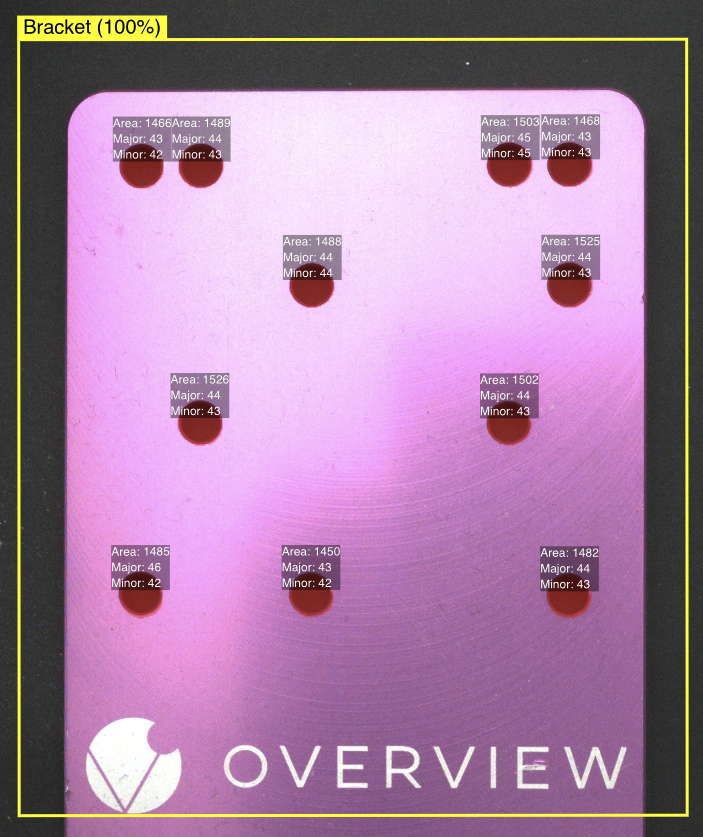
在以下情况使用分割器:
- 需要像素级缺陷定位(划痕究竟在哪里?)
- 需要测量缺陷的尺寸或面积
- ROI 需要较大,但要检测的缺陷较小
- 需要在一个区域内统计多个缺陷
- 示例:表面划痕、污渍、裂纹、焊接质量、尺寸测量
分割器只能学习其所见到的缺陷的尺寸和纹理。如果只用小颗粒污染物训练它,那么生产线上出现同类缺陷的大块样本时,可能只有边缘或零散区域被高亮标记——缺陷主体部分将未被遮罩。解决方法是在训练样本中涵盖预期出现的所有缺陷尺寸范围。没有大缺陷样本?可使用 Defect Creator Studio 生成合成样本。
如需通过交互式 playground 进行更深入的讲解,请阅读 Understanding Segmenter。
训练模式
分割使用单一训练模式:
Accurate/Production Only(高精度/仅生产)
- 用途: 适合生产环境的像素级分析
- 训练: 单一高精度模式
- 速度: 训练时间较长,可实现精确的像素分类
- 精度: 高精度,适合细致的缺陷映射
- 生产就绪: 针对制造环境进行了优化
生产环境中的分割示例
表面缺陷检测(T1 供应商装配)
任务: 识别胶水溢出
设置:
- ROI: 阀门表面周围的矩形区域
- 像素类别:
- 胶水(黄色像素)
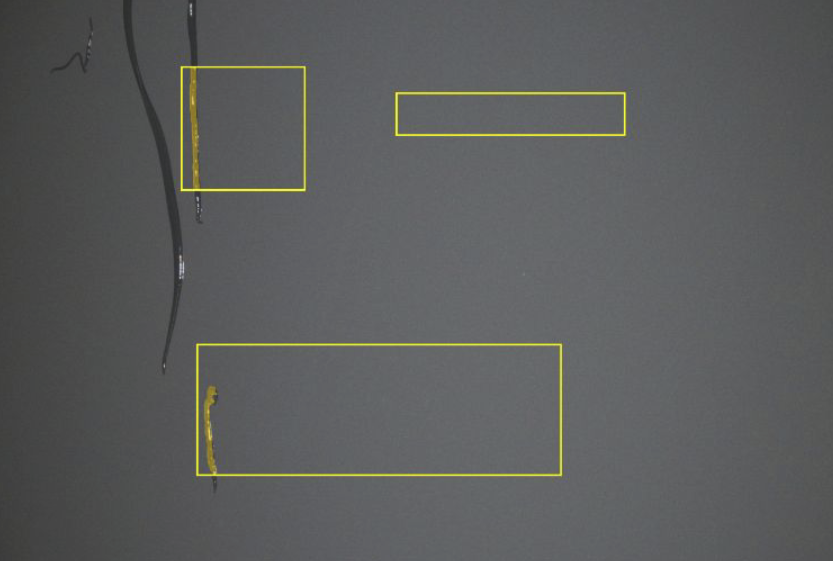
结果: 黄色高亮显示 AI模型 检测到的缺陷,同时显示原始图像以供参考
间隙尺寸测量(T1 供应商装配)
任务: 验证检测间隙的尺寸是否合适
设置:
- ROI: 间隙区域周围的矩形
- 测量逻辑: 基于像素面积值的通过条件
- 类别:
- 蓝色像素,用于教导距离的外观
- 良品 - 面积 <100 像素(通过)
- 缺陷 - 面积 > 100 像素(失败)
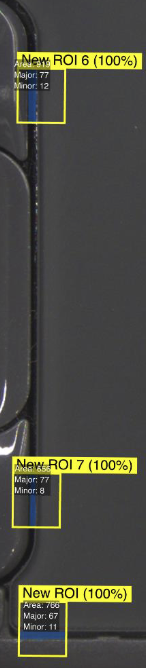
结果: 精确测量间隙尺寸,并给出准确的像素数
喷漆飞溅检测
任务: 识别表面上的喷漆飞溅
设置:
- ROI: 感兴趣区域(ROI)周围的矩形
- 像素类别:
- 黄色像素,用于教导油漆的外观
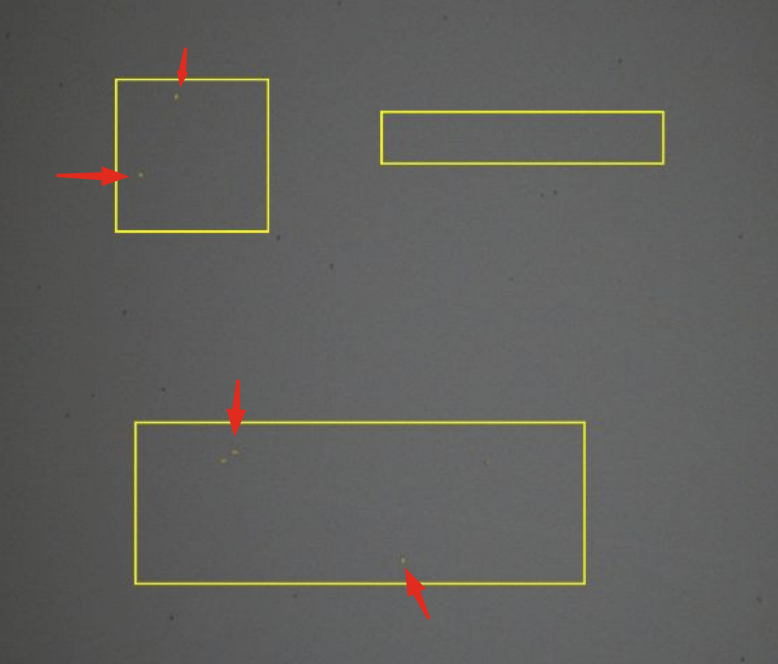
结果: 像素级的喷漆飞溅检测
同时检测多个特征
分割器可以通过定义独立的像素类别同时检测多个特征。例如,您可以训练单个分割器在同一 ROI 中检测划痕(类别 1)、凹痕(类别 2)和污渍(类别 3)。每个类别通过用不同标签涂绘该缺陷类型的像素来独立训练。分割器在一次推理中识别所有缺陷类型,并报告每个像素属于哪个类别。
这与分类不同,在分类中,整个 ROI 仅获得一个标签。而在分割中,同一图像中可以共存多种缺陷类型,每种缺陷都有其独立的像素级遮罩。
对比
| 方面 | 分类器 | 分割器 |
|---|---|---|
| 能告诉您什么 | 类别(通过/失败等) | 缺陷的精确像素 |
| 标注工作量 | 低:为每张图像选择一个类别 | 高:涂绘缺陷像素 |
| 所需数据 | 每个类别起始 10-15 张图像 | 类似,但标注耗时更长 |
| ROI 尺寸 | 配合小 ROI 效果最佳 | 更擅长处理较大的 ROI |
| 最适用于 | 存在/缺失、类别决策 | 划痕、污渍、测量、像素级检测 |
节拍性能
| 模型类型 | 检测速度 | 最佳应用场景 |
|---|---|---|
| 分割 | 最快 | 高速生产线 |
| 分类(精确) | 较慢 | 质量关键型检测 |
| 分类(快速) | 中等 | 测试与原型验证 |
分割模型提供最快的检测节拍,使其成为高吞吐量生产环境的理想选择。
何时选择各类模型
选择分类的情况:
- 您需要简单的良品/不良品分类
- 整个 ROI 可被标注为几个类别之一
- 整体状况评估即可满足需求
- 预期缺陷位置固定
- 您希望在设置时更快地标注
最适用于: Go/No-Go 判定、组件存在/缺失、整体质量评估
选择分割的情况:
- 缺陷可能出现在检测区域的任何位置
- 您需要测量缺陷的尺寸或面积
- 一张图像中可能存在多种缺陷类型
- 需要精确的位置映射
- 生产中最快的节拍至关重要
最适用于: 表面缺陷、间隙测量、覆盖率验证、位置可变的瑕疵
分类器设置更快,所需训练图像更少,并且适用于大多数通过/失败检测。仅当您需要像素级细节、缺陷测量,或需要在较大检测区域内检测小缺陷时,才切换到分割器。
分割器在标注期间需要进行像素级标注,所耗时间远长于分类器标注。与分类器相比,请为初始设置预留额外时间。如果您有许多区域需要标注,时间投入将快速累积。
分类器和分割器都以最大 512x512 像素的分辨率处理 ROI 裁剪图。任何超过此尺寸的 ROI 在 AI 处理之前都会被缩小,这意味着小缺陷可能变得不可见。请尽可能保持 ROI 较小以保留细节,或者如果您需要覆盖较大区域同时仍能检测细微缺陷,请使用分割器。
重叠区域
确实存在重叠。许多检测应用使用任一方法都可行。如果您不确定:
- 从分类器开始。 它设置更简单,标注更快
- 如果您发现分类器精度不够(无法检测大区域中的小缺陷,或需要测量),请切换到分割器
- 在 tools.overview.ai 询问 AI Assistant。描述您的应用,它将推荐最佳方案
训练模式摘要
| 训练模式 | 模型类型 | 生产就绪 | 备注 |
|---|---|---|---|
| Fast Classifier | 分类 | 否 | 快速设置,用于测试和原型开发 |
| Accurate Classifier | 分类 | 是 | 生产就绪,具有更高的精度 |
| Accurate Segmenter | 分割 | 是 | 针对生产优化的单一高精度模式 |
OV20i 与 OV80i 对比
- OV20i: 每个程序选择一种,分类器或分割器
- OV80i: 支持多模型。可在同一程序中对同一捕获组合使用两种模型