AI 驱动文档
您想了解什么?
持续改进您的模型
您的检测程序已部署。那么,当条件变化、出现新的缺陷类型或规格变更时,如何让它持续保持良好性能?
库:您的持续改进工具
相机的每次捕获都会保存在库中,连同 AI 的预测结果和置信度得分。这是您改进模型的金矿。
找出 AI 判断错误的图像
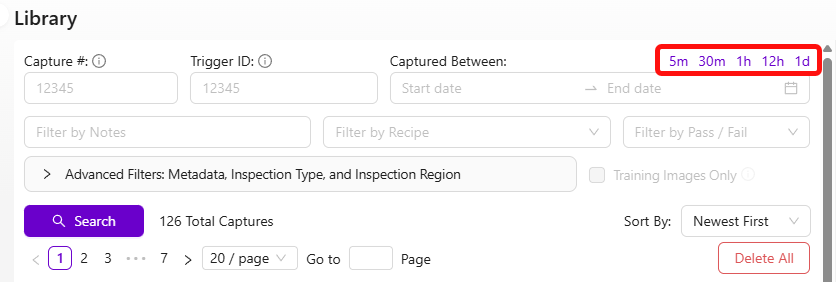
- 进入库
- 浏览最近的捕获图像
- 重点关注两类内容:
- 遗漏: AI 预测明显错误的图像(每个缩略图左上角的复选框)
- 低置信度预测: 在任何图像上向下滚动以查看置信度值。低置信度 = AI 不确定
小型数据集中一张错误标注的图像影响巨大。如果只有 5 张训练图像,一个错误标签会污染 20% 的数据。重新训练前请务必反复检查标签,尤其是数据集较小时。
使用针对性数据重新训练
- 选择 AI 判断错误或不确定的图像
- 点击 "Add to Active Recipe Train Set"
- 如有需要,修正标签
- 点击 Retrain

专注于遗漏和低置信度的捕获图像,而不是随机的新数据。这是最高效的改进方式。
如果您需要查看 AI 在特定图像上的预测结果,请将已保存的 JPEG 文件上传至元数据查看器。OV 相机会将预测结果、置信度得分和相机设置直接嵌入每张捕获的图像中。
分类器改进工作流
- 查看库中的图像 → 找出错误和低置信度的预测
- 将其添加到训练集
- 如有需要,重新标注
- 重新训练
- 使用 Haystack 直观探索您的数据,并大规模找出错误标注的图像
分割器改进工作流
分割器的标注耗时较长(像素级标注),因此有一个快捷方式:
- 将问题图像导入分割程序
- 点击 Generate Predictions,让模型尽可能为新图像预先标注
- 修正预测结果而不是从头开始标注(速度快得多)
- 重新训练
Haystack 是一种可视化数据探索工具,可让您浏览整个训练集,并快速发现看起来不协调的图像。当数据集超过 50-100 张图像时,手动审查变得不切实际。Haystack 会将相似的图像聚类在一起,使错误标注的异常值在视觉上突出显示。
减少分割中的误报
如果您的分割器拾取了大量本不应存在的小型随机斑点,您有两种强大的工具可供使用:在通过/失败逻辑中过滤掉小斑点,以及训练模型以更好地理解"正常"是什么样子。
使用最小尺寸阈值过滤掉小斑点
最快的修复方法是让系统忽略低于特定像素面积的斑点。噪声斑点几乎总是比真实缺陷小得多,因此尺寸过滤器可以在不影响实际检测的情况下消除它们。
在基本模式 (IO 逻辑) 中: 在 pass/fail 设置中设置 最小斑点面积 阈值。任何小于此像素数的斑点将被完全忽略。从 50 像素之类的值开始,逐步向上调整,直到噪声消失但仍能触发真实缺陷。
在高级模式 (Node-RED) 中: 在 function 节点中通过 blob.pixel_count 过滤斑点。例如,要忽略任何小于 50 像素的斑点:
const minBlobSize = 50;
const allBlobs = msg.payload.segmentation.blobs;
const realBlobs = allBlobs.filter(blob => blob.pixel_count >= minBlobSize);
const results = realBlobs.length <1; // Pass if no real blobs remain
msg.payload = results;
return msg;
根据您的应用调整 minBlobSize 值。查看调试输出中噪声斑点与真实缺陷的像素数对比,以找到合适的截止值。
将良品图像添加到训练集
这是减少误报检测最有效的单一方法,也是人们最常忽视的方法。
问题在于:如果您只用包含缺陷的图像进行训练,模型从未学习过干净零件的样子。它会开始将正常的表面纹理、光照渐变和细微变化都视为"缺陷"——也就是您正在对抗的所有小型随机斑点。
修复方法:
- 进入 库 并查找 良品 图像——表面干净、没有缺陷的零件
- 将这些图像添加到训练集中 (Add to Active Recipe Train Set)
- 在标注视图中,选择 ROI,但 不要添加任何缺陷注释。只需按原样包含它们,不做任何涂抹标记
- 重新训练模型
通过向模型展示"正常"的样子,您正在教它不再将普通的表面变化标记为缺陷。这能显著减少噪声。
指导原则:
- 从 10-15 张良品图像开始并重新训练。测试结果
- 如果噪声持续存在,请添加更多。目标是至少 20-30 张良品图像与缺陷图像混合
- 如果您的初始训练集只包含带缺陷的图像,这一点尤其重要
- 确保良品图像涵盖您在生产中看到的正常变化范围(不同的光照、轻微的颜色偏移、表面纹理)
十有八九,当有人抱怨到处出现随机小斑点时,根本原因是训练集中没有良品图像。添加它们并重新训练——改善通常是立竿见影且显著的。
减少噪声的其他提示
- 改善光照一致性。 不一致的光照会产生阴影和高光,模型可能误认为是缺陷。确保内置 LED 配置正确,并且外部光源不会造成眩光或阴影偏移
- 检查模板对齐。 如果对齐器工作不佳,ROI 会在多次捕获之间发生偏移。模型每次看到的背景区域不同,这会增加噪声。请验证对齐是否稳定
- 小步迭代。 添加 10-15 张良品图像,重新训练,测试。重复直到结果干净。这比一次性投入 50 张图像并期望获得最佳结果要快得多
理念
- 持续迭代,永不停止。 AI 拥有强大的学习能力,即使在 50、100 甚至 500+ 张图像之后仍能持续改进
- 针对性地处理失败案例。 不要随意添加数据,而应添加 AI 处理困难的案例
- 定期检查错误标签。 随着数据集的增长,错误标签变得越来越难以发现,但仍会损害准确性
使用 GenAI 工具加速
tools.overview.ai 上的三款 AI 驱动工具可以显著加快您的改进周期:
- Defect Studio —— 生成逼真的合成缺陷图像,速度比等待真实缺陷快 10,000 倍以上
- Integration Builder —— 通过简单的英文描述构建可用于生产的 Node-RED 流程
- AI Expert Helper —— 全天候 24/7 获取关于相机任何问题的专家指导
这三款工具结合使用,可将部署时间从数天缩短至数小时。无需等待真实缺陷即可生成合成训练数据,通过描述需求即可构建集成,无需等待支持工单即可获得即时专家指导。