AI 驱动文档
您想了解什么?
裁剪 ROI 端点(仅限分类)
概览
cropped_roi 端点用于访问由设备上运行的 Haystack 的分类结果生成的裁剪感兴趣区域 (ROI)。
仅限分类
Haystack 目前不支持分割结果。此端点仅适用于分类类型的结果。如果您需要以编程方式处理分割器输出,请改用标准的检查结果 API。
基础 URL 格式为:
http://{device-ip}/edge/haystack/cropped_roi/{classification_result_id}
工作原理
当相机完成分类捕获时,Node-RED 流会通过配对设备 IP 和分类结果 ID 动态构建裁剪 ROI 图像的 URL:
const imageUrl = `http://${baseUrl}/edge/haystack/cropped_roi/${result.id}`;
每个 URL 对应单独分类 ROI 的裁剪图像,通常代表一次检查。
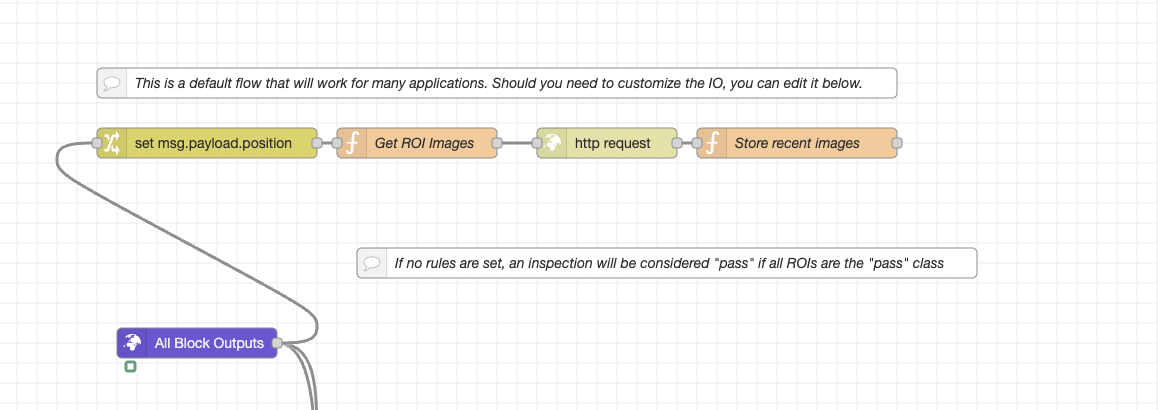
Node-RED 流程摘要
ROI_Crop 流程执行以下操作:
-
提取设备 IP
- 解析
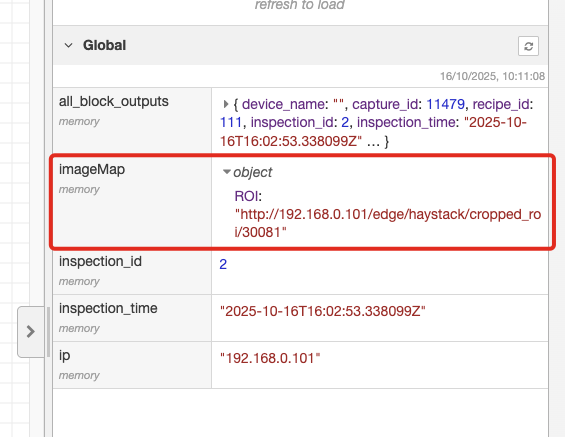
image_url字段以查找 IP(例如192.168.0.101) - 全局存储以便复用
- 解析
-
查询最新捕获数据
-
向设备的 PostgREST API 发送 GET 请求:
http://{device-ip}/postgrest/captures?select=...
&order=id.desc&limit=1 -
检索最新的捕获及所有 classification_result 条目
-
-
仅筛选分类结果
-
跳过分割或对齐结果
-
遍历每个分类结果:
classificationResults.forEach(result => {
  const roiName = result.roi_result?.inspection_region?.name || `ROI_${result.id}`;
  const imageUrl = `http://${baseUrl}/edge/haystack/cropped_roi/${result.id}`;
  imageMap[roiName] = imageUrl;
});
-
-
输出裁剪 ROI URL
- 将所有 ROI 图像链接保存到全局
imageMap - 返回最新裁剪 ROI 图像 URL 的列表
- 将所有 ROI 图像链接保存到全局
使用示例
获取裁剪 ROI 图像
curl http://192.168.0.101/edge/haystack/cropped_roi/42 -o roi_42.jpg
在 Web 界面中使用
<img src="http://192.168.0.101/edge/haystack/cropped_roi/42" alt="Cropped ROI 42">
输出示例
{
  "ROI_1": "http://192.168.0.101/edge/haystack/cropped_roi/1",
  "ROI_2": "http://192.168.0.101/edge/haystack/cropped_roi/2"
}
参数
| 参数 | 类型 | 说明 |
|---|---|---|
device-ip | string | 相机的 IP 地址(例如 192.168.0.101) |
集成流程
- 通过
/postgrest/captures获取最新的捕获元数据。 - 识别可用的
classification_resultID。 - 为每个结果构建裁剪后的 ROI URL。
- 显示或下载这些图像,用于分析、训练数据或 QA 检查。
下载 Node-RED 流程
- ROI 裁剪流程 (JSON) - 用于提取裁剪后 ROI 图像的完整 Node-RED 流程
- 将此流程直接导入 Node-RED 即可访问裁剪后的分类 ROI
- 同时适用于 OV10i 和 OV80i 系统