AI 驱动文档
您想了解什么?
通过 TCP/IP 集成 Universal Robot (UR)
要将 Universal Robot (UR) 与相机系统集成,两台设备必须连接到同一本地网络。通信通过 TCP/IP 套接字建立 — 除确保两台设备处于同一网络外,无需其他激活操作。
在此设置中,通信在机器人与相机之间以请求和响应的方式进行。相机作为服务器,机器人作为客户端。
典型通信流程
-
从机器人打开套接字。
-
从机器人向相机发送信息。
-
相机读取信息并将其转换为所需格式(例如:字符串、ASCII、字节)。
-
相机使用该信息执行功能,并通过 TCP 返回响应。
-
机器人等待 TCP 响应。如果在几秒内未收到响应,机器人将在没有响应的情况下继续其流程。
备注
建议添加一个条件以确认数据已返回。
- 机器人关闭套接字通信。
网络配置与防火墙
网络设置
- 确保 UR 机器人和相机连接到同一本地网络。
- 为它们分配同一子网内的 IP 地址以便于通信。
防火墙设置
- 在两台设备上配置防火墙规则,以允许通过指定端口进行 TCP/IP 通信。
- 确认没有网络策略阻止所需的通信。
URScript 与套接字编程 - UR
数据格式
- 通信可使用多种数据格式,例如字符串、ASCII 或字节。
- 确保两台设备就数据格式达成一致,以避免通信错误。
用于套接字通信的 URScript 函数
socket_open(address, port, "socket_name"):打开到指定地址和端口的套接字连接。socket_send_string("message", "socket_name"):通过套接字发送字符串消息。socket_send_byte(value, "socket_name"):通过套接字发送字节值。socket_read_string("socket_name"):从套接字读取字符串消息。socket_read_ascii_float(number, "socket_name"):从套接字读取 ASCII 浮点数消息。socket_read_byte("socket_name"):从套接字读取字节值。socket_close("socket_name"):关闭套接字连接。
# Open socket connection to the camera server
socket_open("192.168.0.2", 3000, "camera_socket")

# Send a string message
socket_send_string("Request Data", "camera_socket")

# Alternatively, send a byte value
socket_send_byte(42, "camera_socket")  # Sends the byte value 42

# Read the response as a string
response = socket_read_string("camera_socket")

# Read the response as a byte
response_byte = socket_read_byte("camera_socket")

# Close the socket connection
socket_close("camera_socket")
作为 TCP/IP 服务器的配置 - OV10i
服务器设置
- 配置相机在特定端口(例如端口 3000)上监听传入的 TCP 连接。
- 确保相机的 IP 地址为静态地址或为机器人所知,以实现稳定通信。
数据解析
- 在相机上实现逻辑,用于读取来自机器人的传入数据。
- 根据相机功能的要求,转换并处理数据。
- 准备并向机器人发送相应的响应。
用于 UR 机器人集成的 Node-RED 逻辑
要使用 Node-RED 将 Universal Robot (UR) 与您的系统集成,您可以创建一个简单的流程来处理传入的 TCP 消息,根据接收到的数据执行操作,并在必要时向机器人返回响应。
流程示例
以下是一个分类流程示例,其中相机将在触发后检查零件的完整 Pass/Fail 条件,并将响应发送回机器人。
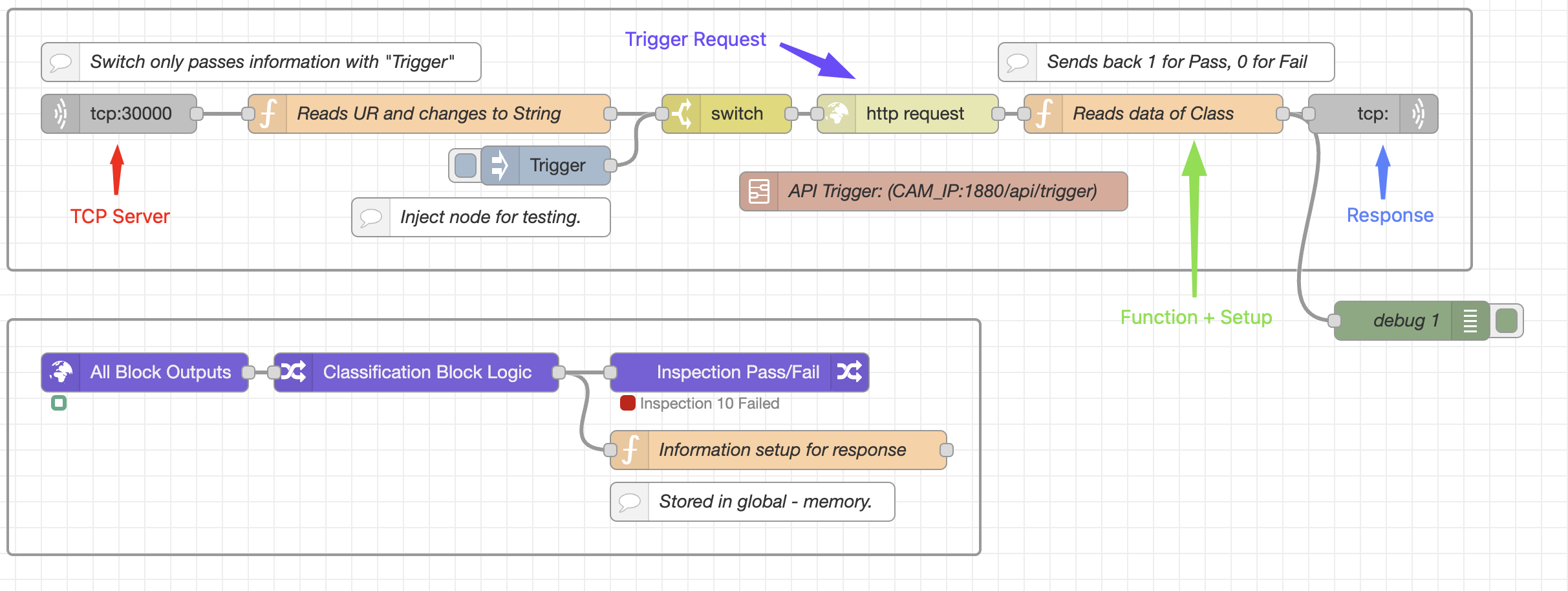
流程 1:
- TCP IN:在 Node-RED 中的端口 30000 上打开一个 TCP 服务器。
- Function 1 (Reads UR):将来自 UR 机器人的传入数据转换为字符串。要使此流程正常工作,UR 必须发送字符串 "Trigger"。
- Switch:如果字符串为 "Trigger",则流程继续;如果为其他内容,则流程停止,UR 机器人将出现超时。
- HTTP Request:向端点 (API Trigger) 发送请求以激活相机触发器。
- Function 2 (Read Data):从全局内存中检索数据(1 或 0),并将其格式化为正确的格式以便在 UR 机器人上进行 ASCII 读取。
- TCP Response:将信息发送回机器人。
流程 2:
- Trigger Command:此流程以触发命令开始。
- All Block Outputs:从最近拍摄的图像(在流程 1 中触发)生成信息。
- Classification Block Logic:为每个 ROI (Region of Interest) 设置条件以确定 Pass 或 Fail 状态。(点击该模型进行设置。)
- Function 3 (Information Setup):将 Pass/Fail 条件转换为 1 或 0,并存储在全局内存中,以便于转换到 UR 机器人。
注意事项
- 流程连续性: 确保处理传入数据的所有节点在同一流程中顺序连接。如果流程拆分为并行路径,TCP Response 可能无法正常工作。
- 无响应场景: 如果不需要响应,可以省略 TCP Response 节点。机器人应配置为能够处理在特定超时时间内未收到响应的情况。
错误处理与健壮性
超时与重试
- 为套接字操作实现超时机制,以防止机器人无限期等待。
- 包含重试机制以应对临时的网络问题。