AI 驱动文档
您想了解什么?
硬件设置与首次连接
本深入讲解将对比 OV10i 和 OV80i 相机,概述电源要求、LED 布局和系统状态指示器,以及安装注意事项和最佳实践。
视频指南
观看此主题的实际操作:几分钟内部署 AI 检测
深入讲解概览
学习目标
- 连接 → 上电并验证硬件运行
- 激活 → 使相机上线并处于活动状态
- 配置 → 设置网络和系统设置
- 创建 2 个程序 → 构建分类和分割模型
- 构建逻辑 → 使用 Node-RED 实现自动化
您将收获
- 设备相关知识
- 技术信心
- 现场部署的故障排除技能
- 对基本 Node-RED 流程的理解
设备检查
- 相机
- 电源适配器和 M12 电源电缆 + 以太网电缆
- 样品检测对象
- 文档和快速参考卡
相机型号对比
OV10i - 即插即用解决方案
- 内置 LED 照明,可通过软件控制分区
- 软件控制对焦 - 无需手动调整
- 1.6 MP
- 全局快门
OV80i - 可定制的高性能机型
- C-mount 镜头灵活性 - 可根据应用选择最优光学元件
- 需要外部照明 - 为专业照明提供最大控制
- 8.3 MP
- 卷帘快门
- 更高的处理能力 - 可处理复杂的多重检测场景
备注
关键物理差异:M12 连接器针脚数
- OV10i: 17 针 M12
- OV80i: 12 针 M12
上电
电源要求
- 电压: 19-24 VDC
- 功耗:
- 最大:18W
- 典型:15W
- 连接: M12 连接器配分线电缆
OV10i 电源连接
- M12 17 针连接器连接至相机
- 分线电缆提供独立的接线连接
- 电源端子: 分线电缆上明确标示了 + 和 -
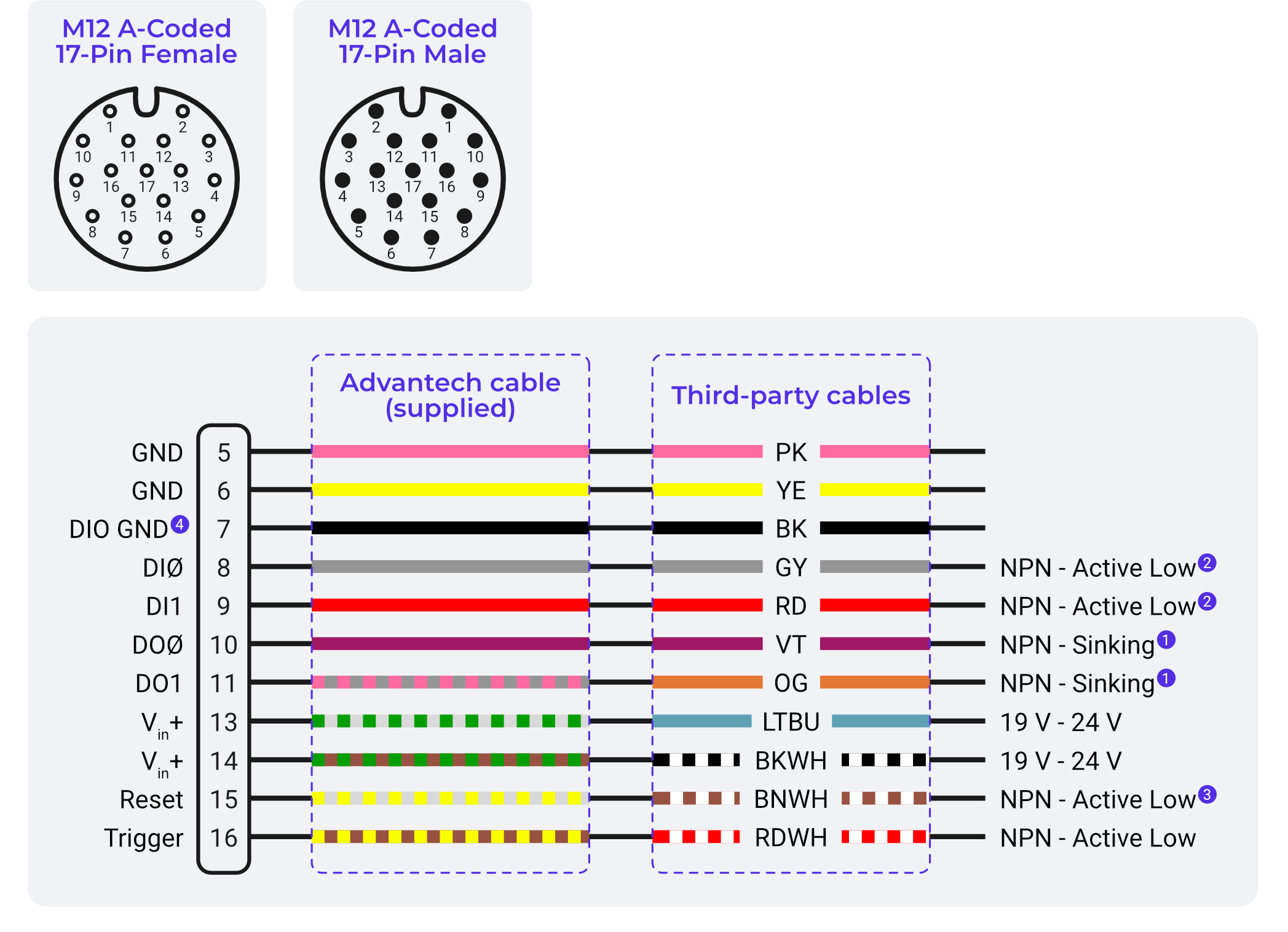
备注
旧版电缆图: 此图显示了 3M 和 5M 电缆使用的原始飞线颜色。如果您的电缆颜色与此匹配,请直接按此接线。如果不匹配(10M 电缆,纯色加第 12 针的黄/绿线),请参阅 线色参考 中的 3M & 5M 与 10M 电缆颜色对照。
LED 状态指示器与系统健康
LED 布局:
- 电源 LED(绿色):指示相机正在接收正确的电源
- 网络 LED:显示以太网连接状态
- 状态 LED:系统运行指示器
电源 LED 状态
- 常亮绿色:电源供应符合规范,相机正常运行
- 熄灭:无电源或电源供应不足
- 暗淡/闪烁/红色: 电源问题 - 检查电压和电流容量
系统状态指示灯
- 常亮:系统完全运行并就绪
- 慢速闪烁:系统正在启动(前 30-60 秒属正常现象)
- 快速闪烁:系统错误或配置问题
- 熄灭:系统未完全启动或硬件问题
使用 LED 进行故障排除
- 首先检查:在进行高级故障排除之前始终验证 LED 状态
- 型号特定:了解每种相机类型上哪些 LED 处于活动状态
- 远程诊断:LED 可见,便于技术人员通过电话进行指导
- 文档记录:在维护程序中包含 LED 参考
物理安装最佳实践
安装选项与注意事项
- 前部安装:相机正面可访问
- 后部安装:保护性更好,适用于恶劣环境
- 减振隔离:必要时使用橡胶垫圈或减振安装座
- 可访问性:为清洁和维护访问预留空间
电缆走线与管理
- 弯曲半径:遵守 M12 电缆的最小弯曲半径
- 应力消除:使用电缆密封套和应力消除接头
- EMI 注意事项:尽可能远离大功率电缆走线
- 灵活性:为机械运动和热膨胀留出余量
环境注意事项
- IP 等级:相机机身按工业环境等级设计
- 清洁:食品级环境可能需要特殊考虑
- 照明:规划环境光对检测的影响
- 温度:在设计中考虑相机的散热