跳到主要内容

AI 驱动文档

您想了解什么?

镜头选择与安装

This guide shows you how to select the right lens for your application and safely replace lenses on the OV10i camera. The lens choice determines your Field of View (FOV) and working distance.

本指南向您展示如何为您的应用选择合适的镜头,并安全地更换 OV10i 摄像头的镜头。镜头的选择决定了您的 Field of View (FOV) 与工作距离。

When to Use This Guide: When you need to change working distance, adjust field of view, or replace a damaged lens.

【使用本指南的情境】:当您需要改变工作距离、调整视野,或更换损坏的镜头时。

Prerequisites

  • OV10i 摄像头系统
  • 十字螺丝刀
  • 替换镜头(6mm、8mm、12mm、16mm,或 25mm)
  • 对于 25mm 镜头:需要额外的定位垫片套件组件

Step 1: Calculate Required Lens Size

1.1 Determine Your Requirements

  • Working Distance:相机与零件之间的距离
  • Field of View:需要检查的区域宽度
  • Part Size:您要检测的工件尺寸

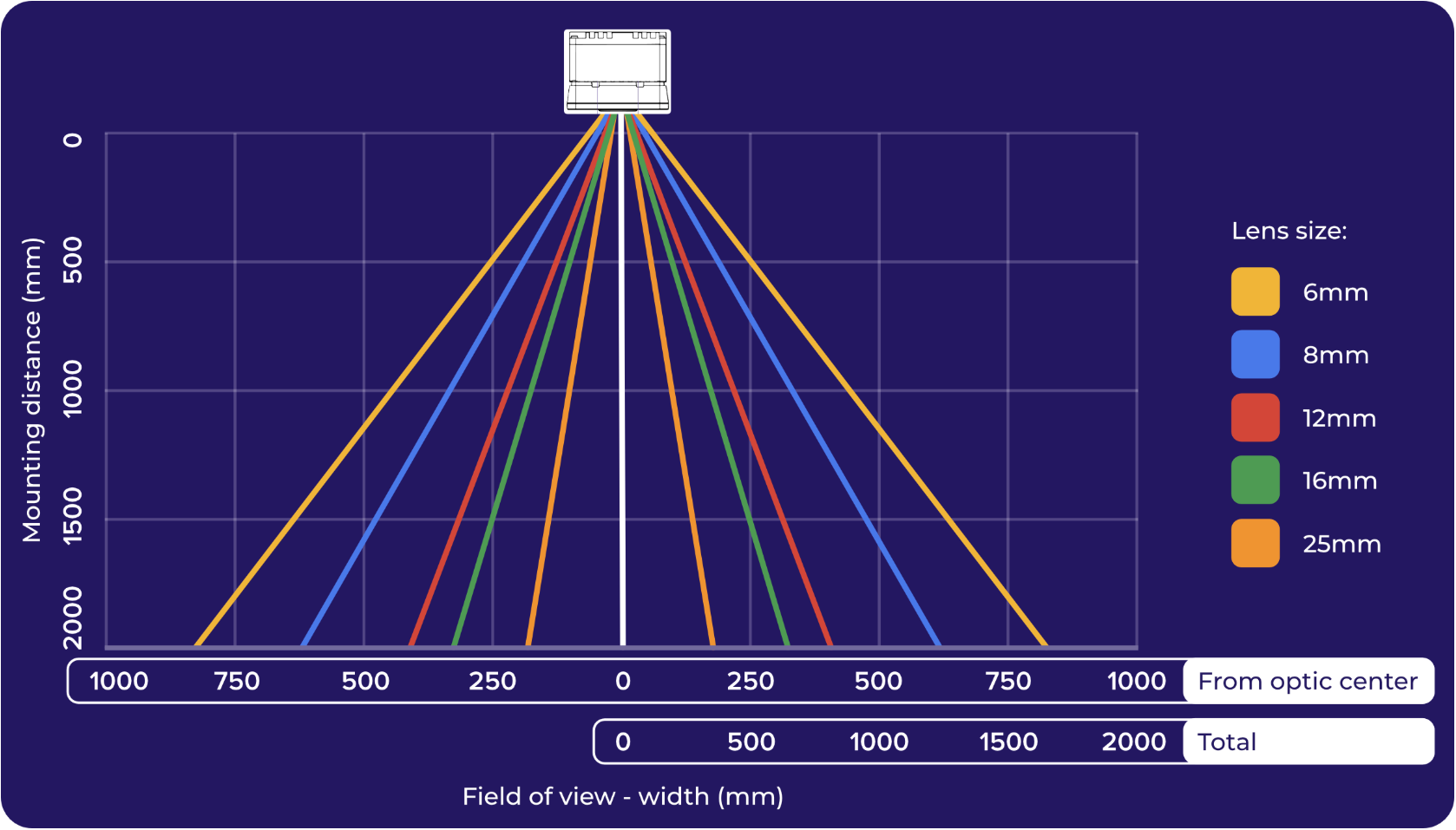
1.2 Use FOV Chart for Lens Selection

Field of View (FOV) Widths at Different Distances:

image.png

Camera Specifications:

  • Aspect Ratio:4:3
  • FOV Height:Width × 0.75
  • Standard Lens:12mm(随摄像头附带)

1.3 Online Calculator

Use the OV10i Calculator for precise FOV calculations based on your specific mounting distance and lens requirements.

使用 OV10i Calculator,根据您的具体安装距离和镜头需求,进行精确的 FOV 计算。

Step 2: Standard Lens Replacement (6mm to 16mm)

2.1 Remove Faceplate

  1. Power down the camera

  2. Remove four corner screws on the faceplate using Phillips-head screwdriver

  3. Carefully lift off the faceplate to expose the LED board and lens

  4. 断电 摄像头

  5. 使用十字螺丝刀 移除前面板上的四个角螺丝

  6. 小心取下前面板,露出 LED 板和镜头

2.2 Replace Lens

  1. Unscrew existing lens by turning counterclockwise (hand-tight only)

  2. Install new lens by turning clockwise

  3. Hand-tighten only - do NOT use tools to avoid damage

  4. 逆时针旋拧现有镜头(仅手拧)

  5. 顺时针旋拧新镜头

  6. 仅手拧 - 禁止使用工具以避免损坏

注意

Over-tightening can damage the lens or camera threads.

注意

过度拧紧可能损坏镜头或相机螺纹。

2.3 Reassemble

  1. Replace faceplate on camera

  2. Secure with four screws removed earlier

  3. Power on and test focus

  4. 将前面板重新安装到摄像头上

  5. 用先前拆卸的四颗螺丝固定

  6. 通电并测试对焦

Step 3: 25mm Lens Installation (Special Procedure)

3.1 Additional Components Required

  • M12 25mm lens
  • 15mm faceplate spacer
  • Spacer rings
  • 4x M3x22 socket head cap screws

3.2 Determine Spacer Configuration

  1. Remove faceplate as in Step 2.1
  2. Set up camera at working distance
  3. Slowly screw in lens until image is sharp
  4. Measure lens extension beyond mount
  5. Select spacer rings to match measured distance

3.1 需要的额外组件

  • M12 25mm 镜头
  • 15mm 前面板定位垫片
  • 定位环
  • 4x M3x22 内六角螺钉

3.2 确定定位垫片配置

  1. 如步骤 2.1 移除前面板
  2. 将相机设置在工作距离
  3. 慢慢旋入镜头,直到图像清晰
  4. 测量镜头在安装座外的伸出长度
  5. 选择定位环以匹配测量得到的距离

3.3 Install 25mm Lens

  1. Slide spacer rings onto lens to correct size

  2. Install lens with spacers into camera mount

  3. Hand-tighten clockwise

  4. Attach 15mm faceplate spacer with M3x22 screws

  5. Place original faceplate onto spacer

  6. 将定位环滑入镜头以调整到正确尺寸

  7. 将带定位环的镜头安装到摄像头安装座

  8. 顺时针方向仅用手拧紧

  9. 使用 M3x22 螺丝将 15mm 前面板定位垫片固定

  10. 将原始前面板放置到定位垫片上

Step 4: Focus and Test

4.1 Initial Focus Check

  1. Power on camera

  2. Navigate to Imaging Setup in camera interface

  3. Use Focus View to achieve optimal sharpness

  4. Adjust focus using camera controls

  5. 给相机通电

  6. 在相机界面导航至 Imaging Setup

  7. 使用 Focus View 以获得最佳清晰度

  8. 使用相机控件调整对焦

4.2 Verify Field of View

  1. Check FOV covers required inspection area

  2. Ensure part positioning fills appropriate portion of image

  3. Confirm image quality meets inspection requirements

  4. 检查 FOV 是否覆盖所需的检测区域

  5. 确保工件定位在图像的适当部分

  6. 确认图像质量符合检验要求

Lens Selection Quick Reference

Lens SizeFOV at 100mmFOV at 1mFOV at 2mBest Use
6mmWide FOVVery WideExtremely WideLarge parts, close inspection
8mmMedium-WideWideVery WideGeneral purpose, medium parts
12mm (Standard)MediumMediumWideMost applications
16mmNarrowMediumMediumSmaller parts, detail work
25mmVery NarrowNarrowMediumPrecision inspection, small features

镜头选择快速参考

镜头尺寸100mm 时的 FOV1m 时的 FOV2m 时的 FOV最佳用途
6mmWide FOVVery WideExtremely Wide大件、近距离检测
8mmMedium-WideWideVery Wide通用、中等件
12mm(标准)MediumMediumWide大多数应用
16mmNarrowMediumMedium较小件、细节工作
25mmVery NarrowNarrowMedium高精度检测、小型特征

Safety and Best Practices

Lens Handling

  • Handle lenses carefully - avoid touching glass surfaces

  • Use lens cleaning cloth for any smudges

  • Store removed lenses in protective cases

  • Check threads for damage before installation

  • 请小心处理镜头,避免触摸镜片表面

  • 使用镜头清洁布清除指纹

  • 取下的镜头请存放在保护盒中

  • 在安装前检查螺纹是否有损坏

Installation Tips

  • Always hand-tighten - never use tools on lens threads

  • Test fit before final tightening

  • Keep screws organized during disassembly

  • Power down camera before lens changes

  • 始终仅用手拧紧,镜头螺纹请勿使用工具

  • 在最终拧紧前先试装

  • 拆卸过程保持螺丝有序

  • 在更换镜头前请关闭相机电源

Success! Your Lens is Installed

Your OV10i camera now has:

Correct lens for your application requirements

Proper field of view for part inspection

Optimal working distance for your setup

Secure mounting for reliable operation

成功!镜头已安装

您的 OV10i 摄像头现具备:

✅ 符合应用需求的镜头

✅ 适合部件检测的合适视野

✅ 针对您的设置的最佳工作距离

✅ 牢固安装,确保可靠运行

Next Steps

After lens installation:

  1. Configure imaging settings for new lens
  2. Update focus for optimal sharpness
  3. Test with actual parts to verify coverage
  4. Adjust camera position if needed for optimal FOV
  5. Document lens configuration for future reference

镜头安装完成后:

  1. 配置新镜头的成像设置
  2. 更新对焦以获得最佳清晰度
  3. 使用实际工件测试以验证覆盖范围
  4. 如需实现最佳 FOV,调整相机位置
  5. 记录镜头配置信息,便于未来参考

🔗 See Also